

XPlay Browser is a high-performance mobile browser designed for users seeking speed, privacy, and video-focused tools. It combines fast page loading with a lightweight design, ensuring smooth navigation even on older devices. The app's clean interface and instant access to essential features make it ideal for everyday browsing.
One standout feature is its Private Browsing Mode, which ensures no history or cookies are stored, offering a secure experience. Additionally, XPlay Browser allows users to download videos from supported websites directly to their devices, enabling offline viewing without requiring third-party apps. This functionality makes it particularly useful for individuals who frequently consume multimedia content.
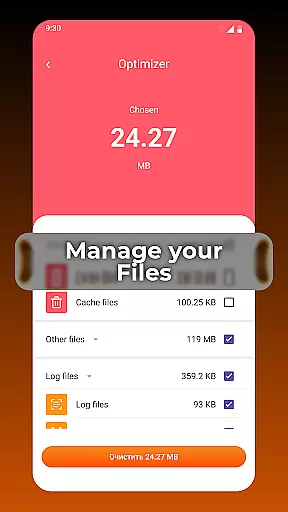
The app also includes smart file management tools that help users organize their device storage efficiently. By highlighting unnecessary files, it ensures the device remains clutter-free. With its battery-efficient performance and modern design, XPlay Browser delivers both functionality and convenience, making it a top choice for users prioritizing speed and privacy.
XPlay Browser stands out with its comprehensive set of features tailored for modern web users. Its fast and smooth browsing capability ensures pages load quickly while maintaining optimal performance on all devices. The app's lightweight architecture minimizes resource usage, allowing users to browse for extended periods without significant battery drain.
Privacy is a core focus of XPlay Browser, thanks to its robust Private Browsing Mode. This mode eliminates tracking by blocking cookies and preventing history storage, ensuring user sessions remain confidential. For multimedia enthusiasts, the browser offers seamless video downloading from supported websites. Users can save videos with a single tap, enabling offline playback anytime, anywhere.
Another notable feature is the built-in file management system, which helps users maintain an organized device. By identifying redundant files and providing easy cleanup options, XPlay Browser enhances overall device efficiency. These innovative features collectively create a versatile browsing experience that prioritizes speed, security, and usability.
Video format compatibility is a crucial feature for any video player, ensuring that users can enjoy content in various formats without technical barriers. XPlay Browser excels in this area by supporting an extensive range of video formats, making it versatile and user-friendly.
The browser's advanced decoding capabilities allow seamless playback of both common and less-known video formats. Whether you're streaming online or playing locally stored files, XPlay ensures smooth performance across different media types.
For users, this means freedom and flexibility. You don't need to worry about converting files or encountering playback issues. The browser handles everything efficiently, providing uninterrupted entertainment and information access.
This comprehensive format support enhances the overall user experience, positioning XPlay Browser as a reliable choice for those who value versatility in their digital tools.
AI-powered editing features represent the cutting-edge integration of artificial intelligence into video editing, offering users unprecedented ease and efficiency. XPlay Browser incorporates these innovative tools to simplify complex editing tasks and enhance productivity.
With intelligent algorithms, the browser can automatically optimize video settings, suggest edits, and even assist in creating professional-quality content. These AI-driven capabilities make video editing accessible to users of all skill levels, from beginners to experts.
Users benefit from time-saving features like automated scene detection, smart trimming, and enhanced stabilization. The browser's AI understands context, ensuring that edits are not only quick but also meaningful and visually appealing.
By leveraging these sophisticated AI-powered editing features, XPlay Browser empowers users to create polished, engaging videos with minimal effort, setting a new standard in the realm of video players and editors.
Fast page loading
Private browsing
Video downloads
Lightweight design
File management
Limited video sites
No sync feature
Basic UI
Few extensions
Offline only






Your media, on your terms.
 4.10
4.10
A Quick and Pro Video Editor
4.70
HD video maker with no watermark, no ads & vlog maker with music, PIP, text
4.50
AirMirror Receiver - Screen mirroring/cast web videos to Android TV by AirPlay.
4.40
Download website videos fast&privacy
4.40
Mix with Virtual DJ directly from your phone or tablet !
3.10
The essential companion to your Blue Iris PC software
2.50
LumaFusion: The Ultimate Storytelling Experience for Video Editing
4.10
A Simple app to download Video & Music from the Internet.
4.70
Support 1000+ Video Format, Subtitle Download, mp3 & Background Play, Cast On TV
4.60
Seamlessly connect and control your smart devices, anytime, anywhere with ease.
4.60
Watch IPTV on your Android device
4.60
Browser + Remote for Roku to stream webvideos, online movies and livestreams
4.60
Full HD Video mp3 Player, MP4 player play 1080p, File manager, Video Downloader
4.40
VLC for Android is the best open source video and music player, fast and easy!
4.10
Make your own Animations, Video and Photo Edits, Visual Effects, and more!
4.00
Watch full episodes of your favorite Cartoon Network and Cartoonito shows!
3.50
Client application for NextPVR software
3.00
Stream high quality video from your camera over NDI protocol
4.4

User Reviews