

Blue Iris is a specialized client application designed for users who have the Blue Iris 5.x software installed on their Windows PCs. This app serves as a secure gateway to your home camera network, eliminating the need to expose individual cameras directly to the internet. By connecting through a session-based protocol, it ensures that no sensitive information like passwords is transmitted in plain text.
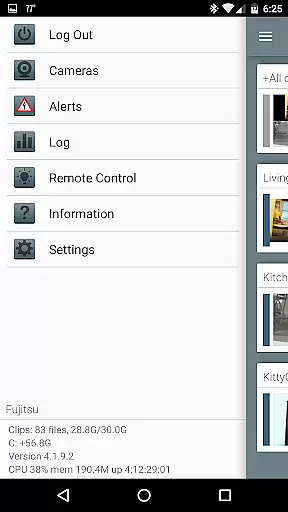
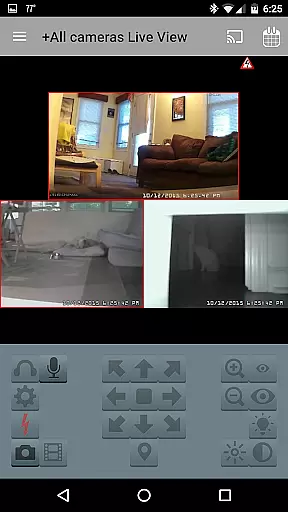
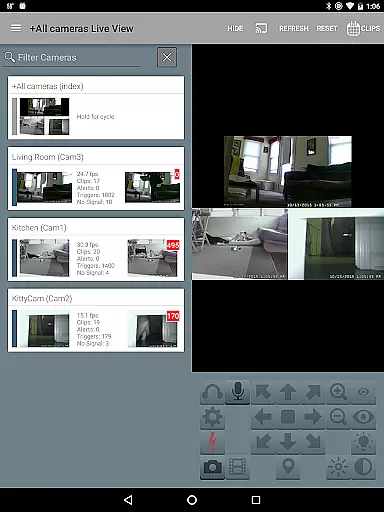
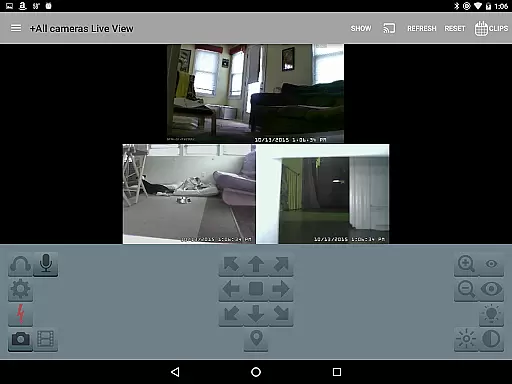
The app offers comprehensive control over your surveillance system, allowing you to manage multiple Blue Iris installations remotely. With features such as PTZ (pan-tilt-zoom) control, push alerts for triggered cameras, and audio communication capabilities, Blue Iris provides an all-in-one solution for monitoring and managing your security cameras from anywhere.
Whether you're a homeowner or a business owner, this app allows you to maintain a vigilant eye over your property while offering advanced functionalities like reviewing recordings at up to 64x speed and controlling DIO output signals on compatible devices. Its intuitive interface makes navigating between cameras simple, ensuring a seamless user experience.
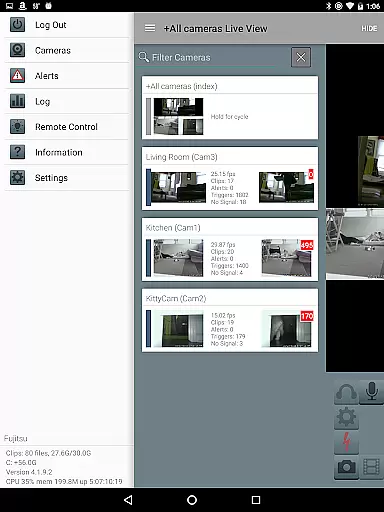
Blue Iris stands out with its robust feature set tailored for both casual and power users. One of its key highlights is the ability to manage multiple Blue Iris installations from a single app, making it ideal for users with complex surveillance needs. The app also lets you control essential settings like traffic signal icons, schedules, and profile selections directly from your mobile device.
For real-time alerts, Blue Iris supports Android push notifications, notifying you instantly when a camera is triggered or when there's a critical status update. The app employs fast H.264 streaming to deliver high-quality video feeds without consuming excessive bandwidth. Additionally, users can control PTZ functions, IR settings, and even engage in two-way audio communication if their cameras support these features.
Another standout feature is the ability to review stored recordings directly from the Blue Iris PC. You can play back videos at speeds up to 64x and selectively delete recordings right from the app interface. Remote control of DIO output signals adds another layer of functionality for advanced users, making Blue Iris a versatile tool for comprehensive home or business security management.
Blue Iris stands out in video format compatibility, ensuring a seamless experience for users who manage multiple camera streams. The app supports H.264 streaming, which is known for its efficiency and widespread adoption in video compression. This allows users to stream high-quality video without significant bandwidth consumption.
The application provides the ability to review recordings stored on the Blue Iris PC with speeds up to 64x, offering flexibility in how users can interact with their footage. Whether it's an urgent need to find a specific event or simply reviewing the day's recordings, this feature ensures that you can do so with ease and speed.
Moreover, Blue Iris handles various camera controls for supported models, including PTZ (pan-tilt-zoom), IR (infrared), and even audio interactions such as listening and talking through compatible cameras. This versatility ensures that regardless of your camerau2019s capabilities, Blue Iris can likely support them.
By focusing on secure connections without the need to open individual cameras to the internet, Blue Iris maintains both security and functionality. Users can confidently manage their home camera network knowing that their data isn't being exposed insecurely online.
While Blue Iris may not focus heavily on AI-powered editing features like some dedicated video editors, it offers essential tools that enhance the user's ability to interact with and manage their video content efficiently. One notable feature is the remote control of DIO output signals on compatible devices, allowing advanced integration options within smart home ecosystems.
Users benefit from Android push alerts when a camera is triggered or there's a critical status message. This real-time notification system ensures that users are always aware of important events as they happen, providing peace of mind and quick response capabilities.
Additionally, the app enables users to selectively delete recordings directly from the Blue Iris PC. This feature helps in managing storage space effectively while maintaining control over what footage is retained. It adds another layer of convenience for users who need to manage large volumes of video data regularly.
Overall, Blue Iris focuses on delivering practical, security-minded features that cater to users looking to maintain robust surveillance systems. Its emphasis on secure, efficient, and versatile video management makes it a reliable choice for those invested in comprehensive home monitoring solutions.
User-friendly interface
Secure connection protocol
Multi-installation management
Real-time push alerts
Advanced PTZ controls
Requires Windows PC
No standalone functionality
Complex setup process
Limited to Blue Iris ecosystem
Dependent on network stability




Fast, private downloading, video saving, social media
 4.50
4.50
HD video & music player - All format support with floating & PIP mode!
3.80
Video player with powerful streaming playback and various convenient features.
2.10
Seamlessly connect and control your smart devices, anytime, anywhere with ease.
4.60
Add date and time watermark to photos and videos
4.50
Cast movies, tv shows and live streams to Chromecast, Roku, DLNA, Fire TV & more
4.60
Livestream, news, & gaming content. Watch, chat, and upload. Join Rumble today!
3.80
Video player with 4K & 1080P support, popup play, background play and subtitle.
4.20
VLC for Android is the best open source video and music player, fast and easy!
4.10
Flud is a simple and beautiful BitTorrent client for Android.
4.80
High-Quality USB Camera Viewer & HDMI Display
4.70
Watch IPTV on your Android device
4.60
HD video maker with no watermark, no ads & vlog maker with music, PIP, text
4.50
Browser for Samsung TV to stream webvideos, online movies and livestreams in HD
4.10
Explore the largest library of free GIFs, Stickers & Memes - or create your own!
3.90
Manage your IPTV live channels and VOD playlists (no playlist included)
3.80
This app is an emulator of some specific IPTV boxes
3.50
Download videos easily & play them all in one smart, powerful video manager.
3.40
Stream high quality video from your camera over NDI protocol
4.0


User Reviews