

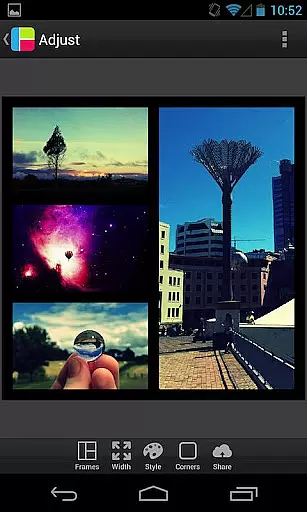
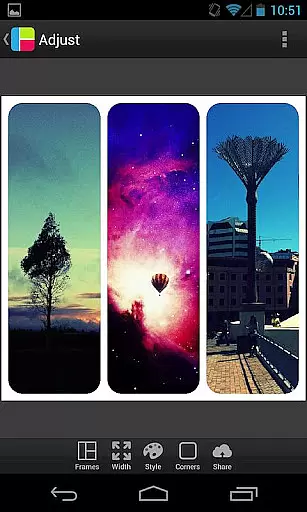
PicFrame is a versatile photography app that allows users to combine multiple photos into visually stunning frames. With 36 fully adjustable frames, users can customize their creations by adjusting borders, corners, and photo effects. The app supports up to five photos per frame, offering endless customization possibilities including rounded corners, shapes, and patterns. PicFrame is perfect for creating unique photo collages to share with friends and family on social media platforms like Instagram and Facebook.
The app's intuitive interface makes it easy to adjust brightness, contrast, and saturation of each photo. Users can also rotate images, pinch to zoom, and drag to reposition photos within frames. Whether you're looking to create a simple collage or an intricate design, PicFrame offers the tools needed to produce professional-looking results. Its variety of output resolutions ensures high-quality prints and digital shares.
PicFrame stands out with its comprehensive set of features designed for creative photo editing. The app provides 36 adjustable frames, allowing users to customize layouts by dragging inner borders. Each photo can be individually adjusted for brightness, contrast, and saturation, while rotation and zoom functions offer precise control over composition. Unique shapes such as circles, hearts, and hexagons add artistic flair to your creations.
Additional features include an easy-to-use border color picker, 52 background patterns, and adjustable border widths. Users can select from six different aspect ratios, including popular formats like square (1:1) and widescreen (16:9). The app supports saving high-resolution images to your gallery and sharing directly to social media platforms. With its robust feature set and user-friendly interface, PicFrame empowers both casual users and professional photographers to create impressive photo collages.
Real-time capture and preview functionality is essential for photography apps like PicFrame. This feature allows users to see exactly what their final composition will look like before capturing the image. With PicFrame, you can adjust your photos in real time, ensuring that every element is perfectly aligned and visually appealing.
The app provides a dynamic interface where users can pinch to zoom and drag to move photos within frames. This interactive approach gives you the control needed to create stunning photo collages with precision. The ability to rotate photos and change their shapes adds another layer of customization, making sure your creative vision comes to life accurately.
Additionally, PicFrame offers adjustable border width and rounded corners, which can be modified on-the-fly. Users can also pick from 52 different patterns for the frame's background, providing endless possibilities for unique designs. These features ensure that your photo frames are not only customized but also maintain high visual standards.
PicFrame includes AI beauty and enhancement features that elevate your photo editing experience. While traditional filters can sometimes appear artificial, PicFrameu2019s advanced algorithms ensure natural-looking enhancements. By adjusting brightness, contrast, and saturation of each photo individually, the app delivers professional-grade results without compromising the authenticity of your images.
One standout feature is the easy-to-use color picker for borders, allowing users to seamlessly blend or contrast their photos with the frame. This attention to detail ensures that every collage looks polished yet genuine. Moreover, the app supports multiple output resolutions, giving users flexibility in how they share or print their creations.
With six different aspect ratios available, including square format, PicFrame caters to various social media platforms. Whether sharing on Instagram, Facebook, or Twitter, these enhancements make sure your photos stand out while retaining their original charm. Overall, PicFrame combines powerful AI tools with user-friendly interfaces to deliver beautiful, natural enhancements every time.
User-friendly interface
Extensive customization options
High-quality output resolutions
Multiple social sharing options
Versatile frame adjustments
Limited to five photos per frame
No advanced editing tools
Some features may feel overwhelming
Occasional performance issues
Learning curve for beginners




Add Watermark - Sign your pictures with a text or logo. Effective, quick, easy!
 4.50
4.50
Application for remote controlling DSLR
3.00
Edit like a pro with Hypic. Apply filters, AI effects, & magic touch.
4.40
Over 800 film simulation recipes for Fujifilm. Black Friday Offer!
4.2
USB Storage Access for Photos, Videos, Music and Documents
3.80
Enhance, retouch & create your story - Share the moment with Photoshop Express.
4.60
Snap photos remotely using your Garmin watch as the camera trigger
4.5
Your personal guide to the sun and moon. Plan ahead, visualize and predict!
4.70
PhotoSync Bundle Add-On License. Enables all features and services in PhotoSync.
4.60
Find time and duration of different sunlight phases at any location
4.90
AI Photo Editor with 100+ Filters, Effects! Remove BG, Retouch & Photo Enhancer.
4.80
Unblur, enhance & restore photos with powerful AI photo enhancer tools.
4.60
AI photo enhancer with Sora 2! Enhance, descratch, and colorize your old photos.
4.50
All-in-One Editor & AI Photo Enhancer, Beautify & Retouch, Collage, Cartoonify
4.20
Professional photography on your mobile phone
4.20
The #1 app for B&W film developing featuring an advanced darkroom timer.
4.10
Transform Photos: Edit, Beautify and Craft Memories & Make Collages!
4.10
Perfect photos with body shaping, BG changer and object remover.
3.70
Photo Album Watch Face shows your favorite pictures as a Watchface.
1.90


User Reviews