

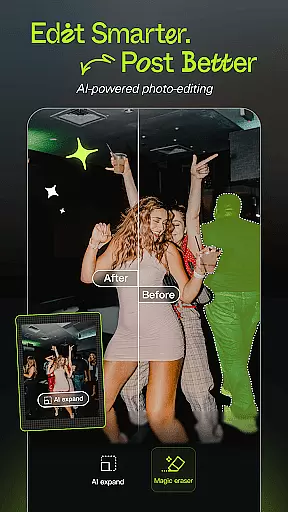
Hypic is an advanced AI-powered photo editing application designed to transform ordinary photos into stunning masterpieces. With its cutting-edge AI technology, users can effortlessly remove backgrounds, generate avatars, cartoon themselves, or enhance image quality with just a tap.
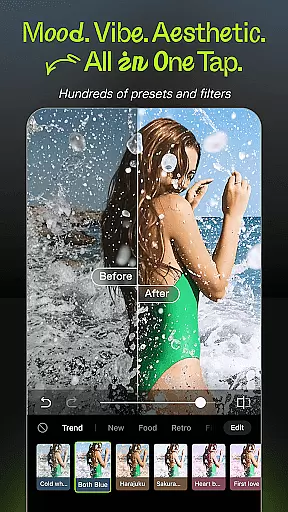
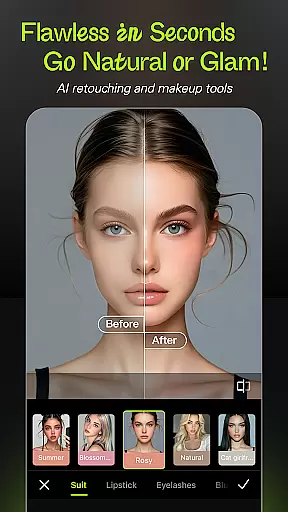
The app offers a wide range of stylish filters and effects, including retro film, clean girl presets, and soft glow filters, allowing users to match their mood or feed vibe instantly. Additionally, Hypic provides smart retouching tools for natural customization, precision in smoothing, reshaping, and enhancing facial features with subtlety and ease.
Hypic stands out with its AI Magic in a Tap feature, enabling users to turn photos into artwork instantly. The app's Stylish Filters & Effects offer trending aesthetic styles, making it easy to achieve the desired look with minimal effort.
Smart Retouching Tools allow for customized and natural-looking edits, while Aesthetic Templates help create stunning visuals quickly using professionally designed templates. Whether editing casually or professionally, Hypic makes the process fun, fast, and easy, perfect for platforms like Instagram, TikTok, and Pinterest.
Real-time capture and preview functionality is essential for ensuring that every photo taken meets the user's expectations without delay. Hypic excels in this area by providing instantaneous feedback on images captured through its interface.
The app leverages advanced AI technology to offer users a seamless experience when taking photos. This includes features like instant filter application, which allows users to see how different aesthetic styles will look on their photos before capturing them.
Users benefit from Hypic's real-time capabilities as it ensures they can make immediate adjustments to achieve the desired outcome. Whether it's tweaking lighting conditions or applying one of the many stylish filters, the ability to preview changes live enhances the overall photography process.
This feature not only saves time but also elevates the creative control available to users, making Hypic an indispensable tool for anyone looking to enhance their photographic skills with minimal effort.
Hypic stands out in the realm of AI beauty and enhancement by prioritizing natural-looking results. The app employs sophisticated algorithms to ensure that edits enhance a user's features while maintaining authenticity.
With just a tap, users can access smart retouching tools designed to smooth skin, reshape facial features, and brighten eyesu2014all with subtlety and precision. These enhancements are applied in a way that respects the original character of the subject, avoiding the over-processed appearance common in other apps.
The emphasis on naturalness means that whether you're editing personal photos or professional portraits, Hypic delivers results that look genuine and polished. This approach appeals to both casual editors and digital creators seeking high-quality outcomes.
Ultimately, Hypicu2019s commitment to preserving the essence of each image while offering powerful editing options makes it a go-to choice for those who value both aesthetics and authenticity in their visual content.
AI-powered editing
Stylish filters
Smart retouching
Aesthetic templates
Batch editing
Subscription required
Limited free features
Occasional bugs
High system requirements
Learning curve



[3DSteroid Pro] is a stereoscopic application for Android.
 4.30
4.30
Create collages easily! Nice pic collage maker & background eraser for Instagram
4.50
Movie camera, supports pro recording settings for filming. Try it and be amazed!
4.50
Professional photography on your mobile phone
4.20
Smart, light, and fast photo and video gallery
4.30
Collage your moments in one tap: 1000+ layouts, filters, stickers, and texts.
4.90
Enhance, retouch & create your story - Share the moment with Photoshop Express.
4.60
Professional camera app that brings DSLR manual photography controls to Android.
4.20
The original Rarevision VHS look seen everywhere!
4.70
Enhance, upscale, and transform your images — on your device, without limits
4.70
Your personal guide to the sun and moon. Plan ahead, visualize and predict!
4.70
Automatically backup your photos and videos to computer, NAS and Cloud services
4.60
A must-have app for landscape photographers
4.60
Discover & download millions of art for The Frame TV or Hisense CanvasTV
4.60
Photo Exif Editor allows to view, add and modify EXIF data of multiple photos
4.50
Luminar: Photo Editor - easy picture editing with AI
4.20
All-in-One Editor & AI Photo Enhancer, Collage, Cartoonify, Funny Stickers & BGS
4.10
Professional quality photo edits with the new Snapseed.
4.00
Hair color changer, AI haircut app, fun hair editor and buzz cut filter for all!
3.80


User Reviews