

Microsoft Copilot is an advanced AI-powered productivity application designed to be your daily AI companion. The app integrates the latest OpenAI and Microsoft AI models, offering users a comprehensive suite of tools to enhance their personal and professional lives. With its cutting-edge capabilities, Copilot provides assistance in writing, research, content creation, and even image generation through its AI photo generator.
The application's core functionality lies in its ability to engage in meaningful conversations, answer complex questions, and provide valuable insights through simple interactions. Whether you need help drafting emails, proofreading documents, or generating creative ideas, Copilot is equipped to handle these tasks efficiently. Its versatility makes it suitable for students, professionals, and creatives who seek to optimize their workflow and boost productivity.
One notable use case is Copilot's implementation in workplace environments. By streamlining routine tasks such as summarizing information, creating shopping lists, or translating content across multiple languages, the app empowers users to focus on more strategic activities. This seamless integration of AI technology into everyday tasks demonstrates how Copilot can significantly improve efficiency and effectiveness in various scenarios.
Microsoft Copilot stands out with its diverse range of features that cater to different user needs. One of its most prominent capabilities is the AI chat assistant, which allows users to communicate through both text and voice. This feature enables users to receive instant answers to complex questions, generate summaries, and even create high-quality visuals from simple text prompts. The voice chat functionality adds another layer of convenience, making it easier than ever to interact with AI technology.
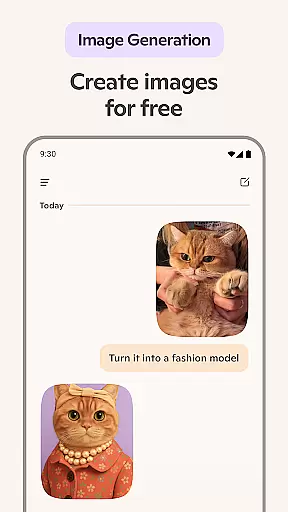
In addition to its conversational abilities, Copilot incorporates a powerful AI photo generator. This tool transforms textual descriptions into stunning visual representations, ranging from abstract concepts to photorealistic images. Users can leverage this feature to develop new design ideas, create illustrations for various projects, or visualize storyboards for films and videos. The application also excels in content creation, helping users compose stories, draft professional documents, and update portfolios with minimal effort.
Another remarkable aspect of Copilot is its multilingual support. The AI assistant can translate and proofread content across hundreds of languages, including regional dialects. This capability makes the application particularly valuable for international teams or individuals working in multicultural environments. Furthermore, the app's ability to simplify grocery lists, assist with meal planning, and spark inspiration for new projects showcases its versatility in handling both professional and personal tasks.
Microsoft Copilot excels in core task management by integrating advanced AI capabilities to streamline daily activities. The application leverages the latest OpenAI and Microsoft AI models to provide users with an intuitive platform for organizing tasks efficiently.
Through its AI chat assistant, Copilot simplifies task creation and tracking. Users can effortlessly compose and manage checklists, such as grocery lists or weekly meal prep plans, using natural language processing. This feature ensures that managing personal and professional responsibilities is both straightforward and efficient.
The app's ability to summarize complex information into clear, actionable insights enhances productivity. Whether drafting emails, creating content, or researching topics, Copilot delivers concise summaries and helpful rewrites, empowering users to accomplish more in less time.
By combining smart task automation with personalized assistance, Microsoft Copilot stands out as a powerful tool for anyone looking to optimize their daily workflow. Its comprehensive approach to task management makes it an invaluable companion for achieving greater productivity.
Cross-device synchronization is a critical feature of Microsoft Copilot, ensuring that users have seamless access to their data across multiple platforms. This reliability is achieved through robust cloud integration, which keeps all user information up-to-date and accessible from any device.
Whether you're switching between your smartphone, tablet, or desktop, Copilot maintains consistent performance and data integrity. This means that tasks initiated on one device can be continued on another without missing a beat, providing a fluid and uninterrupted user experience.
The app supports real-time updates, ensuring that changes made on one device are instantly reflected across all others. This functionality is particularly beneficial for professionals who rely on up-to-the-minute information to make informed decisions, regardless of their location or the device they are using.
With Microsoft Copilot, users can trust that their data will always be synchronized and secure, allowing them to focus on their tasks without worrying about data discrepancies or loss. This reliable cross-device support underscores Copilot's commitment to enhancing productivity and convenience.
User-friendly interface
Advanced AI capabilities
Multilingual support
Versatile content creation
Efficient task management
Limited offline functionality
Subscription fees required
Occasional response delays
Learning curve for new users
Privacy concerns with data sharing






Create study competitions, track your hours, and stay consistent with friends
 4.3
4.3
Make your handwriting beautiful, even more than pen on paper.
3.60
Customizable calendar widget for seamless event sync, planning & scheduling.
4.00
App lock - lock apps with fingerprint, password, pin or pattern, protect privacy
4.70
All in One PDF Reader: Manage, Read and Edit your Documents
4.20
A simple Whisper AI keyboard for reliable speech transcription and rewording
4.60
The ultimate file manager for rooted devices. The original and still the best.
4.00
Simple notepad & memo. Take notes, to-do list, shopping list with reminders.
4.80
Browse and view your photos and videos from the phone with photo & video hide.
4.10
8 custom complications. Custom Time Fonts. Beautiful color schemes. A++ Design.
5.00
Multilingual translator for text, voice, and image translation!
4.90
We're working to become the best machining app on the market! www.cncdirt.com
4.80
Use powerful, industry-leading AI tools to generate visual charts from any data
4.80
aCalendar+ makes your day, week and month
4.70
Translate text/voice/photos in 150+ languages. Offline & fast translator app.
4.50
Automates browsing any website and notifies you of important changes or events
4.30
Secure, open-source, SPICE and SSH Remote Desktop for QEMU KVM virtual machines
4.00
⏰ Finally a timer app which can run multiple timers simultaneously on your watch
3.90
Smart PDF reader & editor to view, organize and manage PDF documents easily.
3.70


User Reviews