

We Translate is a powerful productivity app designed to break language barriers and facilitate seamless global communication. With its comprehensive suite of translation tools, the app supports text, voice, image, and document translation across multiple languages.
Key features include real-time conversation translation, photo translation for signs and documents, and one-tap document translation compatible with PDFs, Word, Excel, and more. Users can also access translation history, save favorites, and customize settings for a personalized experience.
Ideal for travelers, students, professionals, and everyday users, We Translate ensures effortless multilingual communication for work, study, or personal use.
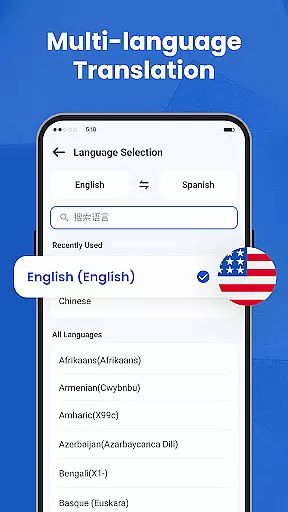
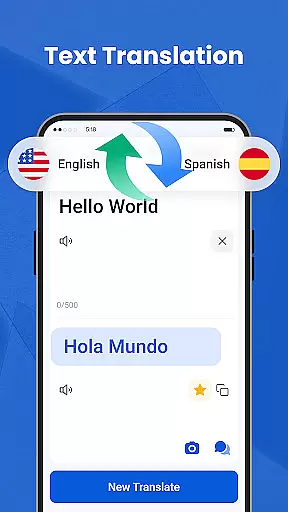
We Translate offers an array of innovative features tailored to meet diverse translation needs. The app provides instant and accurate text translation for over 100 languages, making it perfect for both casual conversations and professional use.
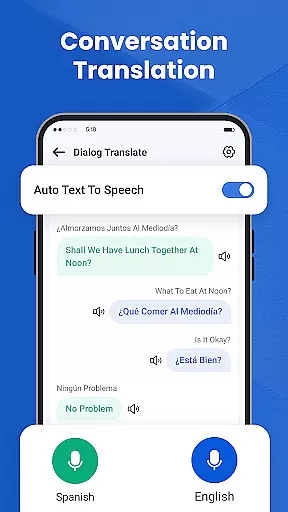
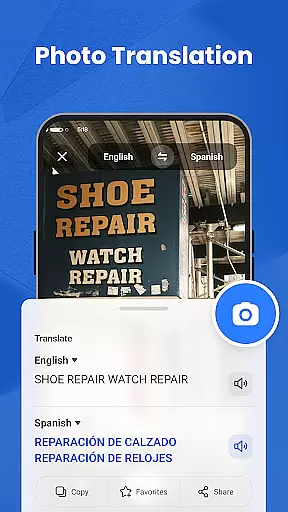
Its standout feature is the real-time conversation translator, which detects and translates spoken language automatically. This allows face-to-face or phone interactions without delays. Additionally, the photo translation tool lets users snap pictures of menus, signs, or documents and receive fast translations without manual input.
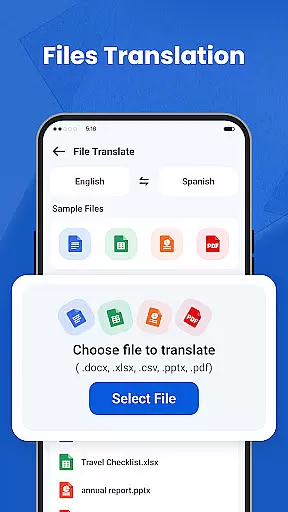
For document-heavy tasks, the app supports translating files in various formats, including PDFs and Office documents. Personalized settings such as adjustable voice speed and language preferences further enhance user experience.
In the realm of productivity, managing tasks efficiently is paramount. We Translate excels in organizing translation tasks with its intuitive interface and powerful features.
Users can easily input text for translation, access past translations through history records, and mark frequently used translations as favorites. This structured approach ensures that users can quickly retrieve important translations, enhancing their workflow and productivity.
The app supports multiple languages and formats, including PDFs, Word documents, and more, making it versatile for various professional and personal needs. With customizable settings such as voice reading speed and translated text options, users can tailor the app to fit their unique preferences.
By integrating seamlessly into daily routines, We Translate not only simplifies task management but also empowers users to focus on what truly matters, breaking language barriers without missing a beat.
For those who use multiple devices, reliable cross-device synchronization is crucial. We Translate offers a robust solution that ensures your translation data is consistently updated across all your devices.
Whether you're switching from your phone to a tablet or desktop, the app provides seamless access to your history, favorites, and personalized settings. This means you can start a translation task on one device and continue it on another without any hiccups.
The synchronization process is designed to be fast and secure, maintaining the integrity of your data while protecting your privacy. Users can trust that their information is safe and accessible whenever they need it.
With We Translate, staying productive has never been easier. The ability to sync effortlessly between devices enhances user experience, allowing for uninterrupted communication and task completion no matter where you are.
Accurate translations
User-friendly interface
Real-time voice support
Photo translation feature
Customizable settings
Limited free usage
Occasional inaccuracies
Premium subscription cost
Requires internet
Heavy on storage

We're working to become the best machining app on the market! www.cncdirt.com
 4.80
4.80
Pwnagotchi companion app
4.20
Make apps & sites with natural language prompts
4.10
Find and delete junk files & block unwanted notifications & manage files
3.70
Cloud storage, automatic phone backup, and more.
4.10
All document reader, all in one file viewer read PDF, DOCX, XLS, PPT, TXT files.
4.60
A simple Whisper AI keyboard for reliable speech transcription and rewording
4.60
This small app MUST BE INSTALLED after purchase, else license won't work
4.40
Seamlessly read, manage, and organize all your PDF files solution in one place
4.40
Android Wallet Password Manager
4.80
The long-awaited modern gallery app for your Nextcloud server
4.70
Scan paperwork into PDF/JPG, generate your own e-signature and send fax or email
4.70
Planet Free VPN - The best Fast Unlimited and Secure VPN Without Logs
4.50
Tally and goal counter for Wear OS & mobile
4.50
CalenGoo is a very flexible and feature-rich calendar app
4.40
Docker, Kubernetes management over Portainer Mobile
4.40
Todo reminder
4.10
Create study competitions, track your hours, and stay consistent with friends
4.5
The upgraded version of Name Wheel with AI and the power to add your own wheels.
4.0

User Reviews