

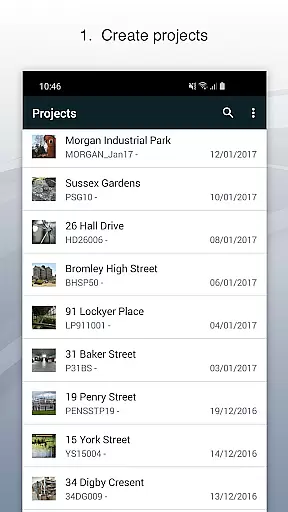
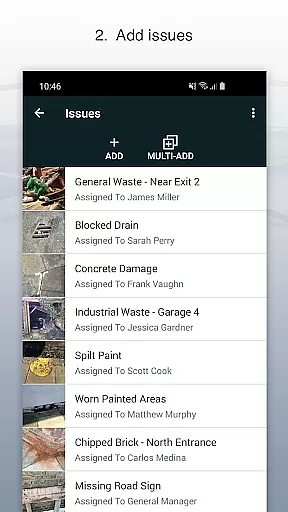
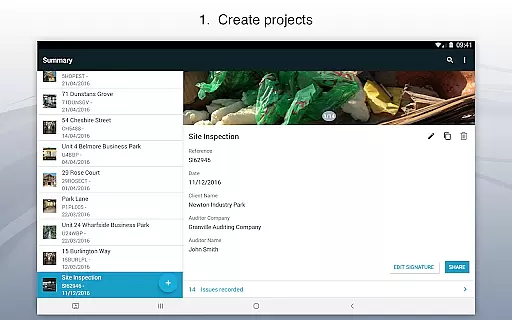
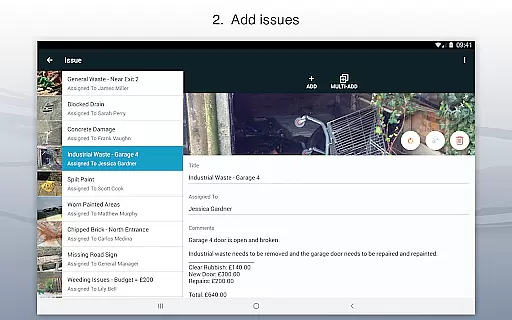
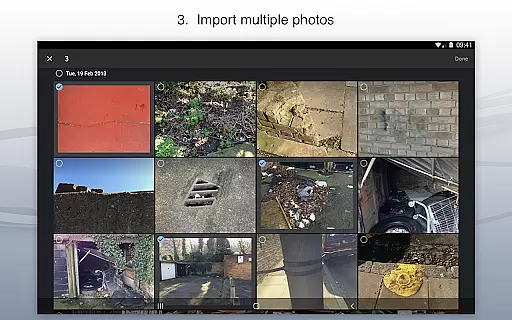
Site Audit Pro is a comprehensive productivity tool designed to simplify the auditing process for businesses across various industries. This mobile application allows users to efficiently record issues by capturing photos, annotating them to highlight critical details, and assigning tasks with comments. The app's intuitive interface enables users to organize these issues into distinct projects, incorporating specific site and client information.
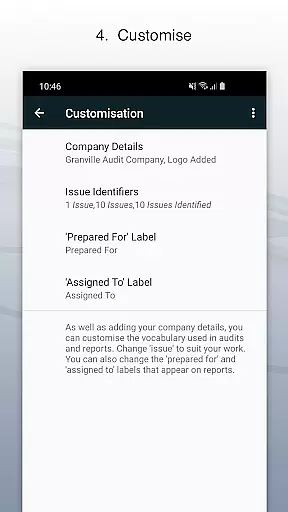
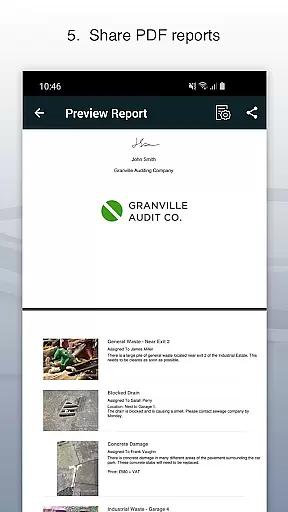
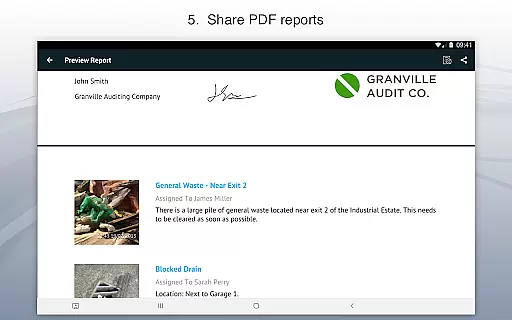
One of the standout features of Site Audit Pro is its ability to generate professional audit reports instantly. Users can share these reports as PDFs via email or cloud services like Dropbox without needing to return to the office. With customizable report templates, businesses can tailor the output to reflect their brand identity by including company logos, auditor names, and signatures. Whether performing safety inspections, creating punch lists, or providing quotations, Site Audit Pro ensures that findings are collated and shared promptly with a personal and professional touch.
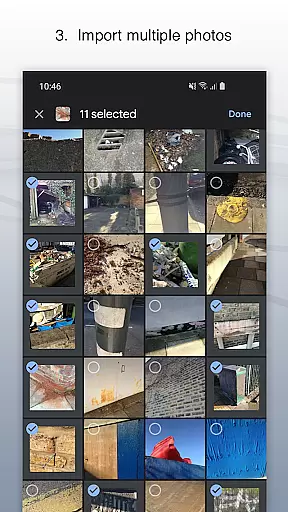
Site Audit Pro offers a robust set of features tailored to enhance productivity during audits and inspections. Users can document issues by taking photos and annotating them to emphasize important information. Each documented issue can be assigned a title, assignee, and comments, ensuring clear communication and accountability within teams. Additionally, the app allows for organizing these issues into projects, where users can input detailed site and client information specific to each project.
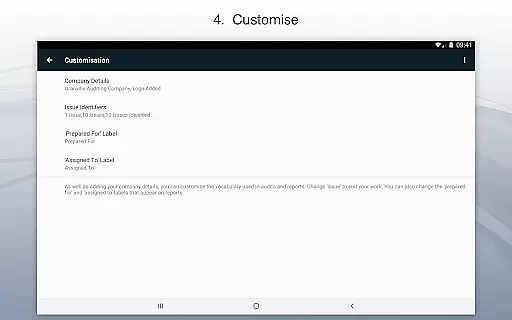
The app excels in its reporting capabilities, enabling users to instantly create and share professional audit reports. These reports can be customized extensively; users can include company names, logos, auditor details, and even signatures to personalize the documents. Furthermore, Site Audit Pro provides flexibility in terminology used in reports, adapting phrases to better suit different industries. With eight professional report designs available for customization, users can ensure their reports align with their corporate branding and industry standards.
Effective task management is crucial for productivity-focused applications like Site Audit Pro. This app simplifies the auditing process by allowing users to record issues, take photos, and assign tasks seamlessly.
The application's interface enables users to organize identified issues into specific projects, ensuring that each audit or inspection is methodically cataloged with relevant site and client details. This structured approach enhances clarity and accountability across all recorded data.
Site Audit Pro also supports annotations on photos, which helps in highlighting critical information visually. This feature not only improves communication but also ensures that every team member understands the exact nature and location of each issue.
By streamlining these core task management features, Site Audit Pro significantly reduces the time needed to carry out audits and inspections, thereby boosting overall productivity for businesses worldwide.
In today's interconnected world, reliable cross-device synchronization is essential for maintaining workflow continuity. Site Audit Pro excels in this area by ensuring that all recorded data, including photos and annotations, are consistently synchronized across devices.
This synchronization capability allows teams to collaborate in real-time without worrying about data loss or inconsistencies. Whether you're updating an issue on your mobile device or reviewing a report on your desktop, Site Audit Pro guarantees that all information is up-to-date and accurate.
Moreover, the ability to instantly share professional audit reports via email or cloud services like Dropbox underscores the appu2019s commitment to seamless data integration. Users can access their reports from any device, at any time, making remote work both feasible and efficient.
With Site Audit Pro's robust synchronization features, businesses can rest assured that their audit processes will remain uninterrupted, regardless of the working environment or device preferences.
User-friendly interface
Customizable reports
Instant report sharing
Photo annotation tools
Project organization
Limited free version
Subscription costs
Occasional bugs
Learning curve
Device compatibility

When you Focus, so will your Bean in this cozy focus timer
 4.30
4.30
Native client for Forgejo and Gitea
5.00
Mega cloud explorer plugin for Solid Explorer
3.80
8 custom complications. Custom Time Fonts. Beautiful color schemes. A++ Design.
5.00
The upgraded version of Name Wheel with AI and the power to add your own wheels.
4.5
⏰ Finally a timer app which can run multiple timers simultaneously on your watch
3.90
ID.me Authenticator is a simple and free Two Factor Authentication solution
3.50
To do list widget with a notebook organizer, checklist, simple shopping list
4.60
AT&T Internet customers can use this app to personalize their Wi-Fi network.
4.40
Best Tool for the professionals Electrician, Electrical contractors, etc.
4.90
Mind Map and brainstorm, note taking and idea collection
4.80
App lock - lock apps with fingerprint, password, pin or pattern, protect privacy
4.70
Secure, fast, open-source, Remote Desktop Client for Windows and Linux with SSH
4.60
Translate text/voice/photos in 150+ languages. Offline & fast translator app.
4.50
This small app MUST BE INSTALLED after purchase, else license won't work
4.40
Create and edit presentations with Google Slides, part of Google Workspace.
4.00
The ultimate file manager for rooted devices. The original and still the best.
4.00
All in one sketching tool. Technical and General drawing. Online Maps support.
3.70
A simple, portable logger for POTA, SOTA, Field Day, and more
4.2


User Reviews