

GitNex is a powerful open-source Android client designed for managing Git repositories on Forgejo and Gitea platforms. This productivity-focused app allows users to efficiently handle multiple accounts, browse files and directories, and create various repository elements such as issues, pull requests, wikis, and more.
The app's comprehensive feature set includes repository exploration, issue tracking, milestone management, and release handling. With support for markdown, emoji, themes, and self-signed certificates, GitNex provides a complete solution for developers seeking a mobile Git management tool.
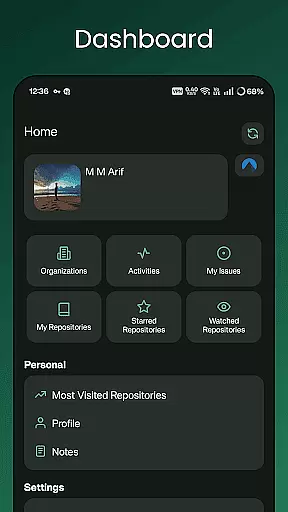
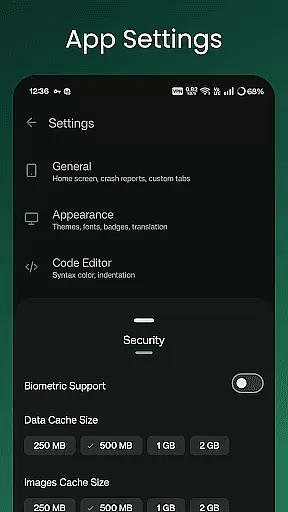
Whether you're maintaining personal projects or collaborating with teams, GitNex streamlines your workflow by providing notifications, commit tracking, and extensive customization options through its settings menu.
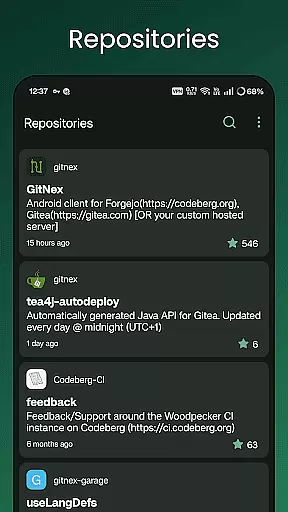
GitNex stands out with its extensive feature set tailored for productivity enthusiasts. The app supports multiple account management, enabling users to switch between different profiles seamlessly. Its integrated file and directory browser allows for easy navigation through repository structures while the built-in file viewer handles various code formats.
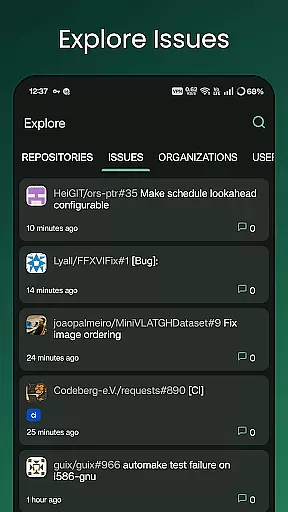
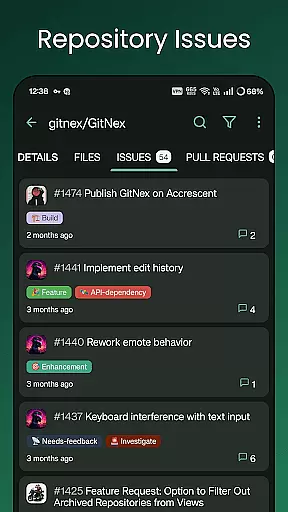
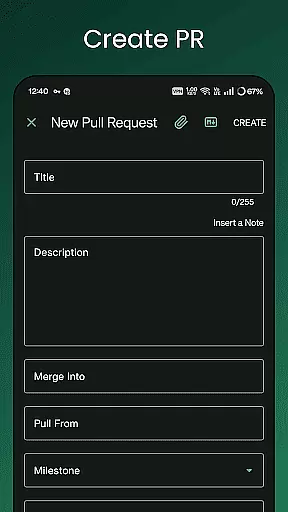
Development teams will appreciate the comprehensive creation tools that allow generating files, issues, pull requests, wiki pages, milestones, releases, and labels directly from the mobile interface. The app maintains detailed lists of repositories, organizations, issues, labels, milestones, and releases, keeping all project information readily accessible.
Additional productivity features include repository commit tracking, markdown support, emoji integration, theme customization, and notification management. These capabilities ensure users can maintain their preferred workflow while staying connected to their projects on the go.
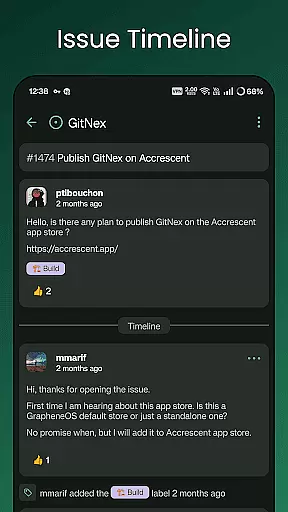
GitNex for Forgejo and Gitea offers robust core task management features that are essential for developers managing multiple repositories. The app supports creating and managing issues, pull requests, milestones, and labels directly from your Android device.
With GitNex, users can efficiently browse through files and directories, create new files, and even manage wiki pages. This comprehensive functionality ensures that all repository management tasks can be handled on-the-go, without the need for a desktop computer.
The ability to handle multiple accounts within a single app enhances productivity by allowing seamless switching between different projects and organizations. This feature is particularly beneficial for developers who contribute to various projects across different platforms.
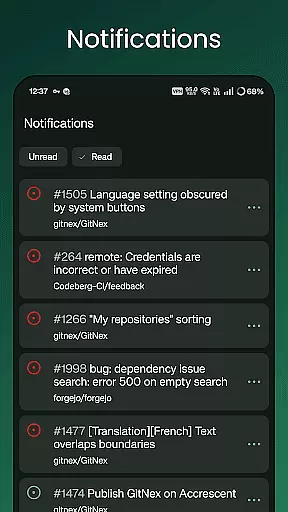
Moreover, the extensive settings and notification system keep users informed about important updates and changes in their repositories. This ensures that users never miss critical information and can respond promptly to any developments in their projects.
Cross-device synchronization is a crucial aspect of GitNex, ensuring that all data and actions performed on one device are accurately reflected across all other devices. This reliability is vital for maintaining consistency and accuracy in collaborative environments.
GitNex achieves this by supporting real-time updates and notifications, which alert users to any changes or updates in their repositories. Whether it's a new issue, a pull request, or a comment, users are immediately notified, allowing them to stay updated regardless of the device they are using.
In addition, the app's support for self-signed certificates enhances security during data synchronization. This feature ensures that all communications between the app and the server are encrypted and secure, protecting sensitive information from unauthorized access.
Furthermore, GitNex's theme customization options allow users to tailor the interface to their preferences, ensuring a consistent user experience across devices. This attention to detail in both functionality and design underscores GitNex's commitment to providing a reliable and user-friendly cross-device synchronization experience.
User-friendly interface
Multiple account support
Comprehensive feature set
Open-source development
Cross-platform compatibility
Steep learning curve
Requires technical knowledge
Limited beginner support
No iOS version available
Complex setup process

A Revolutionary All-in-One Artificial Intelligence Tools
 3.80
3.80
AI Video AI Image Private LLM AI Browser Llama Gemma Ollama Connect LLM Studio
4.0
Experience Reading - Night Mode for Documents
4.40
Planet Free VPN - The best Fast Unlimited and Secure VPN Without Logs
4.50
Android Wallet Password Manager
4.80
Mind Map and brainstorm, note taking and idea collection
4.80
ID.me Authenticator is a simple and free Two Factor Authentication solution
3.50
A comprehensive suite of tools designed specifically for Lactation Consultants
4.0
The ultimate file manager for rooted devices. The original and still the best.
4.00
Use powerful, industry-leading AI tools to generate visual charts from any data
4.80
Functional QR scanner and barcode reader that requires little storage space.
4.60
Translate text/voice/photos in 150+ languages. Offline & fast translator app.
4.50
A Pixel Art watchface inspired by other iconic 90s designs for Wear OS devices!
4.40
Enjoy classic gameplay with customizable features and retro-style graphics.
4.30
Access, manage and transfer files on Android, PC, Mac, NAS and cloud storages.
4.30
Secure, open-source, SPICE and SSH Remote Desktop for QEMU KVM virtual machines
4.00
* block pre-roll ads, pop-up and forced redirect ads * Samsung certification app
4.00
Make your handwriting beautiful, even more than pen on paper.
3.60
Simple and reliable communication between inmates, friends and family
3.20

User Reviews