

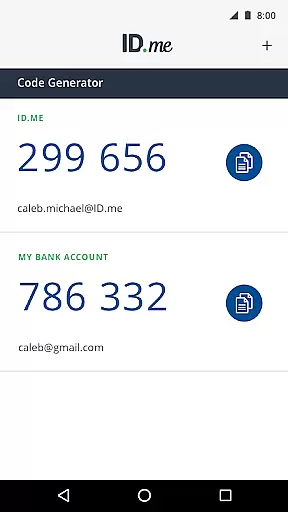
ID.me Authenticator is a productivity-focused application designed to enhance account security through Two Factor Authentication (2FA). This free solution generates 6-digit Time-Based One-Time Passwords (TOTP) and provides PUSH notification-based authentication, ensuring robust protection for online accounts. Compatible with websites that support 2FA, the app allows users to generate verification codes without requiring network or cellular connectivity when used as a TOTP generator.
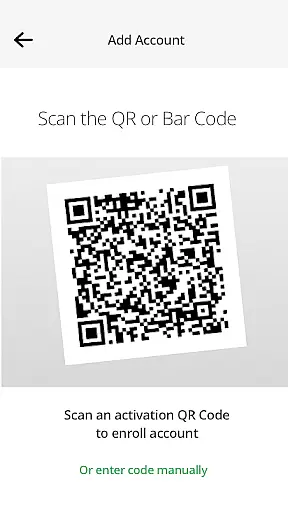
Users can easily enroll and link the app to their ID.me account by scanning a QR code during setup. Additionally, the PUSH-based authentication feature simplifies the login process by allowing users to approve push notifications sent directly to their devices. This dual functionality makes ID.me Authenticator an essential tool for safeguarding digital identities across various platforms.
ID.me Authenticator offers two primary features that set it apart in the realm of account security. As a TOTP Code Generator, the app produces 6-digit verification codes necessary for accessing accounts alongside usernames and passwords. This functionality ensures that users can generate these codes even without an active internet connection, providing flexibility and reliability in diverse scenarios.
The second key feature is PUSH-based authentication, which streamlines the login process. After entering their credentials, users receive a push notification on their mobile device, which they can approve with a single touch. This method not only enhances security but also improves user convenience by eliminating the need to manually input codes. Both features work together to offer a comprehensive and user-friendly approach to Two Factor Authentication.
Core task management in ID.me Authenticator revolves around its ability to generate 6-digit Time-Based One-Time Passwords (TOTP) and provide PUSH notification-based authentication. This functionality ensures that users can manage their security tasks efficiently without the need for a network or cellular connection.
The app simplifies the process of securing online accounts by integrating TOTP generation, which is crucial for two-factor authentication (2FA). Users can easily configure this feature by scanning a QR code during setup, making it accessible even to those who may not be tech-savvy.
By centralizing these security tasks within a single app, ID.me Authenticator offers a streamlined approach to account protection. This minimizes the complexity often associated with managing multiple security layers across different platforms.
Cross-device synchronization reliability is a key feature of ID.me Authenticator, ensuring that users can access their authentication tools from multiple devices seamlessly. The app achieves this by allowing users to enroll and connect their accounts through a QR code scan, which syncs the authentication data across all linked devices.
This synchronization process is vital for users who rely on multiple devices for their daily operations. It guarantees that whether they are using a smartphone, tablet, or computer, the authentication credentials remain consistent and up-to-date.
Moreover, the reliability of this synchronization enhances the overall user experience by providing peace of mind. Users can trust that their authentication methods are always available, regardless of the device they choose to use, thus maintaining high-security standards without compromising convenience.
Enhances account security
User-friendly interface
Free to use
Offline TOTP generation
Convenient PUSH notifications
Limited to ID.me accounts
Requires initial setup
QR code scanning needed
Dependent on device compatibility
No backup authentication methods

Device's storage information in a simple and clear graphical form (infographics)
 4.10
4.10
PDF scanner & converter for files, photos, lottery, QR codes. One swipe away!
4.50
Functional QR scanner and barcode reader that requires little storage space.
4.60
Secure your apps with lock screens, use custom themes and different features.
4.40
Use powerful, industry-leading AI tools to generate visual charts from any data
4.80
Lightweight PDF, Word, Excel reader.
4.60
Scan paperwork into PDF/JPG, generate your own e-signature and send fax or email
4.70
Okta MFA
4.70
Daily processing of PDF documents.
4.40
Best Tool for the professionals Electrician, Electrical contractors, etc.
4.90
Seamlessly integrate data and reports to build your presentation to impress
4.80
Simple notepad & memo. Take notes, to-do list, shopping list with reminders.
4.80
aCalendar+ makes your day, week and month
4.70
Total remote control for your Android device, PC and cloud services (IFTTT)!
4.20
Cloud storage, automatic phone backup, and more.
4.10
Wake up & get tasks done! Add alarms & reminders on the Clock Launcher.
4.00
Customizable calendar widget for seamless event sync, planning & scheduling.
4.00
Mega cloud explorer plugin for Solid Explorer
3.80
IP Camera Viewer - Android TV : RTSP Surveillance camera viewer for Android TV
4.2


User Reviews