

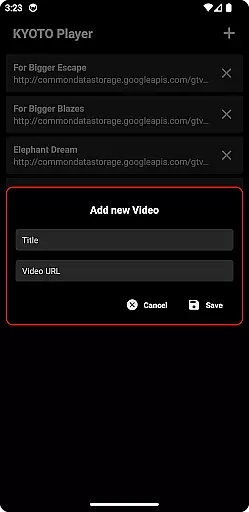
KYOTO Player is a versatile video player app designed for seamless playback of various online video formats. Supporting an extensive range of file types including MP4, HLS, DASH, and more, it ensures smooth streaming and playback without interruptions.
The app's intuitive interface allows users to easily navigate through their media library while enjoying high-quality video performance. Whether you're watching casual videos or managing a large collection of multimedia files, KYOTO Player provides a reliable solution for all your video playback needs.
One of the standout features of KYOTO Player is its broad format compatibility, accommodating over 10 different video and audio formats such as WebM, MKV, OGG, and MPEG-TS. This makes it an ideal choice for users with diverse media libraries.
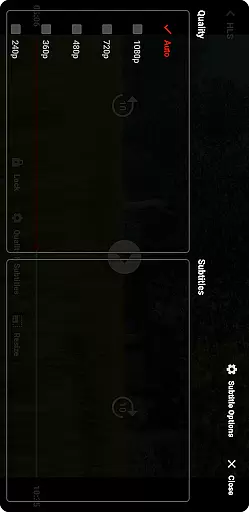
In addition to its format support, the app offers advanced playback controls, customizable viewing options, and background play functionality. These features give users complete control over their viewing experience while maintaining optimal performance across devices.
Video format compatibility is a crucial feature for any video player application. KYOTO Player excels in this area by supporting an extensive range of video formats including MP4, HLS, DASH, MP3, WebM, MKV, OGG, WAV, MPEG-TS, MPEG-PS, FLV, and more.
The ability to play such a wide variety of formats ensures that users can enjoy their media content without worrying about format restrictions. This flexibility makes KYOTO Player suitable for diverse user needs, whether they are streaming online videos or playing locally stored files.
By incorporating advanced decoding technologies, KYOTO Player delivers smooth playback across different devices and platforms. The app's comprehensive format support eliminates the need for additional conversion software, saving users time and effort.
Ultimately, KYOTO Player's robust video format compatibility enhances user satisfaction by providing a seamless viewing experience regardless of the source or type of video content.
While primarily a video player, KYOTO Player also offers AI-powered editing features that enhance the user's interaction with their video content. These intelligent tools allow users to perform basic editing tasks such as trimming, cropping, and adjusting playback speed with remarkable ease.
The integration of artificial intelligence in these editing features enables smart scene detection and automatic highlight creation. This means users can quickly identify and extract key moments from their videos without manual searching through lengthy footage.
Moreover, KYOTO Player's AI algorithms continuously learn from user preferences, improving the accuracy and relevance of suggested edits over time. This personalized approach to video editing streamlines workflows and helps users achieve professional-looking results with minimal effort.
Although not its primary function, these AI-powered editing capabilities add significant value to KYOTO Player, making it more than just a video player but a versatile tool for managing and enhancing video content.
User-friendly interface
Wide format support
Smooth playback performance
Customizable settings
Regular updates
Limited advanced editing tools
No built-in downloader
Occasional buffering issues
Ads in free version
Heavy on battery







Your media, on your terms.
 4.10
4.10
?100% FREE! Download & save videos? safely in this app. All formats supported.
4.60
HD video maker with no watermark, no ads & vlog maker with music, PIP, text
4.50
KMPlayer Plus (Divx Codec) officially support Divx codec.
4.30
Seamlessly connect and control your smart devices, anytime, anywhere with ease.
4.60
Movie maker & video editing app with AI effects and green screen
4.30
Download videos and play them offline
4.70
Browser for Sony TV to stream web videos, online movies and live tv
3.20
Viddo: Generate Action Figure, AI Anime, AI kiss, AI hug Video from image & text
4.40
Pro video editor app for Instagram, edit video with song, AI, effect & slowmo.
4.80
HD Video player all format, HD Videos, Cast & Subtitle. No annoying ads.
4.60
Snaptubè Video Downloader app allows to download videos and music in Snaptube. .
4.60
IPTV Loader, loads your own Playlist. DOES NOT CONTAIN ANY LIST OR CHANNELS
4.60
Watch IPTV on your Android device
4.60
Video Downloader is an utility that can save videos and music from web sites
4.20
Web Browser for LG TV to stream webvideos, online movies and livestreams in HD
4.20
Browser for Samsung TV to stream webvideos, online movies and livestreams in HD
4.10
Make your own Animations, Video and Photo Edits, Visual Effects, and more!
4.00
You can play SWF format file!
2.50

User Reviews