

SuperImage Pro is an advanced AI-powered photo editing application designed for photography enthusiasts and professionals alike. This all-in-one photo toolbox offers a comprehensive suite of features that enable users to enhance, transform, and upscale their images with remarkable precision.
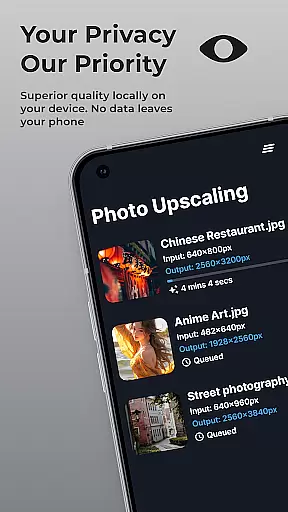
The application's standout feature is its on-device AI processing capability, ensuring complete privacy and security while working with sensitive images. Users can perform complex image manipulations such as background removal, subject isolation, and portrait enhancement without requiring an internet connection. The app's powerful AI models are optimized for modern hardware, delivering fast processing speeds while maintaining exceptional quality.
SuperImage Pro is particularly useful for photographers who need to work on location or in environments where internet access is limited. The ability to load custom AI models adds another layer of flexibility for advanced users seeking specialized image processing capabilities.
SuperImage Pro distinguishes itself through its comprehensive feature set and technical sophistication. The application supports unlimited image processing operations including enhancement, upscaling, and transformation, all powered by sophisticated AI algorithms running locally on the device.
A key differentiator is its support for multiple AI model formats (PyTorch, ONNX, MNN), allowing power users to import custom models tailored to specific needs. The app's portrait enhancement capabilities are particularly noteworthy, offering tools to refine facial features and improve background clarity in low-resolution images.
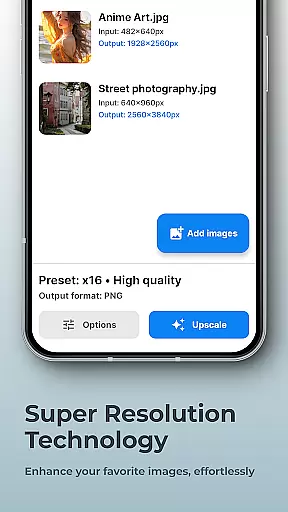
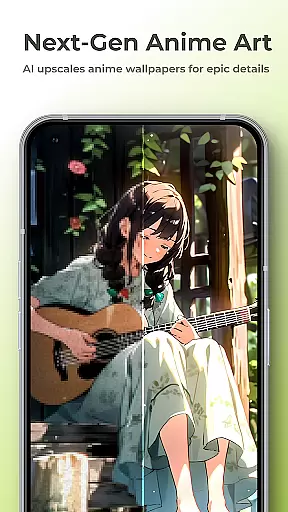
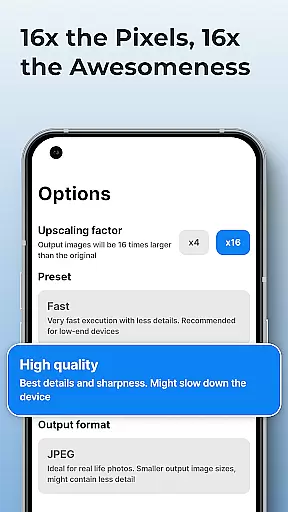
The application also excels in image upscaling, capable of increasing resolution up to 16x while maintaining exceptional detail and clarity. Its transparent cutout feature enables precise subject isolation, making it invaluable for professional-grade compositing work. All these features are delivered through an optimized architecture that ensures fast performance and maintains data privacy.
Real-time capture and preview functionality is essential for photography applications as it allows users to see exactly what the camera is capturing before taking a shot. This ensures that the framing, lighting, and composition are all correct, reducing the need for retakes.
SuperImage Pro excels in this area by leveraging advanced AI models optimized for modern hardware. The app processes images directly on the device, providing instantaneous feedback without requiring an internet connection. This not only enhances user experience but also guarantees privacy since no data is uploaded to the cloud.
Users benefit from the ability to adjust settings such as exposure, focus, and white balance in real time. These adjustments are immediately reflected in the preview, allowing photographers to fine-tune their shots with precision. This feature is particularly useful for professional photographers who demand high accuracy and control over their work.
The real-time capture and preview capabilities of SuperImage Pro ensure that users can take high-quality photos confidently. By offering a seamless and responsive interface, the app empowers users to capture moments perfectly, making it an indispensable tool for both amateur and professional photographers alike.
AI beauty and enhancement features have become increasingly popular in photography apps, allowing users to refine facial features and enhance background clarity effortlessly. The naturalness of these enhancements is crucial, as overly processed images can appear artificial and lose their authenticity.
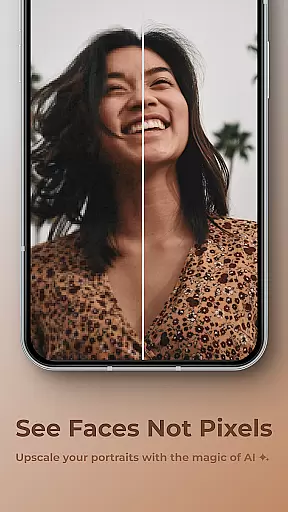
SuperImage Pro stands out by using on-device AI processing to enhance portraits while maintaining a natural look. The app sharpens details and refines facial features without compromising the original essence of the photo. This approach ensures that enhanced images retain their genuine appearance, which is vital for creating believable and appealing portraits.
One of the key benefits for users is the ability to enhance low-resolution portraits effectively. Whether improving the clarity of distant subjects or refining close-up shots, SuperImage Pro delivers impressive results that make subjects look their best without appearing overly edited. This feature is especially beneficial for social media enthusiasts and professionals who require high-quality images.
By prioritizing natural enhancement, SuperImage Pro offers a superior user experience that respects the integrity of the original image. Users can trust that their edited photos will look polished yet authentic, enhancing their overall photography portfolio and boosting confidence in sharing their work.
User-friendly interface
Advanced AI processing
Complete privacy protection
High-quality upscaling
Custom model support
Steep learning curve
High system requirements
Limited beginner guidance
Premium price point
Complex setup process

Gallery show photo, video, slideshow, is perfect 3D effect private photo albums.
 4.80
4.80
Photo editor: AI filters, photo enhancer, pic collage maker, AI art generator.
4.80
Add a dreamy vibe to your selfies and videos with soft style filters
4.3
Future baby face generator: AI kids generator, kid face! What my baby look like?
4.40
AI photo enhancer with Sora 2! Enhance, descratch, and colorize your old photos.
4.50
Hair color changer, AI haircut app, fun hair editor and buzz cut filter for all!
3.80
Turn photos into cartoons & avatars! - Photo Editor, Cartoon Face!
3.90
Your personal guide to the sun and moon. Plan ahead, visualize and predict!
4.70
Discover How to Plan any Sun, Moon and Milky Way Photo You Imagine in Seconds
4.70
Android Native system HD camera app. Never been so simple and faster.
4.70
Cartoon and artistic effects for your photos and videos
4.70
Add Watermark - Sign your pictures with a text or logo. Effective, quick, easy!
4.50
Cut and paste photo editor & eraser to customize photos easy and swap faces fun
4.50
Effortlessly organize, view and share your photos & videos with Gallery app!
4.40
AI portrait generator and polaroid AI selfie, fun AI generated AI photo creator!
4.30
Smart, light, and fast photo and video gallery
4.30
Photo editor: face & body editor, beauty cam, filters and quality enhancer.
4.00
Remote control of the phone camera from your Wear OS smartwatch
3.70
Create amazing frames with up to five photos. Rounded corners, effects and more!
3.60
User Reviews