

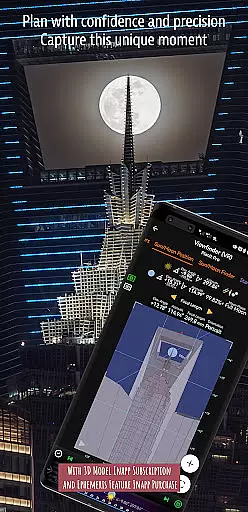
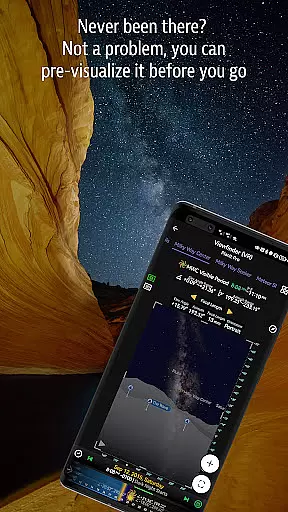
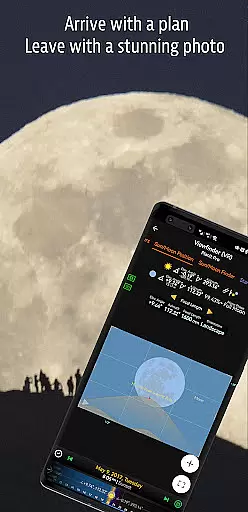
Planit Pro is an advanced photography planning tool designed specifically for landscape, travel, and nature photographers. This app serves as an all-in-one solution that combines mapping technology with a simulated viewfinder to help photographers pre-visualize their shots before arriving at the location. With features like celestial object tracking (Sun, Moon, stars, Milky Way), depth of field calculations, hyperfocal distance, and more, it ensures users are fully prepared for any photographic scenario.
The app also includes tools for time-lapse planning, star trail simulations, exposure calculations, and even tide predictions, making it invaluable for night photography, cityscapes, and astro-photography enthusiasts. By providing detailed overlays on maps and simulated viewfinders, Planit Pro allows photographers to maximize their creative potential while minimizing wasted time and resources in the field.
One standout feature is its offline functionality. Users can preload elevation data and maps, ensuring the app remains fully functional even without network connectivity. Whether you're capturing the perfect sunrise or planning a complex astro-photography session, Planit Pro offers the tools necessary to elevate your photography experience.
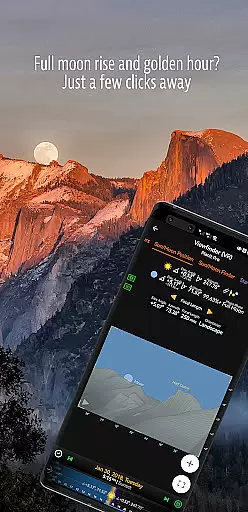
Planit Pro boasts an extensive range of features tailored to meet the needs of professional and amateur photographers alike. The app provides critical information such as GPS coordinates, elevation data, sunrise/sunset times, moonrise/moonset directions, and twilight hours. These features allow photographers to plan shoots down to the minute, ensuring optimal lighting and positioning.
In addition to terrestrial planning tools, Planit Pro includes advanced celestial tracking capabilities. Users can locate major stars, constellations, nebulae, and even predict phenomena like solar eclipses and meteor showers. The app's augmented reality (AR) and virtual reality (VR) modes simulate real-world viewfinders, offering a lifelike preview of how scenes will appear through the lens. This level of detail empowers photographers to experiment with compositions virtually before setting foot outdoors.
Other notable features include exposure calculators, ND filter guides, light metering tools, and tide height predictions. Each function is thoughtfully integrated into either map overlays or visual simulations, creating an intuitive user experience that streamlines workflow and enhances productivity in the field.
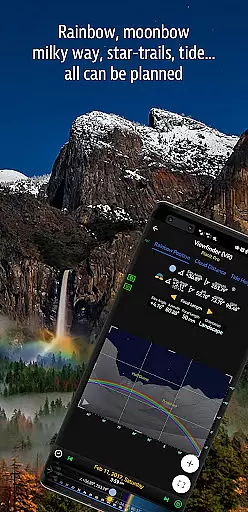
Real-time capture and preview functionality is essential for photographers who need to visualize their shots before taking them. Planit Pro offers a sophisticated simulated viewfinder that allows users to pre-visualize scenes by combining ground subjects with celestial objects such as the Sun, Moon, stars, and Milky Way.
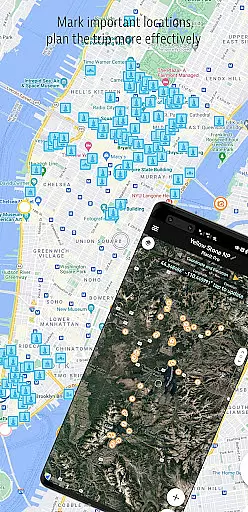
This app leverages advanced mapping technology and overlays critical photographic data directly onto the map interface. Users can access information like GPS coordinates, elevation, distance, and even predict the position of celestial bodies, ensuring they are well-prepared for the perfect shot.
By providing real-time feedback on various parameters such as focal length, depth of field, and hyperfocal distance, Planit Pro empowers photographers to make informed decisions quickly. This feature significantly enhances the ability to capture complex compositions, including time-lapses, star trails, and panoramas, with precision.
The value of this real-time functionality is immense, especially for landscape and night photographers. It not only saves time and resources but also boosts creativity and confidence in capturing breathtaking images under diverse conditions.
While primarily focused on photography planning, Planit Pro also incorporates features that enhance photo quality through precise calculations and simulations. The app's exposure/ND filter calculator and light meter tools ensure that photographers achieve optimal lighting and exposure settings, which is akin to AI beauty and enhancement features found in other photography apps.
These tools help photographers simulate and calculate the best possible settings for their shots, considering factors like twilight times, sun/moon positions, and even tide heights. Such meticulous planning ensures that each photograph maintains natural beauty without over-processing.
Planit Pro stands out by offering comprehensive simulation capabilities that cover a wide array of photographic needs. Whether itu2019s predicting rainbow positions or calculating star trail paths, these features contribute to producing naturally enhanced photographs that require minimal post-processing.
Ultimately, the app's focus on accurate pre-visualization and detailed planning translates into higher quality images straight out of the camera. Photographers benefit from reduced editing time and more authentic, visually appealing results, making Planit Pro an invaluable tool for both amateur and professional photographers alike.
Comprehensive feature set
Offline usability
Accurate celestial tracking
Intuitive AR/VR simulation
Time-saving tools
Steep learning curve
Premium price point
Requires setup for offline use
Interface may overwhelm beginners
Limited social sharing options


How would you look like with a differently shaped nose, chin or lips?
 3.90
3.90
All-in-One Editor & AI Photo Enhancer, Beautify & Retouch, Collage, Cartoonify
4.20
Create & Edit with AI: AI Remove, Enhance, Retouch, Filter
4.10
Light-weight Media Gallery app for Android made with Jetpack Compose
4.60
HD Camera Pro with HD Video shooting, Panorama, Photo editor , Beauty Camera.
4.50
Gallery Slideshow is slideshow maker app for slideshow from your gallery photos.
3.90
Transform Photos: Edit, Beautify and Craft Memories & Make Collages!
4.10
A unique animation app. Powerful, easy to use, and lots of fun.
4.30
Try an anime version, cartoon yourself, and generate AI hug or aging videos!
3.70
AI Photo Editor with 100+ Filters, Effects! Remove BG, Retouch & Photo Enhancer.
4.80
Photo editor: AI filters, photo enhancer, pic collage maker, AI art generator.
4.80
Take videos and pictures with the popular TikTok TIME WARP SCAN filter.
4.60
Easily create custom gifts, cards, photo books & more on the Shutterfly app!
4.60
Add Watermark - Sign your pictures with a text or logo. Effective, quick, easy!
4.50
Photo editor & gallery. Crop pictures & edit photos offline, no wifi!
4.50
Effortlessly organize, view and share your photos & videos with Gallery app!
4.40
Future baby face generator: AI kids generator, kid face! What my baby look like?
4.40
Photobooth mini FULL app will allow you to add more fun to your parties
4.00
Application for remote controlling DSLR
3.00


User Reviews