

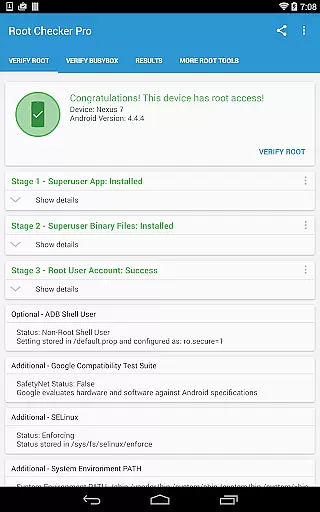
Root Checker Pro is a powerful Android tool designed to verify root access on your device. The app checks for proper root (superuser) permissions and BusyBox installation, ensuring your device is correctly configured for advanced operations.
The application provides detailed diagnostic information about the su binary, SELinux status, and system PATH, making it invaluable for both novice and advanced users. With its intuitive interface, you can quickly export troubleshooting data via email or social media.
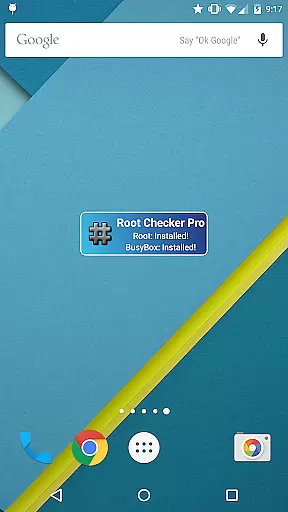
Whether you're troubleshooting root issues or confirming a successful root, Root Checker Pro offers a reliable solution. Its widget feature allows continuous monitoring of root status, keeping you informed at all times.
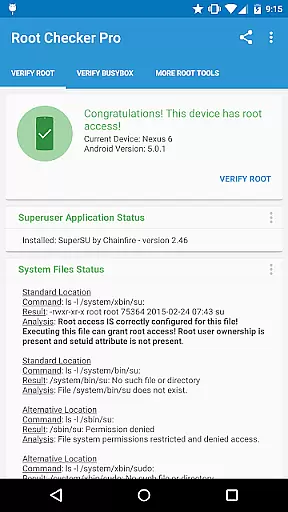
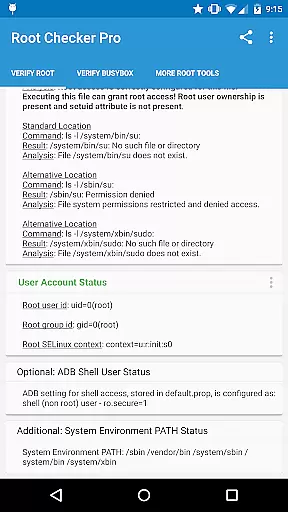
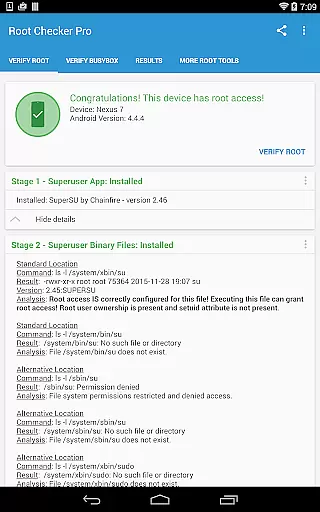
Root Checker Pro stands out with its comprehensive diagnostic capabilities. The app meticulously examines standard su binary locations, file permissions, and user/group IDs, providing a clear picture of your device's root status.
For technically inclined users, the app delivers in-depth details about SELinux contexts, Superuser installations, and ADB shell modes. These insights are crucial for resolving complex root-related issues efficiently.
A standout feature is the one-click export option for sharing diagnostic results. This functionality, combined with the convenient status-monitoring widget, makes collaboration and troubleshooting seamless and effective.
Root Checker Pro delivers exceptional accuracy in verifying root access on Android devices. The application meticulously checks the presence and status of the su binary, which is critical for granting root permissions. By examining standard su binary locations and file permissions, it ensures that users receive precise information about their device's root access.
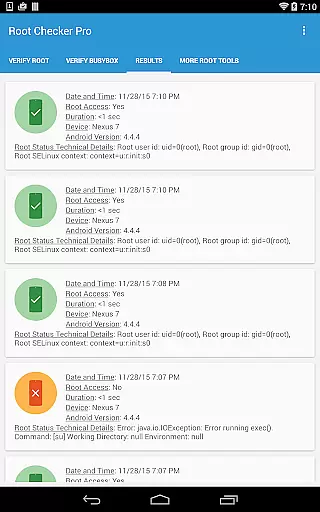
The app goes beyond basic checks by providing detailed outputs of root uid/gid, SELinux context results, and Superuser application installations. This comprehensive approach guarantees that even the most complex root configurations are correctly identified and verified. Such thoroughness makes it an indispensable tool for both novice and advanced users who need reliable root verification.
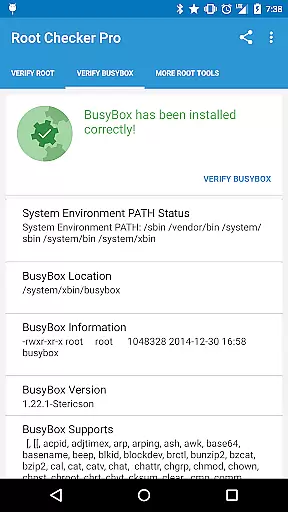
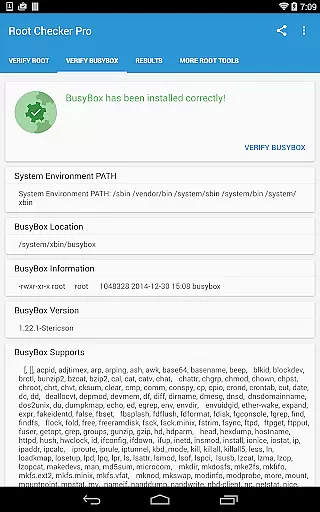
Another key feature is its ability to validate BusyBox installations. BusyBox, often referred to as the Swiss Army Knife of embedded Linux, is crucial for many rooted devices. The app accurately assesses BusyBox installation status and version, ensuring that users can confirm not only root access but also the proper functioning of essential utilities.
By offering quick and reliable test methods, Root Checker Pro empowers users to troubleshoot any issues effectively. Its detailed reports can be easily exported via email or social media applications, facilitating collaboration and support from technical communities. This functionality enhances the overall effectiveness of the app, making it a go-to solution for root and BusyBox verification.
Root Checker Pro excels in providing an intuitive and user-friendly interface that simplifies the complex task of root verification. Upon launching the app, users are greeted with a straightforward dashboard that clearly displays the most important information regarding their device's root status. This immediate access to critical data ensures that users can quickly ascertain whether their device has proper root access.
The design philosophy centers around ease of use, making it accessible even for those new to Android rooting. With just a single tap, users can initiate a comprehensive root check that covers all essential aspects, including su binary locations, permissions, and SELinux status. The results are presented in an easy-to-understand format that eliminates confusion and technical jargon, allowing users to make informed decisions about their device's configuration.
Advanced users will appreciate the additional details provided without overwhelming the interface. The app strikes a perfect balance between simplicity and depth, offering expanded views for those who need more granular information. These detailed views include root uid/gid, Superuser application versions, and adb shell default user mode, all accessible through intuitive navigation paths.
Furthermore, the inclusion of a widget enhances the app's intuitiveness by providing constant monitoring of root and BusyBox status. Users can set up timer intervals for automatic checks, receiving notifications directly on their home screen. This proactive approach keeps users informed without requiring manual checks, embodying the perfect blend of simplicity and functionality in a root checking tool.
User-friendly interface
Detailed diagnostic reports
One-click result sharing
Comprehensive su binary analysis
Convenient status widget
No iOS version available
Premium version required
Limited advanced features
Occasional compatibility issues
Requires technical knowledge

Just swipe the edge to do something!
 4.40
4.40
FV File Manager Pro, Fast and powerful file manager for Android
4.60
Excellent scientific calculator with symbolic algebra, integrals, derivatives
4.80
Navigate with Ease and Style
4.90
Bedrock Together: Join any bedrock server on Xbox/PS
4.80
WiFi Signal Strength Meter help you detect WiFi Signal Strength in real time.
4.80
Mirror your screen to Fire TV - Super fast and simple
4.40
Powerful collection of electronics tools and reference.A must for any enthusiast
4.90
A simple app to back up and restore SMS & MMS messages and call logs.
4.10
Support Fossify apps with a warm thank you!
5.00
Enjoy smooth gameplay with Game Booster
4.90
The ultimate tool for network analysis, wifi scanning and problem detection.
4.90
Extremely fast, secure, and protects your privacy
4.80
App to pay for FUTO Keyboard
4.60
Making emulation easy for everyone!
4.30
Screen Mirroring with sound for Samsung TV, LG TV, Sony TV, Smart TV and Browser
4.20
MS-DOS in your pocket. Play old DOS games anywhere you are ;)
4.10
Clean the junk files on your device
3.40
A non-root local ADB shell client. READ BELOW!
3.40

User Reviews