

BedrockTogether (Pro) is a specialized tool designed for Minecraft Bedrock Edition players who want to connect to servers without DNS rerouting. This ad-free version allows any Bedrock Edition server to appear as a LAN server on Xbox or PlayStation clients, simplifying the connection process. By entering the desired server IP and port, users can easily access multiplayer servers through the "Friends" tab in the game.
The app ensures seamless connectivity within the same LAN network, though it currently does not support Realms or Nintendo Switch compatibility. With an intuitive interface and straightforward setup, BedrockTogether (Pro) enhances the multiplayer experience by removing technical barriers, making it ideal for players seeking hassle-free connections.
BedrockTogether (Pro) offers several notable features that enhance its functionality. Firstly, it eliminates the need for DNS rerouting, allowing direct LAN server visibility on supported platforms like Xbox and PlayStation. The app's simple interface requires only the server IP and port to establish a connection, streamlining the process significantly.
Additionally, the app provides troubleshooting guidance to ensure smooth operation, such as verifying network connections. While it doesn't support Realms or Nintendo Switch, its compatibility with other platforms makes it a versatile tool for Minecraft enthusiasts. Users also benefit from active community support via Discord and Telegram, where they can report bugs and get assistance, ensuring continuous improvement and reliability.
BedrockTogether (Pro) is designed to enable seamless connectivity between Bedrock Edition servers and Minecraft clients on Xbox or PlayStation. The app's core function ensures that any Bedrock server can appear as a LAN server, allowing users to connect without the complexities of DNS rerouting. This functionality is crucial for simplifying multiplayer gaming experiences.
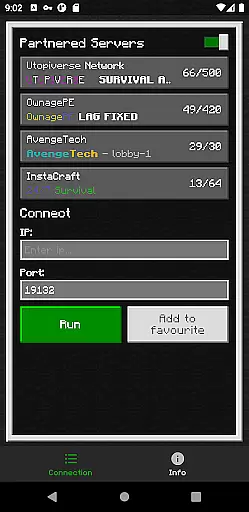
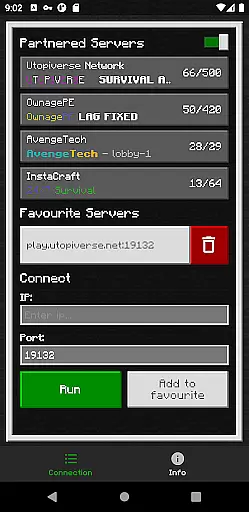
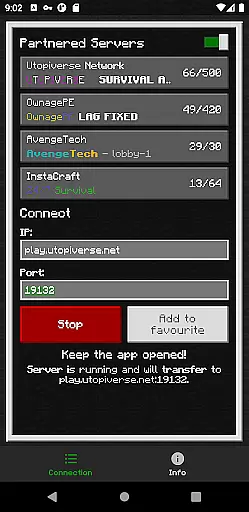
The application achieves this by requiring users to input their desired server IP and port, then clicking the 'Run' button. Once activated, the app facilitates a direct connection through the 'Friends' tab in the game, streamlining the process significantly. This method eliminates unnecessary technical steps, making it accessible even for less tech-savvy players.
For users, this means quicker and more reliable access to multiplayer servers, enhancing their overall gaming experience. By removing barriers such as complicated network configurations, BedrockTogether (Pro) allows players to focus on what truly mattersu2014enjoying the game with friends.
Ultimately, the app's effectiveness lies in its ability to deliver a hassle-free connection process. Gamers can enjoy an uninterrupted, ad-free experience while connecting to their favorite servers, ensuring that they spend less time troubleshooting and more time playing.
A key feature of BedrockTogether (Pro) is its commitment to providing a simple and intuitive user interface. As a tool designed to simplify the connection process between Minecraft clients and servers, it ensures that users can navigate its features with ease. This focus on usability enhances the overall user experience significantly.
The app requires just a few straightforward steps: entering the server IP and port, clicking 'Run,' and then accessing the gameu2019s 'Friends' tab to connect via LAN. These minimalistic interactions ensure that users are not overwhelmed by complex menus or settings. Such simplicity is vital for maintaining accessibility across different user skill levels.
By prioritizing clarity and ease of use, BedrockTogether (Pro) empowers users to execute its primary function without frustration. Players can swiftly move from setup to gameplay, reducing downtime and increasing enjoyment. This streamlined approach also minimizes potential errors during the connection process.
In summary, BedrockTogether (Pro)'s interface design reflects its dedication to user-centric solutions. Its intuitive layout ensures that gamers can utilize its powerful networking capabilities without being hindered by a steep learning curve, ultimately enhancing both convenience and satisfaction.
Easy server connection
No ads included
Active community support
Simple user interface
Direct LAN visibility
No Nintendo Switch support
Limited to LAN networks
No Realms compatibility
Third-party application
Manual network setup

 4.50
4.50 4.50
4.50
Best leveling tool for your Android device. Hang paintings like a pro.
4.90
View detailed information about your Nissan Leaf the dealer never shows you.
4.10
The one-and-only remote control for PC, Mac, and Linux
4.70
Play your X-Box games remotely in 1080p with any controller and zero latency
4.60
The ultimate tool for network analysis, wifi scanning and problem detection.
4.90
Pro Emulator is an easy to use game console emulator for a range of consoles.
4.40
Fun lie-detection pranks for friends and parties.
3.80
Easily install aab(Android App Bundle) files on your Android device with our app
4.80 4.50
4.50
Quickly switch to an encrypted DNS server on Android TV
4.50
Screen Mirroring for Roku Sticks, Roku TCL TV and Roku Hisense TV
4.50
Use your phone as a webcam on your computer over WiFi or USB.
4.40
App that Recover your pictures, videos or files after you delete them.
4.20
Signal Strength, Mobile, Wifi, Speed Test, Bad Signals, Cellular, 5G, LTE, 4G
4.20
Introducing Smart Printer, your ultimate destination for printing solutions!
4.00
Clean the junk files on your device
3.40
Unlock your Essential Key. Create custom shortcuts to your favorite apps!
4.4

User Reviews