

EmuReady Beta is a comprehensive emulation compatibility tool designed to help users discover which games work best on their devices. The app provides a detailed compatibility database, allowing users to browse thousands of games and view performance reports across different devices and emulators. With its community-driven platform, EmuReady offers real user experiences, device-specific information, and multiple emulator support.
The app's key features include smart filtering options for refined search results, a voting and commenting system for community interaction, and detailed performance tracking metrics. Users can save their favorite games, switch between light and dark modes, and enjoy an optimized viewing experience. Whether you're new to emulation or a seasoned pro, EmuReady serves as your trusted guide in the world of retro gaming.
By providing essential compatibility information, EmuReady saves users time and effort by ensuring they only attempt to run games that are known to perform well on their specific hardware. This makes it an invaluable tool for both casual gamers and dedicated emulation enthusiasts looking to maximize their gaming experience.
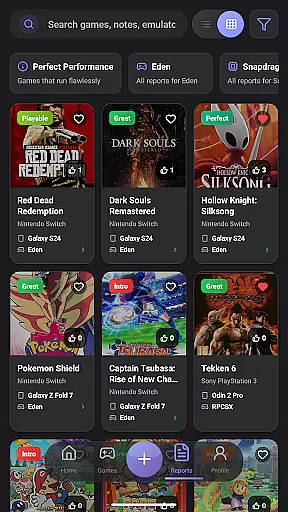
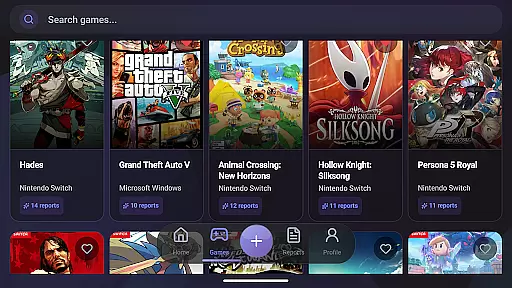
EmuReady Beta stands out with its robust set of features tailored for the emulation community. At its core, the app boasts a comprehensive Game Compatibility Database where users can instantly see how thousands of games perform on various devices and emulators. This database is easily searchable by game title, system, or through an extensive catalog browsing feature.
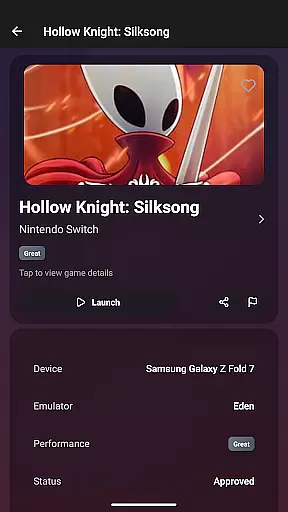
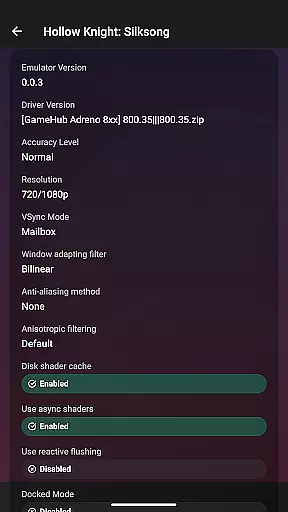
Another significant feature is the Community Reports section, where real users contribute detailed compatibility reports. These reports include performance ratings, custom settings, and helpful notes, offering valuable insights from the community. Additionally, the app supports multiple emulators for systems like Nintendo Switch and 3DS, enabling users to compare performance and find the best emulator for each game.
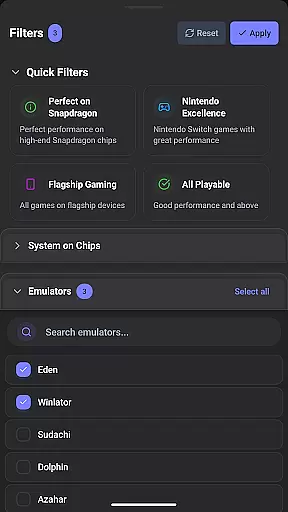
Smart Filtering allows users to refine their searches by device, emulator, performance rating, and more. The app also includes a Vote & Comment System for community engagement, Performance Tracking for detailed metrics, Save Favorites functionality for personal libraries, and a comfortable Dark Mode for any time of day usage. These features collectively enhance the overall user experience and make EmuReady Beta an essential tool for emulation enthusiasts.
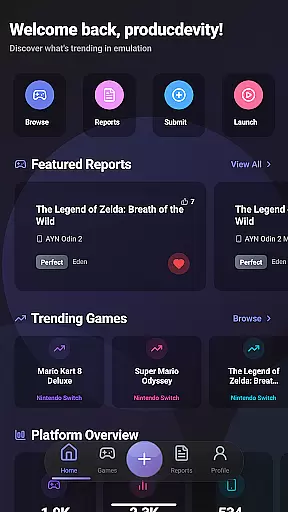
EmuReady Beta focuses on providing accurate and effective core functions that are essential for retro gaming enthusiasts. The app's Game Compatibility Database allows users to browse thousands of games and instantly see how they perform across different devices and emulators. This feature ensures that gamers can make informed decisions about which games will run smoothly on their specific hardware.
The community-driven platform enhances the app's effectiveness by offering Community Reports. These reports consist of real user experiences, complete with performance ratings, custom settings, and helpful notes. By aggregating this data, EmuReady provides a comprehensive view of game compatibility, ensuring users have reliable information before investing time in emulation.
Device-Specific Information further amplifies the app's accuracy. Users can find tailored reports for their exact device model, whether it's a flagship phone or a budget tablet. This specificity helps users optimize their emulation experience by applying settings that are known to work well for their hardware configuration.
Ultimately, EmuReady Beta empowers users to avoid the frustration of trial and error. With features like Multiple Emulator Support and Performance Tracking, users can compare different emulators and understand detailed metrics such as FPS and playability ratings. This precision ensures that users enjoy a seamless gaming experience, making EmuReady an indispensable tool for both novice and seasoned emulation enthusiasts.
EmuReady Beta excels in delivering an interface that is both simple and intuitive, catering to users of all experience levels. The app's design emphasizes ease of use, allowing users to quickly access its extensive features without a steep learning curve. Key functionalities like the Game Compatibility Database and Community Reports are easily navigable, ensuring users can efficiently find the information they need.
Smart Filtering is another feature that highlights the app's intuitive design. Users can filter reports by various criteria such as device, emulator, and performance rating. This capability allows for quick and precise searches, streamlining the process of finding compatible games and settings. The straightforward filtering mechanism ensures that even those new to emulation can effortlessly navigate the app.
Additionally, EmuReady offers a Vote & Comment System that simplifies user interaction. This system encourages community engagement by letting users upvote helpful reports and share their own experiences. Such interactions are seamlessly integrated into the interface, promoting a collaborative environment without complicating the user experience.
Finally, the inclusion of Dark Mode underscores the app's commitment to user comfort. By providing an automatic theme-switching option, EmuReady ensures a pleasant viewing experience at any time of day. This attention to detail in the user interface design makes EmuReady Beta not only functional but also a joy to use, enhancing overall user satisfaction and engagement.
User-friendly interface
Comprehensive game database
Community-driven reports
Multiple emulator support
Smart filtering options
Limited to compatibility checking
Beta version instability
No emulator provided
Dependent on user reports
Performance varies by device


 4.50
4.50 4.50
4.50
Quickly switch to an encrypted DNS server on Android TV
4.50
Save any video in HD - paste the link, download fast and watch offline.
4.3
Safely recover deleted photos, videos, and files with a single easy tap.
3.70
Powerful collection of electronics tools and reference.A must for any enthusiast
4.90
Game Booster, GFX Tool is now compatible with newer game update
4.50
Screen recorder with audio to record high-quality videos and take screenshots.
4.40
The ideal app to be the digital eye of your family
3.40
Enjoy smooth gameplay with Game Booster
4.90
Easily install aab(Android App Bundle) files on your Android device with our app
4.80
Small and simple app to Verify Root Access and BusyBox Install!
4.70
Protect your device with antivirus, storage cleanup, and system monitoring
4.70
Mirror your screen to Chromecast and Android TV - Super fast and simple
4.60
eXtended Permission Manager - a small app to manage permissions and AppOps
4.50
Just swipe the edge to do something!
4.40
An easy-to-use calculator designed to save time calculating and bending conduit
4.30
pdf merge, word to pdf, jpg to pdf, edit pdf, convert to pdf and much more!
4.20
Automate everything from settings to photos, SMS to speech. ADC2 prize winner.
4.10

User Reviews