

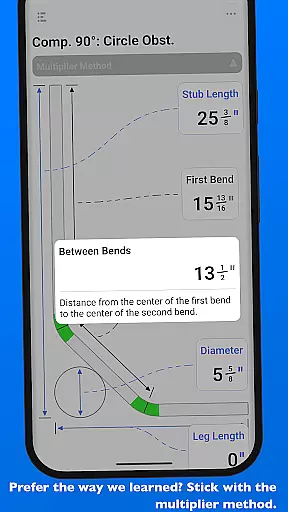
QuickBend is a cutting-edge conduit bending calculator app designed for electricians and professionals working with conduit or tubing. The app offers unparalleled accuracy by considering the radius of the shoe and bender, conduit type, and size diameter. All measurements are generated using the centerline radius algorithm, ensuring precision in every calculation.
Built by an electrician for electricians, QuickBend caters to both seasoned professionals and DIY enthusiasts. It helps avoid simple mistakes, saving time and money while providing detailed documentation for individual bends. With its intuitive interface, users can toggle between inches and centimeters, switch input styles, and benefit from QuickCheck, which visually indicates possible issues with bend feasibility.
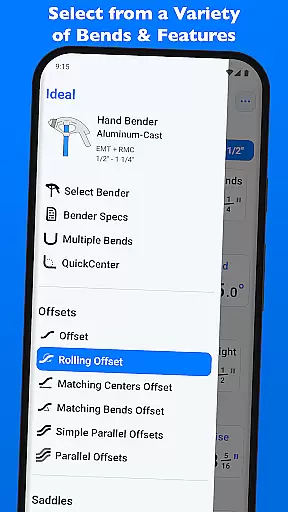
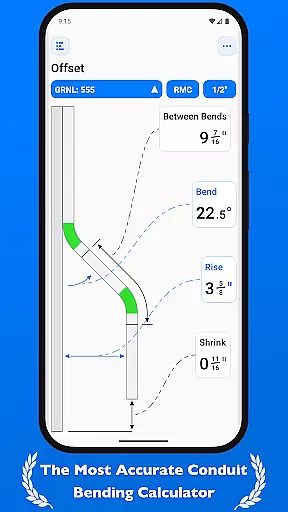
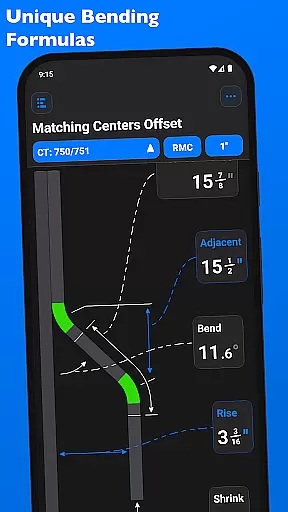
QuickBend stands out with its innovative features tailored for productivity and accuracy. The app supports various types of bends including Offset, Rolling Offset, Three-Point Saddle, and more. Each bend type is rigorously processed and field-tested, ensuring reliable results every time.
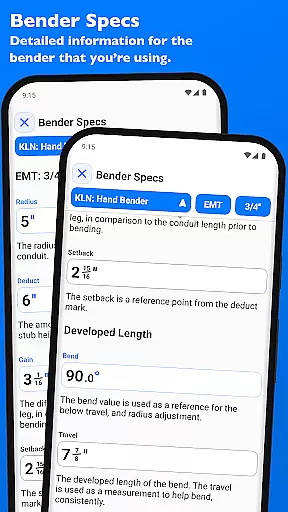
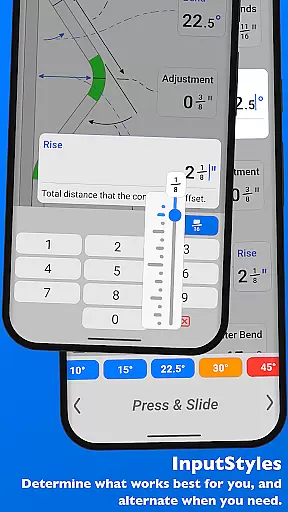
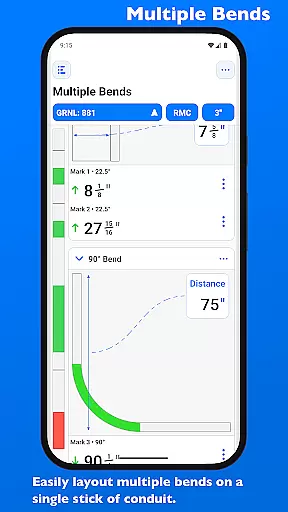
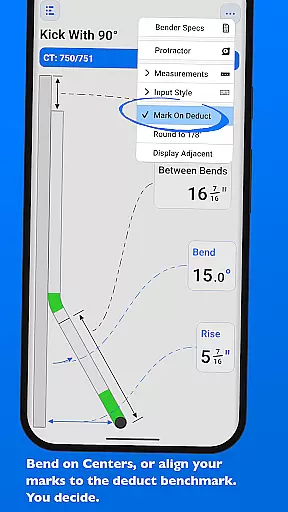
The app's interface allows seamless switching between different input methods such as number pad or slider bar (Press & Slide). QuickCheck provides real-time feedback on bend feasibility through color-coded text. Additionally, users can layout multiple bends on a single conduit, edit bender specifications, and view detailed information like centerline radius, deduct, gain, and setback, all visualized within the 'Bender Specs' section.
QuickBend revolutionizes the way electricians and conduit workers manage their bending tasks through its advanced calculation algorithms. The app's core functionality lies in its ability to handle complex measurements with precision, taking into account variables such as shoe radius, bender type, and conduit dimensions.
By integrating a centerline radius algorithm, QuickBend ensures that every measurement is not only accurate but also rigorously field-tested. This means users can rely on the app for both simple and intricate bending projects without worrying about errors or inconsistencies.
The app offers an intuitive interface that allows seamless switching between different input methods, including number pads and slider bars. This flexibility empowers users to choose their preferred method of data entry while maintaining high levels of accuracy and efficiency in their work.
One of QuickBend's standout features is its reliable cross-device synchronization, which ensures that all user data remains consistent across multiple devices. Whether you're working on a smartphone or tablet, the app maintains real-time updates so you can pick up where you left off on any device.
This synchronization extends to the detailed bender specifications stored within the app. Users can edit and view information such as centerline radius, deduct, gain, and setback values, knowing that these details will be accurately reflected across all their devices.
Furthermore, QuickBend allows users to pin frequently used benders for quick access, streamlining workflow efficiency. This feature, combined with the app's robust synchronization capabilities, makes it an indispensable tool for professionals who need reliable access to their bending data at all times.
Highly accurate calculations
User-friendly interface
Comprehensive bend support
Real-time feasibility checks
Customizable measurement units
Premium pricing model
Steep learning curve
Limited free features
Requires technical knowledge
No offline functionality

A Revolutionary All-in-One Artificial Intelligence Tools
 3.80
3.80
QuickBooks Workforce lets teams view pay info and track time in one place.
4.70
Experience Reading - Night Mode for Documents
4.40
When you Focus, so will your Bean in this cozy focus timer
4.30
Experience real multitasking on your Android!
4.00
Automates browsing any website and notifies you of important changes or events
4.30
Customizable calendar widget for seamless event sync, planning & scheduling.
4.00
Easiest event planning, volunteer signups & parent teacher conference scheduling
2.20
AI Chatbot and AI writing assistant powered by ChatGPT.
4.60
Absolutely the best CNC machinist speed and feed calculator around. fswizard.com
4.60
Subscribe to Webcal & .ics calendars and keep them up-to-date!
4.50
Secure your apps with lock screens, use custom themes and different features.
4.40
Share files & memories safely. Keep your photos and videos secure.
4.40
Pwnagotchi companion app
4.20
Make apps & sites with natural language prompts
4.10
Find and delete junk files & block unwanted notifications & manage files
3.70
ID.me Authenticator is a simple and free Two Factor Authentication solution
3.50
The upgraded version of Name Wheel with AI and the power to add your own wheels.
4.4
IP Camera Viewer - Android TV : RTSP Surveillance camera viewer for Android TV
4.3


User Reviews