

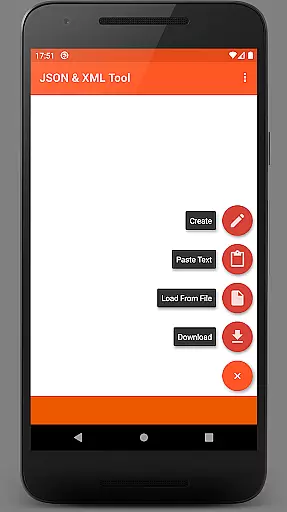
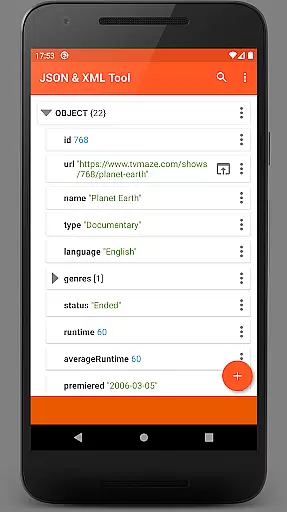
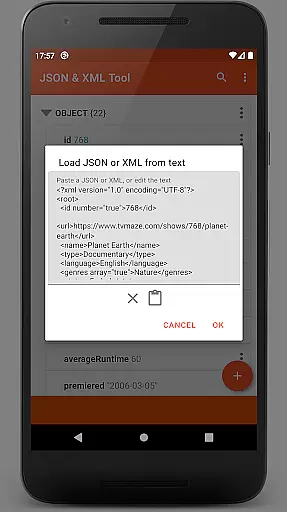
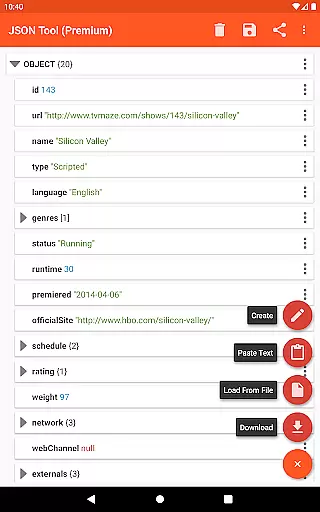
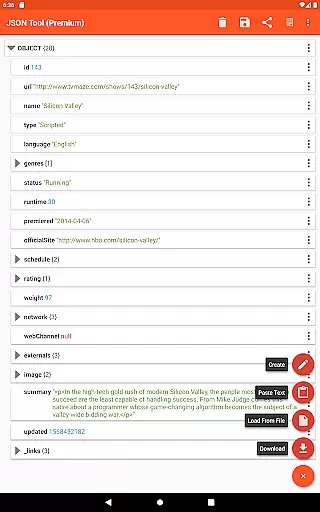
JSON & XML Tool Premium is a powerful productivity application designed for effortless creation, viewing, and editing of JSON and XML files. The app features a user-friendly hierarchical view that simplifies navigating complex data structures, making it an ideal tool for developers and power users who need to edit game addons or convert file types.
In addition to its core functionality, the app offers advanced capabilities such as JMESPath query support for extracting and transforming elements, PDF export options, and seamless integration with external applications through Android's Storage Access Framework (SAF). This ensures secure file handling without unnecessary storage permissions, while still providing flexibility when needed.
Whether you're managing configuration files, working on game development, or handling data transformation tasks, this app provides a comprehensive solution that enhances your productivity by streamlining JSON and XML workflows.
One of the standout features of JSON & XML Tool Premium is its robust editing suite. Users can rename node elements, modify values, and switch between Boolean, Number, and String types effortlessly. Additionally, the app supports adding, duplicating, and removing nodes, as well as reordering array elements, ensuring complete control over your data structure.
Beyond basic editing, the app includes several productivity-enhancing tools. These include dark theme support for comfortable long-term use, formatted text output for better readability, and the ability to share JSON/XML content via ACTION_SEND intents. Files can also be previewed as plain text or exported as PDF documents, offering versatility in how users interact with their data.
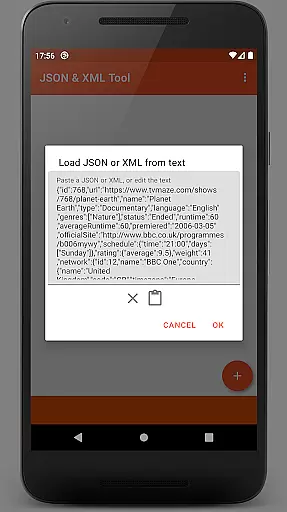
The app further distinguishes itself with its flexible file handling options. It integrates seamlessly with SAF for secure file access, allows downloading files from URLs, and accepts input from other apps via ACTION_SEND intents. With these features, JSON & XML Tool Premium caters to a wide range of professional needs while maintaining ease of use.
At the heart of the JSON & XML Tool Premium app lies its robust core task management system, designed to streamline the handling of JSON and XML files. This productivity tool offers a comprehensive suite of features that cater to various user scenarios, from creating game addons to converting file types. The app's intuitive interface allows users to perform complex tasks with ease, ensuring that both novice and experienced users can efficiently manage their data.
The app leverages the Storage Access Framework (SAF) for seamless file browsing without necessitating broad storage permissions. This selective permission approach enhances security while maintaining functionality. When required, the app will prompt for specific storage access, ensuring that users retain control over their device's data. Such a system optimizes the balance between capability and privacy, making file management both secure and straightforward.
Users benefit from an array of editing options that empower them to manipulate JSON and XML files precisely. From renaming nodes to modifying values and switching between data types, the app provides all necessary tools for effective file customization. Additionally, features like element duplication, movement within arrays, and saving options ensure that productivity is not hampered by cumbersome workflows. These capabilities culminate in an application that not only manages tasks but enhances overall efficiency.
Cross-device synchronization is a pivotal feature of the JSON & XML Tool Premium app, ensuring that users can rely on consistent access to their files across multiple devices. In today's interconnected world, having reliable synchronization is essential for maintaining workflow continuity and safeguarding data integrity. The app addresses this need by providing stable and dependable sync capabilities that keep all user devices updated with the latest file versions.
By utilizing advanced syncing algorithms, the app guarantees that changes made on one device are accurately reflected on others. Whether editing a file on a smartphone or accessing it from a tablet, users can trust that their work remains current and coherent across platforms. This reliability fosters confidence in using the app for critical tasks, as users know their data remains consistent regardless of the access point.
Moreover, the app supports real-time updates, which means modifications are instantly available across synced devices. This immediacy not only boosts productivity but also facilitates collaborative efforts, allowing teams to work concurrently without fear of version conflicts. With such steadfast synchronization, the JSON & XML Tool Premium app becomes an indispensable asset for users seeking efficient and reliable cross-device operations.
User-friendly interface
Advanced editing tools
Flexible file handling
Dark theme support
JMESPath query integration
Premium version only
No free trial available
Limited beginner guidance
Occasional permission prompts
Requires technical knowledge

Client for Nextcloud Deck
 4.60
4.60
Native client for Forgejo and Gitea
5.00
Simple and reliable communication between inmates, friends and family
3.20
Code on-the-go with VScode for Android. Edit,debug and collaborate from mobile!!
3.10
A beautiful digital clock with autostart and many other functions
4.70
To do list widget with a notebook organizer, checklist, simple shopping list
4.60
Ultimate Virtual AI Character for immersive Roleplay Chat. Perfect Companion
3.90
Simple notepad & memo. Take notes, to-do list, shopping list with reminders.
4.80
AT&T Internet customers can use this app to personalize their Wi-Fi network.
4.40
Seamlessly integrate data and reports to build your presentation to impress
4.80
Direct Chat without saving contacts & Dual WA Account on Single Device
4.70
When you Focus, so will your Bean in this cozy focus timer
4.30 4.20
4.20
Professional calendar app for Google Calendar, MS Outlook & Exchange
4.20
Font maker keyboard with your own handwriting
4.10
Take control of your clipboard with Clipper!
3.90
Access your phone's notifications, calls, apps, photos & texts on your PC
3.90
A Revolutionary All-in-One Artificial Intelligence Tools
3.80
Ads Free App! Editor, Hide File, Copy, Move, Delete and Rename.. all facility av
1.70

User Reviews