

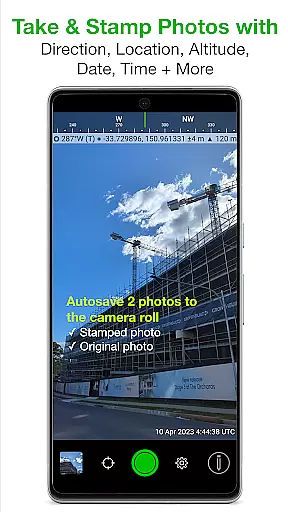
Solocator is a professional GPS camera app designed for fieldwork and photo documentation across various industries. It allows users to overlay critical metadata such as location, direction, altitude, date, and time directly onto photos, making it ideal for proof-of-work scenarios.
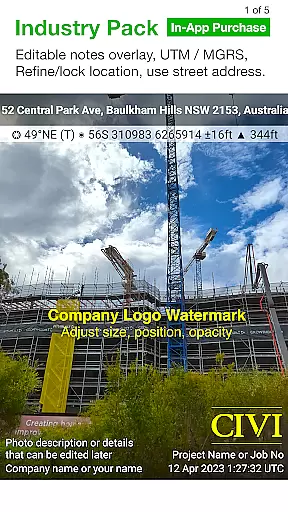
With the optional Industry Pack, users can capture additional details like project names, photo descriptions, and company watermarks. The app supports both front and back cameras, offers advanced sorting and sharing options, and integrates seamlessly with cloud storage services, ensuring maximum flexibility for professionals in the field.
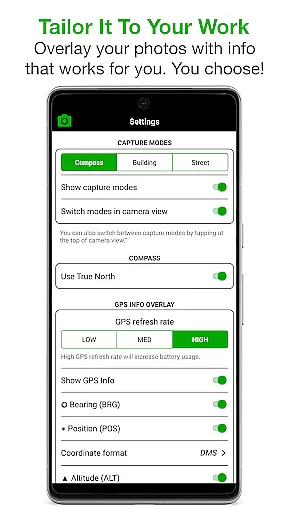
Solocator stands out with its extensive customization options for photo overlays. Users can select from a wide range of data points, including GPS coordinates, compass direction, altitude, tilt, roll angles, and even street addresses (via the Industry Pack). This ensures that every photo contains the exact information required for specific workflows.
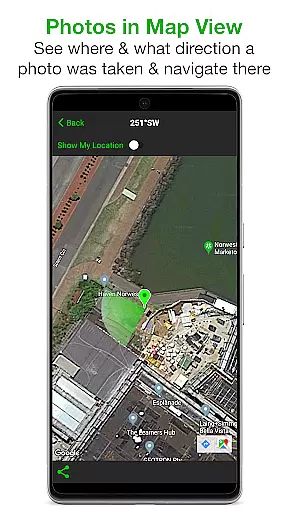
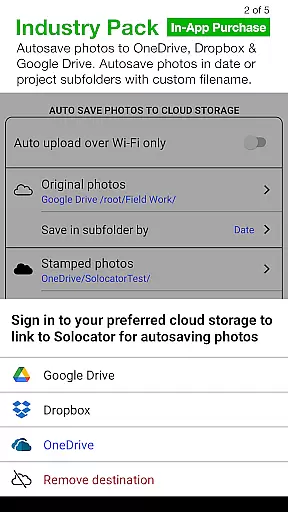
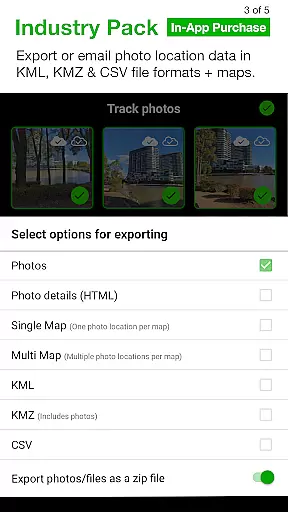
The app also includes advanced features like autosaving photos with or without overlays, batch editing capabilities, and exporting options in KML, KMZ, and CSV formats. Its compatibility with cloud storage services such as Google Drive and Dropbox further enhances its utility for professionals who need reliable and organized photo documentation.
Real-time capture and preview functionality is essential for photography applications like Solocator. This feature ensures that users can instantly see the results of their shots with all selected overlays applied before taking the photo. The immediacy of feedback allows photographers to make necessary adjustments on the fly, ensuring they capture the perfect image without any guesswork.
Solocator enhances this experience by offering a comprehensive set of customizable overlays. Users can select from various data points such as GPS position, compass direction, altitude, and more, which are then stamped directly onto the photo in real time. This capability not only saves time but also provides critical context to each photograph, making it invaluable for fieldwork or documentation purposes.
The app supports both back and front cameras, providing flexibility for different shooting scenarios. With additional features like pinch zoom, self-timer, flash, and exposure controls, Solocator ensures that users have full control over their photography process. These tools combined with real-time previews empower users to produce high-quality, informative images tailored to their specific needs.
While Solocator does not focus on AI beauty enhancements typical in portrait photography apps, it excels in enhancing photo utility through precise data overlays. For professionals who require natural and accurate representations, Solocator's ability to overlay critical information seamlessly onto images serves a similar purposeu2014enhancing the value and authenticity of each photo without altering its fundamental appearance.
The Industry Pack further extends these capabilities by allowing users to add project names, descriptions, and watermarks. This level of customization ensures that every photo carries relevant metadata, adding a layer of professionalism and traceability. Users can trust that the information presented is both natural and integral to the imageu2019s intended use, whether for documentation, reporting, or archival purposes.
Additionally, Solocator offers advanced export options, including KML, KMZ, and CSV formats, ensuring that the enhanced data remains accessible and usable across different platforms. By focusing on maintaining the integrity and natural presentation of photos while enriching them with vital details, Solocator stands out as a tool designed for accuracy and reliability in professional environments.
User-friendly interface
Comprehensive metadata options
Cloud storage integration
Customizable export filenames
Batch editing functionality
Industry Pack is paid
Limited on devices without compass
Occasional GPS inaccuracies
Advanced features may overwhelm new users
Requires manual refinement for GPS locking

Cut and paste photo editor & eraser to customize photos easy and swap faces fun
 4.50
4.50
What celebrity do you look like? Celebs will find your celebrity match!
4.10
Create & Edit with AI: AI Remove, Enhance, Retouch, Filter
4.10
Photo editor: AI filters, photo enhancer, pic collage maker, AI art generator.
4.80
The #1 app for B&W film developing featuring an advanced darkroom timer.
4.10
Transform Photos: Edit, Beautify and Craft Memories & Make Collages!
4.10
PhotoSync Bundle Add-On License. Enables all features and services in PhotoSync.
4.60
Discover & download millions of art for The Frame TV or Hisense CanvasTV
4.60
Discover How to Plan any Sun, Moon and Milky Way Photo You Imagine in Seconds
4.70
Android Native system HD camera app. Never been so simple and faster.
4.70
Unblur, enhance & restore photos with powerful AI photo enhancer tools.
4.60
Photo Exif Editor allows to view, add and modify EXIF data of multiple photos
4.50
HD Camera Pro with HD Video shooting, Panorama, Photo editor , Beauty Camera.
4.50
A reflected light meter with spot metering and incident light metering.
4.40
[3DSteroid Pro] is a stereoscopic application for Android.
4.30
Natural Beauty, Selfie Retouch
4.30
Professional photography on your mobile phone
4.20
How would you look like with a differently shaped nose, chin or lips?
3.90
Perfect photos with body shaping, BG changer and object remover.
3.70

User Reviews