

X PhotoKit is a versatile photo editing application that brings professional-level tools to your fingertips. The app features AI-powered face swapping, comprehensive photo editing options, collage creation, and customizable templates. Whether you're looking to enhance personal photos or create marketing materials, X PhotoKit provides the necessary tools to produce stunning visuals.
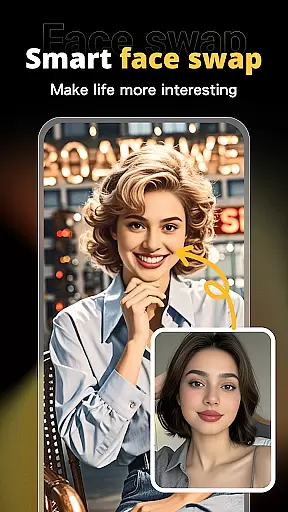
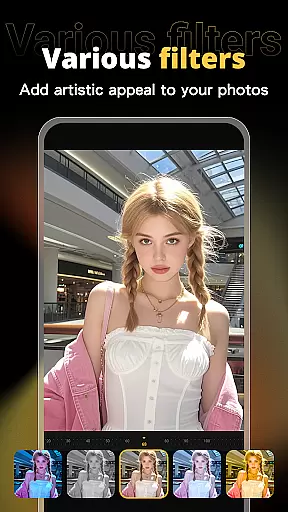
With its intuitive interface, users can easily apply filters, effects, and adjustment tools to beautify their images. The intelligent AI face swap function allows for seamless replacement of faces in photos, ensuring natural results. Additionally, the app offers built-in templates for various occasions, making it simple to design posters and covers.
This app is perfect for social sharing, preserving travel memories, creating holiday greetings, and even commercial design projects. X PhotoKit empowers users to unleash their creativity and achieve professional-quality edits from anywhere, at any time.
X PhotoKit stands out with its rich feature set tailored for both casual and professional photographers. One of the key highlights is the AI face swap technology, which uses advanced algorithms to ensure realistic and high-quality results. Users can upload a selfie and merge it into another image effortlessly.
The app also includes a comprehensive suite of photo editing tools. These range from basic adjustments like brightness and contrast to more sophisticated options such as filters and effects. With these tools, users can quickly enhance the visual impact of their photos.
For those who enjoy creative projects, X PhotoKit offers photo collage and image stitching features. Users can choose from multiple layouts and templates to combine photos into collages or stitch them together for panoramic views. Built-in templates for various occasions further simplify the design process, allowing anyone to create visually appealing content without needing extensive design skills.
Real-time capture and preview functionality is essential for ensuring that users can see the results of their photo edits instantly. This feature allows users to visualize changes as they apply filters, effects, and adjustments, providing immediate feedback on their creative decisions.
X PhotoKit offers a seamless real-time editing experience by leveraging advanced processing capabilities. The app ensures that even complex edits like AI face swapping and image stitching are previewed without delay, maintaining a smooth workflow for users.
The benefit of real-time capture and preview is significant. Users can experiment with different styles and settings confidently, knowing that they can undo or tweak any changes before finalizing their work. This interactive approach not only enhances user satisfaction but also encourages more experimentation and creativity.
For photography enthusiasts and professionals alike, this feature in X PhotoKit transforms the editing process into an intuitive and engaging activity, allowing them to produce high-quality visuals with greater efficiency and precision.
AI beauty and enhancement features focus on improving the aesthetic quality of photos while maintaining a natural look. These tools use sophisticated algorithms to enhance facial features, skin texture, and overall image quality without making the results appear overly processed or artificial.
In X PhotoKit, the AI beauty enhancement tools are designed to offer subtle yet effective improvements. Users can adjust parameters such as skin smoothing, eye enlargement, and teeth whitening with precision, ensuring that the final image retains its authenticity and charm.
This emphasis on natural enhancement provides immense value to users who seek professional-grade results without the need for extensive manual editing. Whether preparing images for social media or personal albums, users can achieve polished and attractive photos effortlessly.
By prioritizing naturalness in AI-driven enhancements, X PhotoKit stands out as a versatile tool for anyone looking to elevate their photography with minimal effort, delivering stunning yet believable visual outcomes every time.
User-friendly interface
Advanced AI capabilities
Versatile editing tools
Rich template library
Creative collage options
Limited free features
Subscription required
Occasional bugs
Ads in free version
Learning curve




Gallery show photo, video, slideshow, is perfect 3D effect private photo albums.
 4.80
4.80
Add Watermark - Sign your pictures with a text or logo. Effective, quick, easy!
4.50
Find time and duration of different sunlight phases at any location
4.90
A must-have app for landscape photographers
4.60
See your baby AI baby face generator AI baby maker Face generator babymaker fun!
4.70
AI Photo Editor with 100+ Filters, Effects! Remove BG, Retouch & Photo Enhancer.
4.80
A light meter for true photographers.
4.20
PhotoSync Bundle Add-On License. Enables all features and services in PhotoSync.
4.60
Your Family Calendar + Photos. Manage your Skylight Calendar and Skylight Frame.
4.40
Enhance, upscale, and transform your images — on your device, without limits
4.70
Take videos and pictures with the popular TikTok TIME WARP SCAN filter.
4.60
Photo editor & gallery. Crop pictures & edit photos offline, no wifi!
4.50
Use AI Video Generator to turn your words to ai generated videos.
4.50
Shooting photos and records video easily and efficient with professional Camera
4.30
AI-powered video creator by MiniMax - Where ideas meet cinema
4.20
The #1 app for B&W film developing featuring an advanced darkroom timer.
4.10
Turn photos into cartoons & avatars! - Photo Editor, Cartoon Face!
3.90
Astrophotography with your smartphone, photo live stacking and much more!
3.90
Photo Album Watch Face shows your favorite pictures as a Watchface.
1.90

User Reviews