

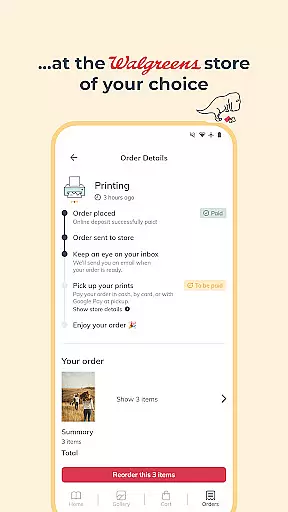
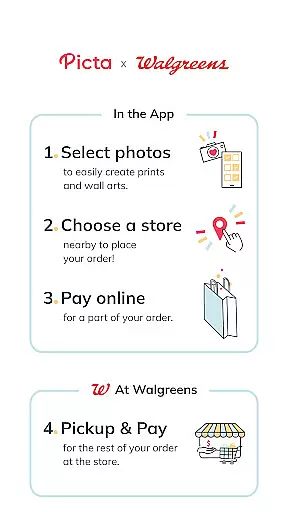
Picta is a photo printing app that allows users to print photos directly from their mobile devices to their nearest Walgreens store for quick pickup. The app offers professional-quality photo printing services on Kodak paper in multiple sizes, including 4x6, 5x7, and square prints perfect for Instagram photos. Users can also create personalized gifts such as magnets, posters, and photobooks.
With an intuitive interface, Picta makes it easy to select photos, choose print sizes, and crop images within the app. Orders can be tracked in real time, and customers can benefit from Walgreens' unique service by only paying in-store after checking the quality of their prints. The app also features exclusive deals and coupons for its users, enhancing the overall value proposition.
Picta stands out with its comprehensive set of features designed to streamline the photo printing process. One key feature is the ability to order prints directly from your phone and pick them up at a nearby Walgreens or Duane Reade store within one hour. This fast turnaround time is supported by an enhanced store locator that helps you find the most convenient location.
The app provides various customization options, allowing users to create photo collages in different layouts and personalize gifts for all occasions. Additionally, Picta ensures safe and fast photo transfers and organizes your mobile photos by date taken in a dedicated gallery. All products are manufactured exclusively in the United States, guaranteeing high-quality standards. These features collectively offer a seamless and efficient user experience, making photo printing more accessible than ever.
Real-time capture and preview functionality is essential for ensuring that users can accurately select and edit their photos before printing. This feature allows users to see exactly how their images will look when printed, reducing the likelihood of errors or dissatisfaction with the final product.
Picta offers an intuitive real-time capture and preview experience by enabling users to select photos directly from their mobile devices. The app provides options to crop and zoom each picture easily within the app, ensuring that users can make precise adjustments to their images before sending them for printing.
The value of this feature lies in its ability to enhance user confidence in the photo printing process. By allowing users to preview their images in real-time, Picta ensures that customers are satisfied with their selections before they proceed to checkout. This leads to a more seamless and enjoyable user experience, encouraging repeat usage of the app.
Ultimately, the real-time capture and preview feature in Picta empowers users to create professional-quality prints with ease. Whether printing standard sizes or custom products like magnets and photobooks, users can trust that their final prints will match their expectations, thanks to the app's robust preview capabilities.
AI beauty and enhancement features have become increasingly popular in photography apps, offering users the ability to improve their photos with natural-looking enhancements. These tools leverage advanced algorithms to automatically adjust elements such as lighting, color balance, and sharpness, resulting in polished yet authentic images.
In Picta, AI beauty and enhancement functionalities ensure that users' photos are optimized for printing without appearing overly processed. The app uses sophisticated AI technology to enhance image quality while maintaining the original essence of the photograph. This approach helps preserve the authenticity of users' memories, making them ideal for creating lasting photo prints and gifts.
For users, the benefit of AI beauty and enhancement features is clear: they can achieve professional-grade results without needing extensive editing skills. Picta's AI-driven tools simplify the photo preparation process, allowing users to focus on selecting the best images for their projects rather than worrying about manual adjustments.
By integrating AI beauty and enhancement capabilities, Picta sets itself apart as a leader in mobile photo printing. Users can trust that their printed photos will reflect the highest standards of quality and naturalness, enhancing the overall appeal of their photo products and ensuring customer satisfaction.
User-friendly interface
Fast 1-hour pickup
High-quality prints
Exclusive deals
Multiple customization options
Limited to Walgreens stores
No direct payment option
Requires physical store visit
Occasional delays
Geographic limitations




HD Photo gallery and photo manager to edit, hide private photos, videos & albums
 4.3
4.3
Virtual makeup, hair filters & body tuner—edit from face to full body!
4.20
Create collages easily! Nice pic collage maker & background eraser for Instagram
4.50
Photo editor: AI filters, photo enhancer, pic collage maker, AI art generator.
4.80
Create amazing frames with up to five photos. Rounded corners, effects and more!
3.60
AI-powered video creator by MiniMax - Where ideas meet cinema
4.20
Hair color changer, AI haircut app, fun hair editor and buzz cut filter for all!
3.80
Your personal guide to the sun and moon. Plan ahead, visualize and predict!
4.70
Your Family Calendar + Photos. Manage your Skylight Calendar and Skylight Frame.
4.40
AI photo enhancer with Sora 2! Enhance, descratch, and colorize your old photos.
4.50
Effortlessly organize, view and share your photos & videos with Gallery app!
4.40
Trendy TikTok time warp scan funny filter app brings you unique photos & videos.
4.40
All-in-One Editor & AI Photo Enhancer, Collage, Cartoonify, Funny Stickers & BGS
4.10
Transform Photos: Edit, Beautify and Craft Memories & Make Collages!
4.10
How would you look like with a differently shaped nose, chin or lips?
3.90
Be your best in every shot! Fix, edit and retouch your face in selfies & photos.
3.70
Superimpose one photo on top of another using the original Superimpose app!
3.20
Professional video recording application with manual controls for filmmakers!
2.80
Long exposure camera with computational photography
2.60


User Reviews