

YouCam Makeup is the world's leading AR makeup and beauty camera app, leveraging advanced AI technology to provide users with a comprehensive virtual makeover experience. The app offers hundreds of virtual makeup styles, instant face retouch filters, and body tuning tools that allow users to experiment with different looks effortlessly.
With features like AI-powered photo enhancement, hairstyle try-ons, and professional-grade makeup tools, YouCam Makeup caters to both casual selfie enthusiasts and beauty professionals. Whether you're looking to refine facial features, try bold new hairstyles, or perfect your selfies, this app delivers an unparalleled beauty editing experience.
Ideal for anyone seeking to enhance their natural beauty or explore creative makeup styles, YouCam Makeup transforms the way users interact with beauty tech, offering practical value through its intuitive interface and robust feature set.
YouCam Makeup stands out with its diverse range of innovative features tailored to beauty enthusiasts. The app includes advanced face retouch tools such as skin smoothing, teeth whitening, and blemish removal, enabling users to achieve flawless skin in every selfie. Additionally, it provides specialized makeup tools like eyeshadow palettes, contouring options, and eyebrow editors for creating professional-level looks.
One of the app's key highlights is its AI-driven functionalities, including AI Retake for fixing closed eyes in photos, AI Clothes for trying on virtual outfits, and AI Image-to-Video for animating selfies. These cutting-edge features not only enhance creativity but also save time by streamlining the editing process.
For those seeking full customization, YouCam Makeup offers body tuning sliders, virtual hairstyles, and color experiments, empowering users to personalize their appearance. With these capabilities, the app ensures a versatile and engaging user experience while maintaining high-quality results.
Real-time capture and preview functionality is essential for any photography app, allowing users to see exactly what their final image will look like before taking the shot. YouCam Makeup excels in this area by providing an advanced AR beauty camera that lets users experiment with hundreds of virtual makeup styles and instant face retouch filters live on their camera feed.
The app's real-time capabilities extend beyond just applying makeup. It includes a comprehensive set of tools such as skin smoothing, facial feature refinement, teeth whitening, and even virtual hairstyles and hair colors. This ensures that users can achieve a complete makeover look in real time, making adjustments until they are satisfied with the preview.
For those looking to perfect their selfies, YouCam Makeup offers additional features like blemish removal, contouring, and highlightingu2014all visible instantly on the screen. The ability to see these changes as they happen allows for precise edits and boosts user confidence in capturing the perfect selfie.
Overall, the real-time capture and preview functions in YouCam Makeup not only enhance the user experience by providing immediate visual feedback but also empower users to take control of their appearance with professional-grade tools at their fingertips.
AI beauty and enhancement naturalness is a critical aspect of photo editing apps, ensuring that modifications appear realistic and preserve the user's original features. YouCam Makeup leverages sophisticated AI algorithms to deliver enhancements that look genuine, avoiding the over-processed appearance common in lesser applications.
The appu2019s AI-driven tools include options for smoothing skin while retaining texture, brightening eyes without creating an unnatural sparkle, and reshaping facial features subtly so that edits are virtually indistinguishable from reality. These capabilities allow users to enhance their photos with confidence, knowing that the results will maintain their unique identity.
YouCam Makeup goes further by offering personalized beauty solutions tailored to individual facial structures. Whether it's adjusting lip shape, nose contours, or experimenting with different eyebrow styles, the app ensures each change complements the user's natural look, enhancing rather than masking their true self.
Ultimately, the emphasis on natural-looking enhancements in YouCam Makeup provides users with the means to elevate their images while staying true to who they are. This commitment to authenticity sets the app apart in the crowded field of photo editors, appealing to those who value subtlety and realism in their digital touch-ups.
User-friendly interface
Extensive makeup options
Advanced AI tools
Versatile hairstyle trials
High-quality photo edits
Premium features locked
Occasional ads
Heavy on storage
Learning curve for tools
Limited free styles
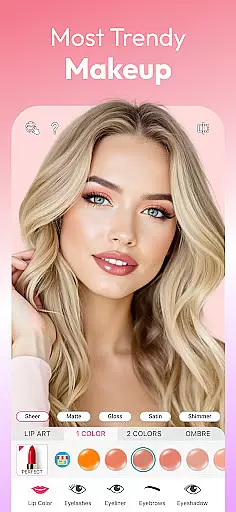
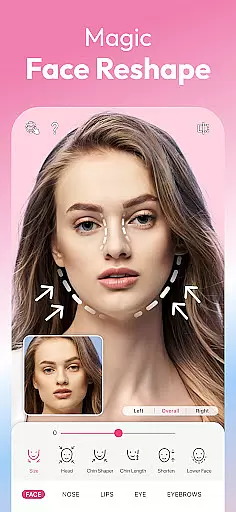
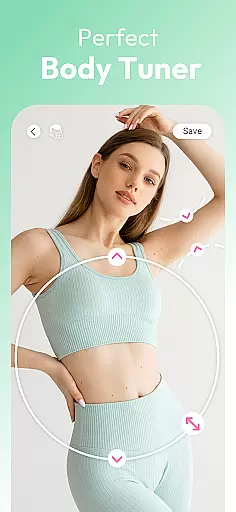
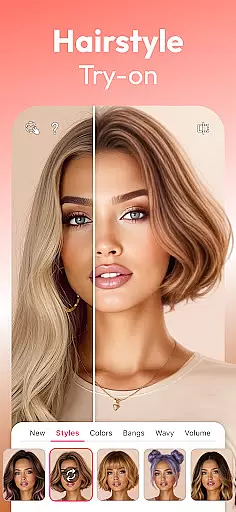
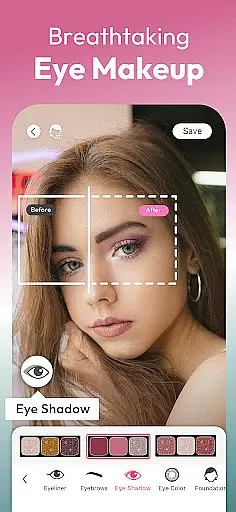
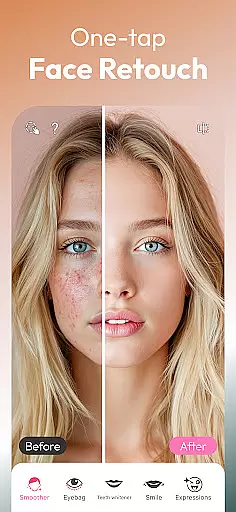
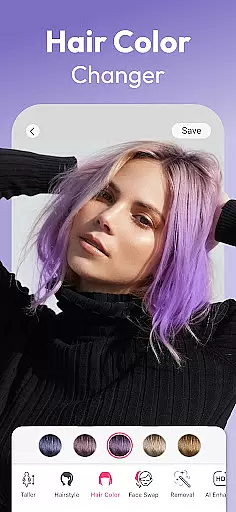
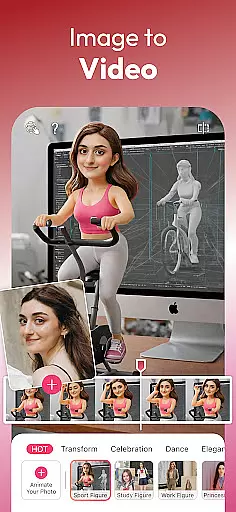

Photo Album Watch Face shows your favorite pictures as a Watchface.
 1.90
1.90
Take videos and pictures with the popular TikTok TIME WARP SCAN filter.
4.60
Create Business Headshots, Polaroid Filter, Retake Photos,Profile Pics,AI Photos
4.50
Amazing Photo Effects - The most fun you can have with your photos!
4.70
Easily view, share, delete photos with Gallery.
4.70
Use AI Video Generator to turn your words to ai generated videos.
4.50
Astrophotography with your smartphone, photo live stacking and much more!
3.90
A unique animation app. Powerful, easy to use, and lots of fun.
4.30
Welcome to ProShot, the most powerful camera app on Android.
4.20
See your baby AI baby face generator AI baby maker Face generator babymaker fun!
4.70
Android Native system HD camera app. Never been so simple and faster.
4.70
Enhance, retouch & create your story - Share the moment with Photoshop Express.
4.60
Create AI photos & videos with Enhancer; restore, fix, beautify, enhance photos
4.50
Effortlessly organize, view and share your photos & videos with Gallery app!
4.40
Trendy TikTok time warp scan funny filter app brings you unique photos & videos.
4.40
Create AI Photos, Improve and restore quality of blurry, old or damaged pics.
4.20
Professional photography on your mobile phone
4.20
Remote control of the phone camera from your Wear OS smartwatch
3.70
Perfect photos with body shaping, BG changer and object remover.
3.70


User Reviews