

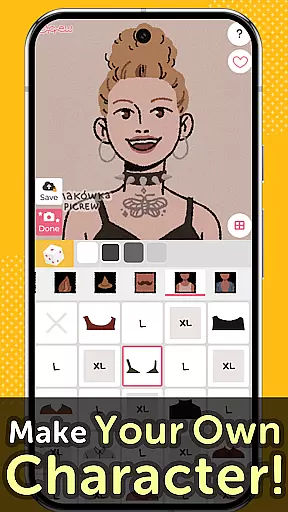
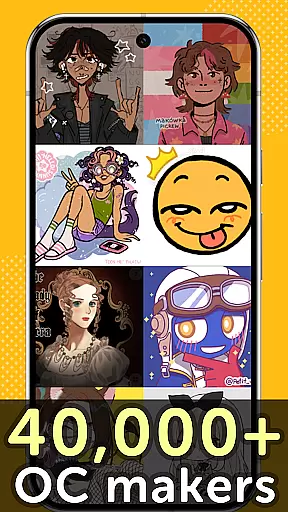
Picrew PFP & OC Maker is a versatile avatar and character creation platform that allows users to design unique avatars, profile pictures, and icons for free. With over 10,000 Image Makers available, the app caters to various tastes including cute, cool, stylish, and more. Users can customize their creations by selecting facial features, clothing parts, and other elements to reflect their personal style.
The app also supports social media integration, enabling users to share their creations on platforms like Facebook, X, and LINE. Additionally, Picrew offers tools such as Dress-up Maker, Random Maker, and bookmarking features, making it easy to create and save favorite designs. Whether you're looking to craft an anime-style avatar or an aesthetic profile picture, Picrew provides all the necessary tools in one place.
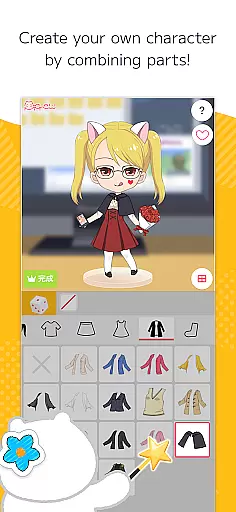
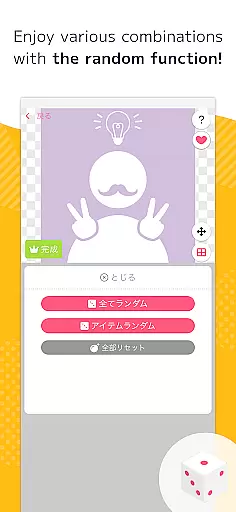
Picrew PFP & OC Maker stands out with its comprehensive suite of creative tools. The Dress-up Maker lets users manually select parts to build their desired avatar, while the Random Maker generates images based on chance, offering a fun twist akin to fortune-telling. These features ensure both precision and variety in character creation.
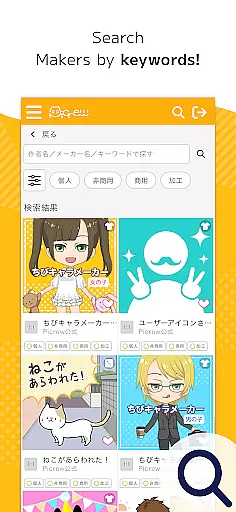
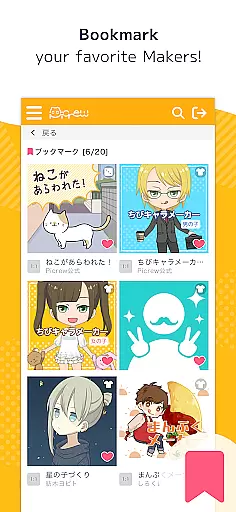
Beyond customization, Picrew emphasizes usability and community engagement. Users can search for specific Image Makers using keywords or tags, bookmark favorites for quick access, and report inappropriate content to maintain a safe environment. Social sharing options allow seamless posting to platforms like Facebook and X, enhancing user interaction and expanding creative possibilities.
Each Image Maker comes with defined usage guidelines set by creators, ensuring proper use of generated images. This attention to detail extends to administrative functions, where users can block unwanted content and contact support for assistance. With these robust features, Picrew empowers users to explore endless creative avenues within a structured framework.
In the realm of digital creativity, having a comprehensive suite of tools is paramount. Picrew PFP & OC Maker offers an extensive array of features that cater to artists and creators looking to design unique avatars, characters, and icons. With over 10,000 Image Makers at your disposal, this platform provides unparalleled versatility in crafting personalized visuals.
The application includes both Dress-up Maker and Random Maker functionalities, allowing users to either meticulously select parts for their creations or enjoy the serendipity of random combinations. This dual approach ensures that whether you're in control or leaving things to chance, the results will be engaging and reflective of your personal style.
Moreover, Picrew supports integration with social media platforms, enabling seamless sharing of your artistic endeavors. The ability to search for specific Image Makers using keywords, categories, or tags adds another layer of convenience, ensuring you can quickly find exactly what you need to bring your vision to life.
Ultimately, Picrew's robust feature set empowers users to explore their creativity without limits. From designing aesthetic profile pictures to crafting original characters, the platform's complete toolkit makes it an indispensable resource for anyone interested in digital art and design.
Flexibility in canvas and format options is crucial for unleashing creative potential. Picrew PFP & OC Maker excels in this area by providing a dynamic environment where users can freely experiment with various styles and formats. Whether you're aiming to create an anime-style avatar or a stylish icon, the platform accommodates diverse visual expressions effortlessly.
Picrew allows users to customize their creations extensively, from combining facial features to dressing up characters with different clothing parts. This level of detail ensures that every avatar or character reflects the creatoru2019s unique vision and style. Furthermore, the availability of numerous Image Makers created by global artists introduces a wide spectrum of aesthetics, from cute and cool to more unconventional themes.
The platform also emphasizes usability by offering easy navigation and management features such as bookmarks and blocks. These functions ensure that users can save their favorite Image Makers for future use or filter out undesired content, streamlining the creative process.
By prioritizing canvas and format flexibility, Picrew not only enhances user experience but also broadens the scope of creative possibilities. Artists can confidently explore new ideas, knowing that the platform supports their journey with adaptable tools designed to meet varied artistic needs.
User-friendly interface
Variety of styles
Free to use
Social media sharing
Customizable options
Limited mobile features
No offline mode
Dependent on creators
Occasional bugs
Ads present

Draw on screen: FP sDraw is a simple and lightweight drawing app
 4.70
4.70
See Color, Paint Color
4.90
Create color palette from Image, RGB & RYB Color wheel harmonies, Color Scheme
4.50
Draw Trace image sketch by, AR art projector app, Easy to trace any image.
4.50
Mobile pixel art editor. Simple. Fast. Portable.
4.80
Experience next-gen icons with a modern liquid glass look.
3.60
Bring One UI 8.5 Icons to life -elegant dark icons with a modern, premium touch.
4.30
Create cute cat emojis & PFPs! Fun, custom avatars for cat lovers.
3.70
AI-powered photo & video creation—fast, fun, and effortless with Quick Actions
4.60
Make your phone cooler and have a fantastic experience
4.80
Draw glowing spinners, relax, and spin your creative art
4.60
Image resizer to resize, crop, rotate, flip, change dpi photo or picture in bulk
4.60
Draw anime & manga drawing, art with templates to create stunning picture!
4.50
AI generated images & photos, turn your words into drawing, painting & pictures.
4.30
Remove Background, Magic Eraser, Photo Enhancer, Story Templates, Collage Maker
4.30
Get creative and make art with your Sesame Friends!
4.00
Design your dream room with AI. Get decor ideas & plan home interiors
3.90
Resize photos and print photos in exact size with our powerful photo printer!
3.80
Your homescreen as an elegant glass with customized blur, lighting, and visuals.
3.70


User Reviews