

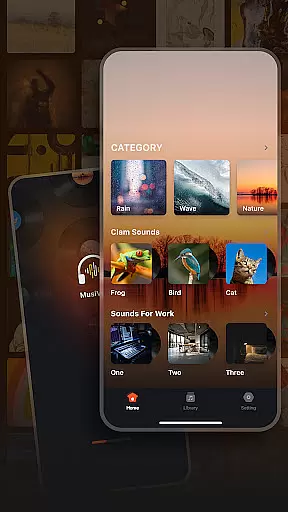
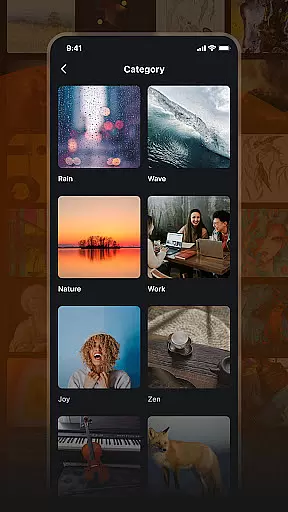
Musivibe is a feature-rich offline music player designed to enhance your listening experience. It offers an intuitive interface that categorizes sounds into various themes such as Rain, Ocean Waves, and Nature, making it easy to find the perfect soundtrack for any moment. Whether you're working, relaxing, or need an energy boost, Musivibe provides a tailored audio experience.
The app allows users to create personalized playlists, edit them, and even share their favorite tunes with others. Its powerful organization tools ensure you can enjoy your music anytime, anywhere, without needing an internet connection. With Musivibe, you get the best of both worlds - convenience and quality.
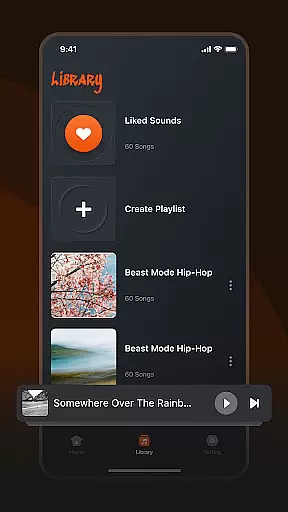
Musivibe stands out with its diverse sound categories, including Zen, Instruments, and Animals, catering to different moods and activities. The app's user-friendly UI design ensures seamless navigation, allowing users to effortlessly manage their music library. You can create playlists that suit your current state of mind and organize them in a way that makes sense to you.
One of the key features is the ability to stream and share custom playlists, enhancing the social aspect of music sharing. Additionally, Musivibe supports offline playback, which means you can enjoy your favorite tracks without worrying about data usage or connectivity issues. This combination of powerful tools and thoughtful design makes Musivibe a top choice for music enthusiasts.
When it comes to music applications, the size and authenticity of the music library are crucial factors. Musivibe offers a diverse range of sound categories including Rain, Ocean Waves, Nature, Work, Cheerful, Zen, Instruments, and Animals. This extensive collection ensures that users have access to a wide variety of music and sounds, catering to different moods and activities.
The application not only categorizes songs but also emphasizes copyright authenticity. By ensuring that all tracks are properly licensed, Musivibe provides peace of mind to users who want to enjoy their favorite tunes without legal concerns. This commitment to copyright compliance enhances the credibility of the app and assures users of the legitimacy of the content they are accessing.
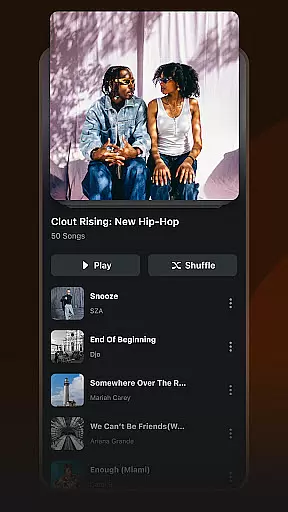
Moreover, Musivibe allows users to create and organize personalized playlists. This feature enables listeners to tailor their music experience according to their preferences, enhancing user engagement and satisfaction. The ability to customize playlists adds a personal touch, making the listening experience more enjoyable and relevant to individual tastes.
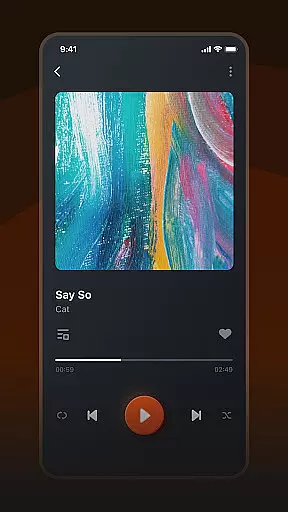
Audio quality is a significant aspect of any music player, and Musivibe excels in providing various audio quality options. With its powerful offline music player functionality, users can enjoy high-quality sound regardless of their location. Whether you're at home, commuting, or traveling, Musivibe ensures an optimal listening experience with clear and rich audio output.
In addition to superior audio quality, Musivibe features a user-friendly in-app UI design. This intuitive interface makes it easy for users to navigate through different sound categories and manage their playlists effortlessly. The seamless integration of advanced audio settings within a straightforward layout enhances the overall usability of the application.
Musivibe also supports creating, editing, streaming, and sharing custom playlists. These capabilities empower users to curate their music collections and share them with friends and family. By offering flexible audio quality options alongside robust playlist management tools, Musivibe stands out as a versatile and reliable choice for music enthusiasts seeking both convenience and exceptional sound fidelity.
User-friendly interface
Customizable playlists
Offline playback support
Diverse sound categories
Seamless music sharing
Limited advanced equalizer
No lyrics display feature
Occasional bugs reported
Ads in free version
Some features require premium

Equalizer, Bass Booster and Volume Booster (Eq & Bass) improve sound quality
 4.30
4.30
Over 100 million tracks available for high quality streaming and download
4.60
DJ Music Mixer - DJ Remix: remix songs, make beat music & record mix of DJ.
4.40
Enhance the sound quality of your devices, listen to what you want
4.50
Network/Cloud Streaming, Visualization, Graphic Equalizer and Sound Effects.
4.20
Super Sound Editor, Song Maker & Mixer, Vocal Remover, Voice Recorder & Changer!
4.60
The Minimalistic Premium Music Player. Handmade with passion for music
2.20
The iconic iOS metronome app is now on Android.
3.70
One-tap booster for max volume - enjoy powerful sound with this audio booster
4.50
Voice recorder - Audio recorder. Best recorder for recording
4.90
AI Music Maker: Generate And Compose AI Tunes & AI Songs & AI Music & AI Melody!
4.60
Learn the notes on the guitar fretboard fast with this easy and fun app
4.60
Let your Android device with the sound effects you want
4.50
The original SP-1200 experience on your iPad
4.20
Next generation modular control surface
4.10
Turn your phone into a musical instrument from the future!
3.90
Slow music down without changing pitch.
3.70
Remove ads permanently from Music Visualizer
4.2
Music Streaming suite for Ampache, Nextcloud Music and compatible backends.
4.1

User Reviews