

BlackPlayer EX is a premium music player designed for audiophiles who appreciate both quality and customization. This app removes ads and offers an extensive array of features beyond the standard version, including Chromecast support, customizable crossfading, and unique themes.
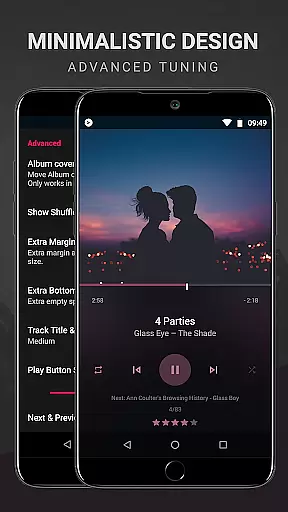
With BlackPlayer EX, users can personalize their interface through various settings such as fonts, color accents, and library pages. The app supports local music files like MP3, FLAC, and WAV while providing advanced playback options like gapless playback and a built-in equalizer. Its powerful functionality makes it ideal for those seeking a refined listening experience.
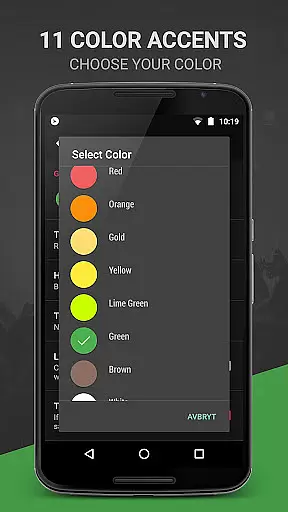
BlackPlayer EX stands out with its rich feature set tailored to enhance music playback and user control. It includes exclusive options like Light theme, 11 color accents, and 8 extra Now Playing themes, allowing users to create a personalized aesthetic.
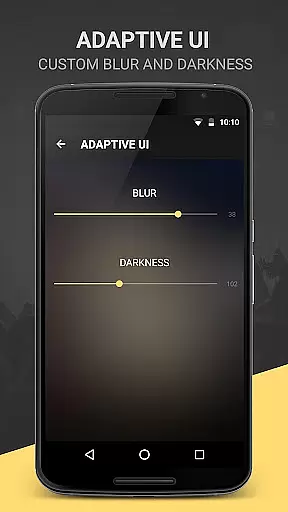
The app also provides practical functionalities such as customizable crossfading, screen always-on option, and Chromecast support. Users can track played tracks monthly, apply blur effects to the lockscreen, and utilize the Zap function to discover music quickly. These innovations ensure a versatile and engaging audio experience.
BlackPlayer EX offers an extensive music library that supports various formats including MP3, FLAC, and WAV files. This ensures users have access to a wide range of audio content without limitations on file type.
The application focuses on copyright authenticity by allowing users to play locally stored music files. This means users can manage their legally acquired music collection with confidence, knowing they are adhering to copyright laws.
With features like the tag editor and the ability to manually search and set artist images, users can maintain a personalized and authentic music library. These tools help ensure that album art and track information are accurate and reflect the true nature of the content.
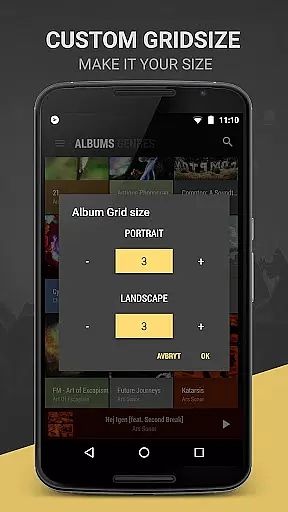
Additionally, BlackPlayer EX provides options for customizing the Library pages completely, adding or removing sections as needed. This level of personalization allows users to tailor their music library to fit their unique tastes while maintaining proper organization and presentation.
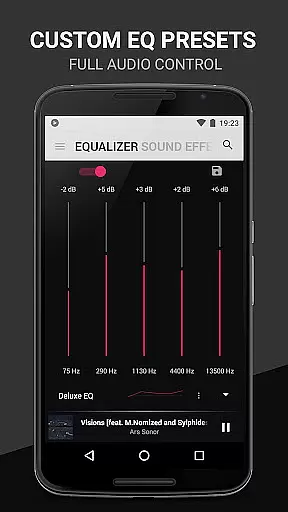
BlackPlayer EX places a strong emphasis on audio quality options, providing users with advanced sound settings such as a built-in Equalizer, BassBoost, Virtualizer, and Left/Right sound balance. These features allow listeners to fine-tune their audio experience according to their preferences.
The player also supports gapless playback, ensuring uninterrupted listening for live albums or tracks meant to segue seamlessly. This feature is crucial for audiophiles who demand high-fidelity sound reproduction without any breaks in the music flow.
For those seeking further customization, BlackPlayer EX includes 11 color accents and options for custom colors across the action bar, main windows, and popup displays. While these visual enhancements don't directly affect audio quality, they contribute to an immersive user interface that complements the auditory experience.
Moreover, the inclusion of Chromecast support enables users to stream their music to compatible devices, enhancing the overall sound output potential. By leveraging these audio quality options, users can enjoy a superior listening experience tailored to their specific needs and equipment capabilities.
Ad-free experience
Customizable interface
Advanced playback options
Chromecast support
Exclusive premium features
Paid app
Complex for beginners
Occasional bugs
Limited cloud integration
Heavy on system resources

Offline and always ad-free - stream in the highest quality available.
 4.10
4.10
Tune in to the greatest hits on UK Radio | The home of Capital, Smooth & Heart.
4.90
VB-AUDIO Software / VBAN-Receptor allows listening to any VBAN Streams
4.10
DJ Music Mixer - DJ Remix: remix songs, make beat music & record mix of DJ.
4.40
24,000 free audio books and no ads!
4.90
AI Music Maker: Generate And Compose AI Tunes & AI Songs & AI Music & AI Melody!
4.60
Simple mp3 and mp4 player with advanced features.
3.40
Learn the notes on the guitar fretboard fast with this easy and fun app
4.60
The iconic iOS metronome app is now on Android.
3.70 4.70
4.70
The best music and audio player, with beautiful UI, music search and equalizer.
4.60
10-Band Audio Equalizer, Sound / Bass Booster for Spotify Users & Music Players
4.40
Help you quickly get started with Shokz headphones
4.40
The Music Journey in Your Hands
4.30
Powerful 10-Band equalizer pro with sound booster improves Android audio quality
4.30
Smart piano keyboard, Classical to Pop, Real-time multiplayer connection!
4.20
The official Sonos app
4.10
Powerful beat maker & DJ mixer to remix tracks, make music, & perform DJ mix
3.70
Simply convert wav to mp3. Clear. Reliable. Safe.
4.1

User Reviews