

Equalizer & Bass Booster Pro is a powerful audio enhancement application designed specifically for Android devices. This app allows users to significantly improve their device's sound quality through advanced equalizer settings, bass boost, and surround sound features.
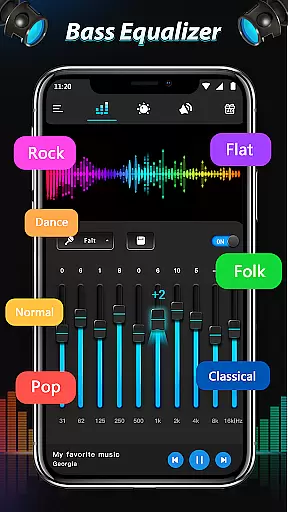
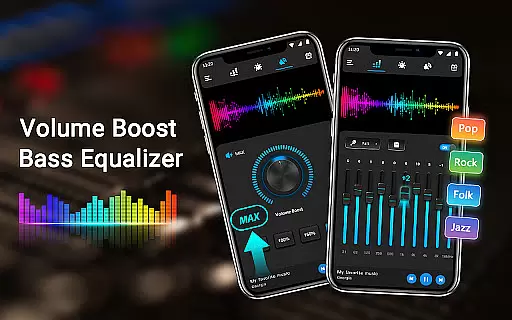
The app provides a comprehensive suite of audio tools including a five-band equalizer, bass booster, virtualizer effects, and 22 customizable presets. These features work together to deliver an optimized audio experience whether you're listening to music, watching videos, or using the FM radio. With its intuitive interface and seamless integration with most media players, Equalizer & Bass Booster Pro ensures you get the best possible sound from your Android device.
Ideal for audiophiles and casual listeners alike, this app is particularly useful when paired with headphones, offering unparalleled control over your audio experience while ensuring maximum sound quality and clarity.
Equalizer & Bass Booster Pro stands out with its impressive array of professional-grade audio features. The app includes a sophisticated five-band equalizer that allows precise frequency adjustments, giving users complete control over their sound profile.
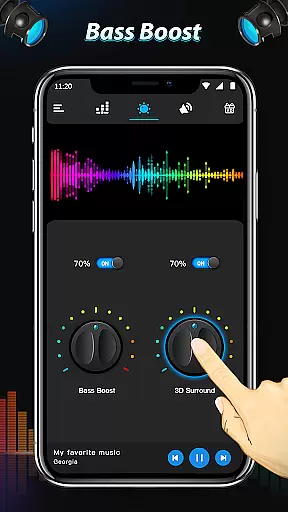
In addition to the equalizer, the app offers powerful bass boost and virtualizer effects. These features work in tandem to create a richer, more immersive audio experience. Users can choose from 22 built-in equalizer presets or create and save their own custom settings, making it easy to optimize audio for different genres or personal preferences.
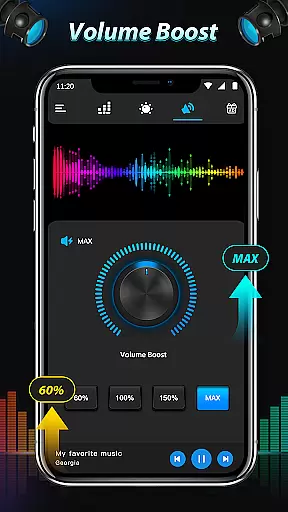
The app also includes practical features like media volume control, stereo LED VU meter, and music playback controls. Its ability to run seamlessly in the background while maintaining performance makes it an essential tool for enhancing both music and video content across various media players and streaming services.
Equalizer & Bass Booster Pro offers a unique approach to enhancing your music experience by providing powerful audio controls rather than a built-in music library. The app focuses on improving the sound quality of your existing music collection stored on your Android device.
The five-band Equalizer allows users to customize audio frequencies to suit different music genres, while the Bass Boost and Virtualizer effects add depth and dimension to the sound. These features ensure that all audio content, regardless of its source, benefits from enhanced clarity and richness.
Although the app doesn't directly manage music libraries or copyright issues, it works seamlessly with most music players, giving users complete control over their legally acquired audio files. This compatibility ensures that users can enjoy improved sound quality across various streaming services and personal music collections.
By focusing on sound enhancement rather than content delivery, Equalizer & Bass Booster Pro provides a versatile solution for audiophiles who want to optimize their listening experience without worrying about content restrictions or copyright limitations.
Equalizer & Bass Booster Pro excels in delivering superior audio quality through its comprehensive set of sound enhancement tools. The application's five-band Equalizer provides precise control over different frequency ranges, allowing users to fine-tune their audio experience according to personal preferences and specific music genres.
The Bass Boost feature adds extra depth to low-frequency sounds, making music more impactful and engaging. Meanwhile, the Virtualizer effect creates a surround sound experience that enhances spatial perception, making listeners feel as if they're in a concert hall or studio environment.
With 22 preset Equalizer settings, users can quickly switch between optimized configurations for various music styles, from classical to hip-hop. For advanced customization, users can create and save their own presets, ensuring optimal sound quality for every listening scenario.
The app's ability to work with most music and video players means that these audio quality enhancements are consistently available across different media types. Whether streaming music, watching videos, or listening to podcasts, users can expect consistently improved sound quality throughout their Android device usage.
Advanced equalizer settings
Powerful bass boost effect
Wide range of presets
Intuitive user interface
Seamless background operation
Paid version only
May drain battery faster
Interface looks outdated
Limited customer support
No automatic preset switching

Formerly known as Spotistats! View your top tracks, artists, albums and more!
 4.40
4.40
Walkout Song DJ is the most intuitive app to manage your sports music.
4.70
Simple & Intuitive Metronome
4.70
Bass Booster & Volume Equalizer Pro improves your music and video sound quality
4.60
Unleash your creativity! Turn simple prompts into full fledged songs.
4.70
Play your hearts out on TouchTunes jukeboxes & connect with fellow music lovers.
4.80
Turn your Android phone into a professional audio analyser with up to 120 bands.
4.00
Manage your Sonos system directly from your home-screen!
4.40
Reverse your voice & songs instantly! Fun singing challenge with cool effects.
4.60
24,000 free audio books and no ads!
4.90
Voice recorder - Audio recorder. Best recorder for recording
4.90
Responsive piano with great sounds, graphics, and songs
4.80
Fun & Easy Voice Changer – Record, Edit & Add Hilarious Effects!
4.50
Enhance the sound quality of your devices, listen to what you want
4.50
Save hundreds of dollars for a physical strobe tuner and instead use this app.
4.50
The Music Journey in Your Hands
4.30
A sleek, no-frills player designed for true music lovers.
4.20
Sheet music reader, piano & music note player. Play music score & learn to read.
3.90
Simply convert wav to mp3. Clear. Reliable. Safe.
4.3

User Reviews