

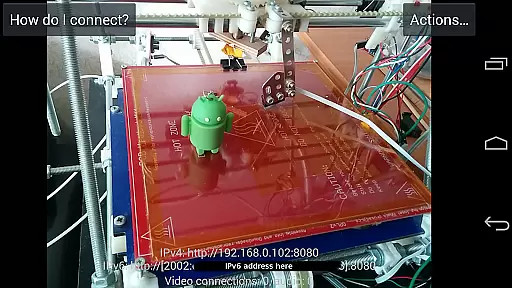
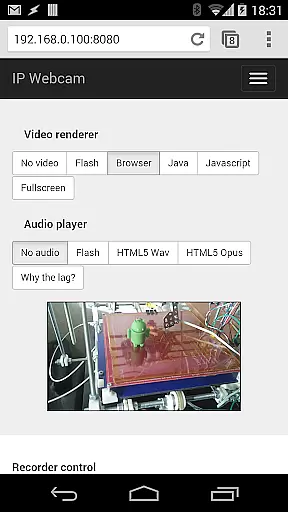
IP Webcam Pro transforms your smartphone into a versatile network camera, enabling real-time video streaming across multiple platforms. With support for VLC player and web browsers, it facilitates seamless viewing within local WiFi networks without requiring internet access.
Beyond basic streaming, the app supports optional Ivideon cloud broadcasting for global accessibility. It also features two-way audio when paired with tinyCam Monitor on another Android device, making it an ideal solution for both personal and professional surveillance needs.
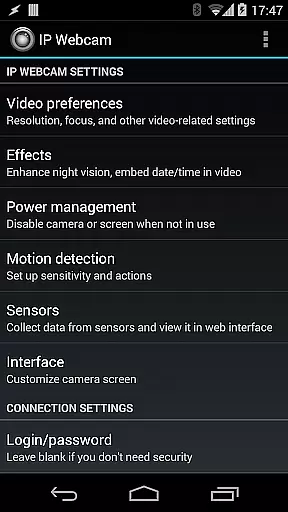
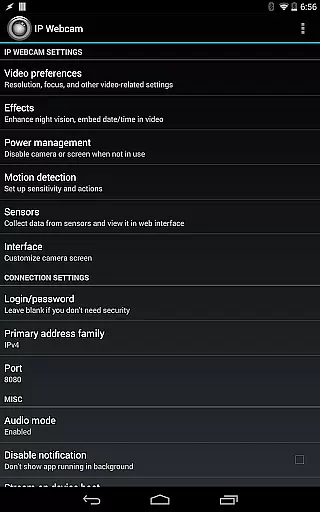
The application's comprehensive feature set includes motion detection, customizable video overlays, and sensor data acquisition, all of which enhance its utility as a security or monitoring tool. Whether used as a baby monitor or for pet surveillance, IP Webcam Pro delivers advanced functionalities tailored to meet diverse user requirements.
IP Webcam Pro boasts an extensive array of features designed to maximize its utility as a network camera. Users can upload videos directly to Dropbox, SFTP, FTP, and Email using the Filoader plugin, ensuring flexible file management options. The app provides multiple web renderers—Flash, Javascript, or built-in—for optimal compatibility across different devices and platforms.
Video recording is supported in various formats including WebM, MOV, MKV, and MPEG4 (on Android 4.1+), while audio streaming offers formats such as wav, opus, and AAC (AAC requires Android 4.1+). Advanced functionalities like motion detection with sound triggers, Tasker integration, and date/time/battery level overlays further augment its surveillance capabilities.
Additional features include sensor data acquisition with online graphing, videochat support for Windows and Linux via MJPEG drivers, and cloud-powered services such as push notifications, motion-triggered cloud recordings, and online broadcasting through Ivideon. These robust tools make IP Webcam Pro a top choice for users seeking a comprehensive monitoring solution.
IP Webcam Pro excels in video format compatibility, ensuring that users can stream and record in multiple formats. The app supports WebM, MOV, MKV, or MPEG4 (on Android 4.1+), catering to a wide range of user preferences and device capabilities.
This flexibility in video formats allows users to choose the best option for their specific needs, whether it's for quality, file size, or compatibility with other software and devices. Such versatility is crucial for both casual users and professionals who rely on specific formats for their workflows.
Moreover, the app's ability to stream video inside a WiFi network without internet access adds another layer of convenience. Users can enjoy seamless streaming experiences within local networks, making it ideal for home security systems or personal monitoring setups.
While IP Webcam Pro focuses primarily on video streaming and surveillance, it also offers AI-powered editing features that enhance its utility. These features include motion detection with sound triggers, which intelligently starts recording when specific conditions are met, thus saving storage space and time during video review.
The app provides date, time, and battery level video overlays, enriching the footage with essential metadata. This not only aids in record-keeping but also enhances the contextual understanding of the video content. Additionally, sensor data acquisition with online web graphing allows users to monitor environmental conditions alongside their video feeds.
For those seeking advanced functionalities, IP Webcam Pro includes cloud push notifications on motion and sound, as well as cloud recording for motion-triggered records. Powered by Ivideon, these features ensure users never miss an important event, providing peace of mind and enhancing the overall security and monitoring experience.
User-friendly interface
Extensive feature set
Cloud broadcasting support
Motion detection capabilities
Cross-platform compatibility
Paid version only
Complex setup required
Limited free version
High resource usage
Occasional connectivity issues

Online Videos Player
 3.90
3.90
Fast, private downloading, video saving, social media
4.50
Powerful, professional, versatile teleprompter. Developed by an active film crew
4.00
Powerful HD video player with support for all formats & subtitles.
4.3
Stream Web Videos to Chromecast, Samsung, LG, Sony, Roku, Fire TV, DLNA + more
4.00
Viddo: Generate Action Figure, AI Anime, AI kiss, AI hug Video from image & text
4.40
VLC for Android is the best open source video and music player, fast and easy!
4.10
Photo editor & video maker with music and slideshows.
4.10
Make videos you’re proud to share with Edits, a video editor for creators.
4.70
A Simple app to download Video & Music from the Internet.
4.70
Find, download, and play torrents with the official BitTorrent® Pro app
4.70
Watch a large amount of high-definition short drama content
4.60
Fast & Private HD Video Downloader with Built-in Proxy Browser and Video Player.
4.50
This app was created to edit the metadata of music files.
4.20
Web Browser for LG TV to stream webvideos, online movies and livestreams in HD
4.20
All format media Player, no need video converter any more!
4.00
Explore the largest library of free GIFs, Stickers & Memes - or create your own!
3.90
HD video & music player - All format support with floating & PIP mode!
3.80
Connect EasyCap or UVC devices for recording and broadcast video/audio stream
3.60

User Reviews