

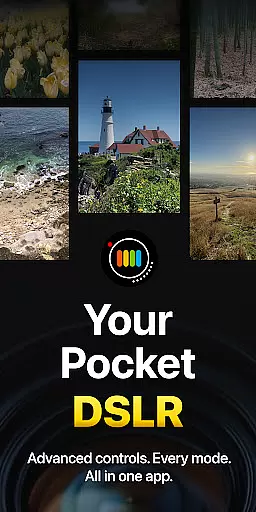
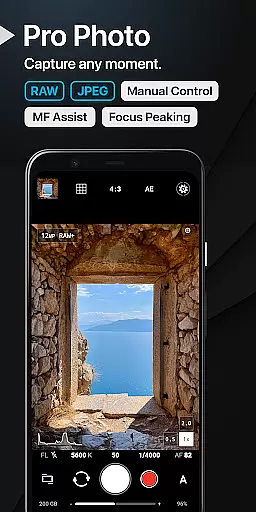
ProShot is a professional-grade photography and filmmaking application designed for Android users who demand full control over their mobile photography experience. The app provides extensive manual controls akin to a DSLR camera, including shutter speed, ISO, white balance, and focus adjustments, ensuring that photographers can capture the perfect shot under any condition.
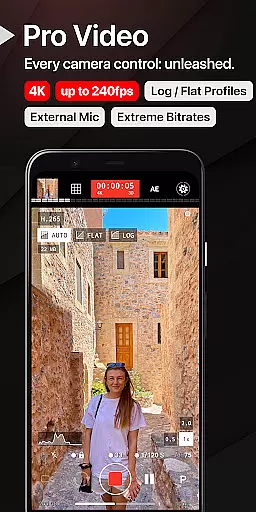
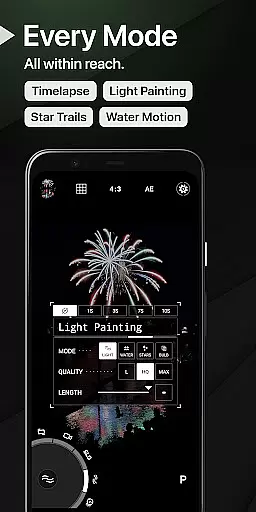
In addition to its robust photo capabilities, ProShot also excels in video recording with support for up to 8K resolution, extreme bitrate options, and various frame rates. Users can record in LOG and FLAT color profiles for enhanced dynamic range, making it ideal for post-production work. With features like Light Painting modes, Bulb mode, and Timelapse functionality, ProShot offers limitless creative possibilities for both amateur and professional photographers alike.
ProShot stands out with its Dual Dial system for swift navigation through settings and its adherence to privacy standards by not collecting or transmitting personal data. This ensures that all captured images, videos, and related data remain secure on the user's device. The app supports RAW (DNG), JPEG, and HEIC formats, catering to different workflow preferences and device compatibilities.
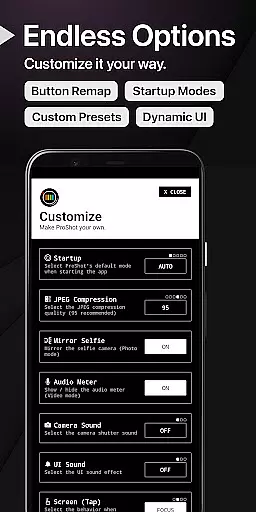
Additional features include fully customizable accent colors, manual focus assist with focus peaking, histogram display with three modes, and up to 10x zoom using a single finger. For videographers, ProShot delivers advanced video functionalities such as adjustable frame rates from 24 FPS to 240 FPS, support for external microphones, real-time audio level monitoring, and simultaneous audio playback during recording. These comprehensive tools empower creators to produce high-quality content directly from their mobile devices.
Real-time capture and preview functionality is essential for photographers who need to see exactly what their camera is capturing before taking the shot. ProShot offers a sophisticated real-time viewfinder that mirrors the DSLR experience, providing users with an accurate representation of their scene.
The app leverages advanced camera2 API capabilities to deliver a responsive and detailed preview. This ensures that every adjustment made to settings like ISO, shutter speed, or white balance is immediately reflected in the viewfinder, allowing users to fine-tune their shots with precision.
With features such as manual focus assist, focus peaking, and live histogram analysis, ProShot empowers photographers to achieve perfect focus and exposure. These tools are crucial for capturing high-quality images without the need for post-processing adjustments.
Ultimately, ProShot's real-time capture and preview system provides a seamless photography experience, enabling both amateur and professional photographers to take full creative control over their mobile photography endeavors.
While ProShot does not emphasize AI-driven beauty enhancements, it focuses on delivering natural and authentic image quality through its powerful manual controls. The app allows users to adjust various parameters that impact photo enhancement naturally, without relying on artificial intelligence.
ProShot offers options for noise reduction, sharpness, and tone mapping, which can be customized to enhance image quality while maintaining a natural look. These settings ensure that photos retain their original character and detail, avoiding the over-processed appearance common in AI-enhanced images.
Additionally, the ability to shoot in RAW format gives photographers even greater control over post-processing. This means they can make nuanced adjustments to their images using professional editing software, achieving desired enhancements without compromising the authenticity of the original shot.
By prioritizing genuine photographic techniques over automated AI enhancements, ProShot caters to purists who value the integrity of their images and seek to express their unique artistic vision.
User-friendly interface
Extensive manual controls
Privacy-focused design
High-quality video options
Versatile shooting modes
Steep learning curve
Requires compatible hardware
Premium price point
Complex settings for beginners
Limited automated features

Effortlessly organize, view and share your photos & videos with Gallery app!
 4.40
4.40
AI portrait generator and polaroid AI selfie, fun AI generated AI photo creator!
4.30
[3DSteroid Pro] is a stereoscopic application for Android.
4.30
Perfect photos with body shaping, BG changer and object remover.
3.70
Create & Edit with AI: AI Remove, Enhance, Retouch, Filter
4.10
Virtual makeup, hair filters & body tuner—edit from face to full body!
4.20
Gallery Slideshow is slideshow maker app for slideshow from your gallery photos.
3.90
Luminar: Photo Editor - easy picture editing with AI
4.20
Edit photos with the picture generator: PS2 & AI Clay filters, cartoon effects.
4.50
Perfect body tune & face app - photo retouch, makeup, slim body & beautify face.
4.80
Android Native system HD camera app. Never been so simple and faster.
4.70
PhotoSync Bundle Add-On License. Enables all features and services in PhotoSync.
4.60
Edit like a pro with Hypic. Apply filters, AI effects, & magic touch.
4.40
Turn your phone into a professional camera - full DSLR manual photography
4.30
A light meter for true photographers.
4.20
How old age camera Gender Swap App Face Shape Hairstyle App Hair Styler App fun!
4.00
GCamera allows all GCam features on all phone models! Better photos with GCamera
3.30
HD Photo gallery and photo manager to edit, hide private photos, videos & albums
4.3
Add a dreamy vibe to your selfies and videos with soft style filters
4.0


User Reviews