

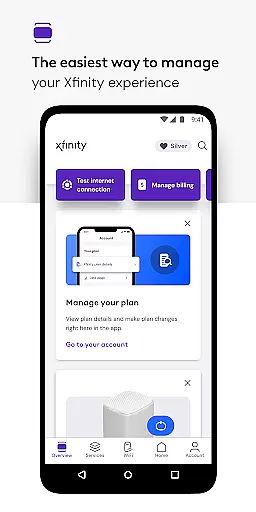
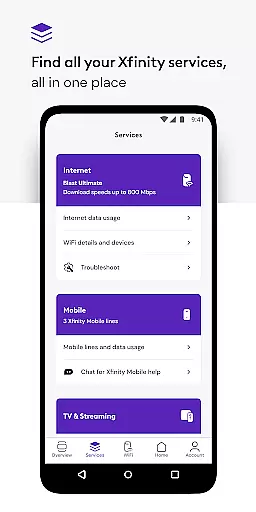
Xfinity is a productivity app designed to enhance your Xfinity services experience. It serves as an all-in-one platform for managing your internet and mobile services, offering real-time support, tools for equipment activation, and internet speed testing. The app introduces NOW, a simplified approach to obtaining internet and mobile services with transparent, all-inclusive pricing.
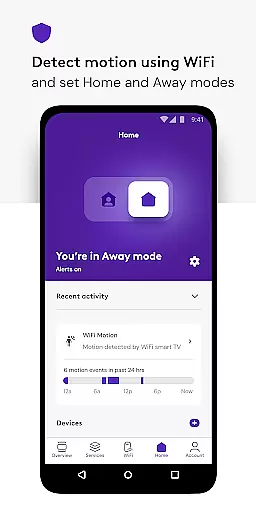
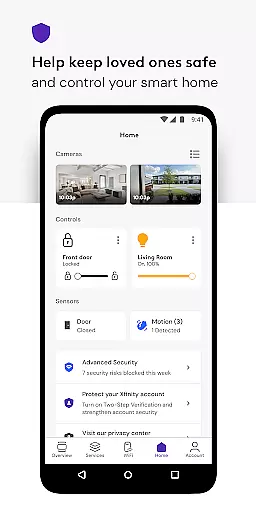
For Xfinity customers, the app provides access to Xfinity Rewards, offering unique benefits and experiences. Equipment renters gain additional functionalities such as account management, personalized WiFi performance tips, and advanced security features. These include device protection, safe browsing on-the-go, and parental controls to manage family internet usage effectively.
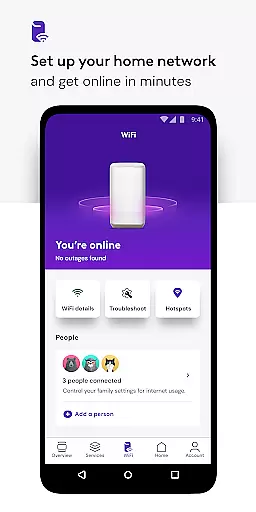
The app's comprehensive suite of tools empowers users to set up WiFi, assign user profiles, and optimize connected devices' performance. Available for users with an Xfinity ID, this app ensures seamless service management and enhanced digital safety for households and individuals alike.
Xfinity stands out with its robust feature set tailored for service management and digital safety. One prominent feature is the 24/7 real-time support, ensuring help is available whenever needed. This is complemented by tools that facilitate easy equipment activation and internet speed testing, empowering users to maintain optimal connectivity.
Advanced Security features provide comprehensive protection for all connected devices and offer safe browsing when connected to unsecured networks away from home. This is achieved through a VPN service that activates upon enabling the feature, enhancing online safety without compromising convenience.
Parental controls are another highlight, allowing users to establish family-safe browsing environments and manage WiFi access for any device. Additionally, the app offers personalized tools and tips to improve WiFi performance and detailed account management options. These features collectively ensure users have ultimate control over their digital home environment, making service management straightforward and secure.
In the realm of productivity, core task management is pivotal for organizing and executing tasks efficiently. The Xfinity app excels in this area by providing users with comprehensive tools to manage their services seamlessly.
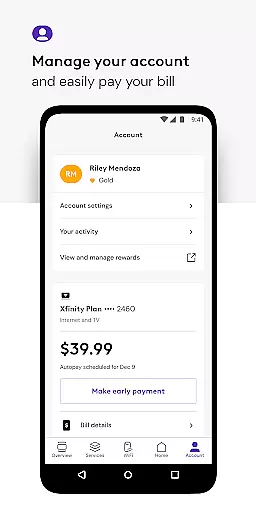
With the Xfinity app, customers can pay bills, view plan details, and make service changes directly from their mobile device. This consolidation of features into one accessible platform ensures that users can maintain control over their account without the need for multiple visits to a physical location or website.
The real value for the user lies in the time saved and the simplicity of managing complex services like internet and mobile plans. With everything streamlined into an intuitive mobile interface, customers can focus more on using their services rather than managing them.
Furthermore, personalized tools such as WiFi performance tips and advanced security features enhance the core task management experience. These tools not only simplify network management but also ensure users have a robust and secure connection, elevating the overall productivity of both personal and professional online activities.
Cross-device synchronization is essential for users who engage with their digital services across multiple platforms. The Xfinity app addresses this need by ensuring reliable and consistent access to services regardless of the device being used.
Whether at home or on the go, customers can expect real-time updates and seamless transitions between devices. This means that any changes made to an account, such as service upgrades or parental controls adjustments, are immediately reflected across all instances of the app.
This reliability is crucial for maintaining an uninterrupted workflow and entertainment experience. Users benefit from the peace of mind that comes with knowing their data and preferences are up-to-date, no matter where they are or which device they choose to use.
Additionally, the Xfinity app's ability to provide advanced security features on mobile devices away from home underlines its commitment to cross-device synchronization. By enabling safe browsing through a built-in VPN service, it ensures users remain protected even when connected to unsecured networks, thus reinforcing trust in the synchronization process.
User-friendly interface
Comprehensive security features
Real-time customer support
Personalized WiFi management
Rewarding loyalty program
Requires Xfinity ID
Limited to Xfinity customers
Some features need rental equipment
VPN permission requests
Geographical service restrictions

Secure, fast, open-source, VNC and SSH Remote Desktop for Windows, Linux and Mac
 4.70
4.70
A customizable calendar for your Wear OS watch
4.20
Experience Reading - Night Mode for Documents
4.40
Take control of your clipboard with Clipper!
3.90
Simple and reliable communication between inmates, friends and family
3.20
Activate Two Factor Authentication (2FA or Multi OTP), Password manager and more
4.10
Create and edit presentations with Google Slides, part of Google Workspace.
4.00
A comprehensive suite of tools designed specifically for Lactation Consultants
4.4
Daily processing of PDF documents.
4.40
A beautiful digital clock with autostart and many other functions
4.70
The AI assistant that thinks with you - write, code, and solve complex tasks
4.60
Enjoy classic gameplay with customizable features and retro-style graphics.
4.30
Access, manage and transfer files on Android, PC, Mac, NAS and cloud storages.
4.30
Pwnagotchi companion app
4.20
All in One PDF Reader: Manage, Read and Edit your Documents
4.20
Font maker keyboard with your own handwriting
4.10
Cloud storage, automatic phone backup, and more.
4.10
Wake up & get tasks done! Add alarms & reminders on the Clock Launcher.
4.00
A simple, portable logger for POTA, SOTA, Field Day, and more
4.3


User Reviews