

Ringtone Maker Pro is a versatile audio editing tool designed for music enthusiasts and casual users alike. This application allows you to create custom ringtones, alarms, and notifications from various audio formats including MP3, WAV, AAC/MP4, and 3GPP/AMR files. With its intuitive timeline interface, you can easily set precise start and end points for your audio clips.
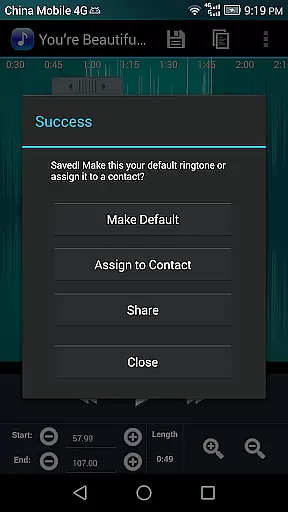
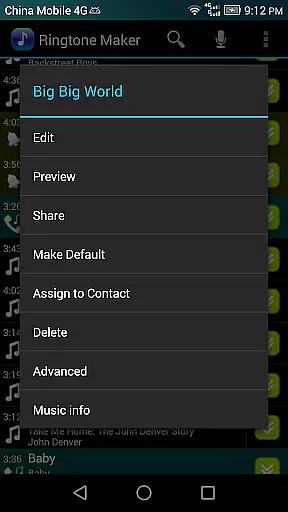
The app stands out with its comprehensive editing capabilities such as copy, cut, paste, fade in/out effects, and volume adjustments specifically for MP3 files. You can preview your creations before saving them, ensuring the output meets your expectations. Additionally, the ability to assign ringtones directly to contacts makes it an essential tool for personalizing your device's audio experience.
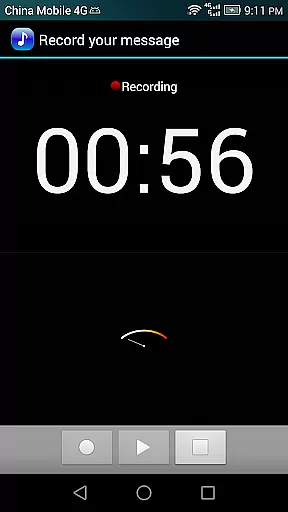
Whether you're looking to edit existing audio files or record new ones, Ringtone Maker Pro provides all the necessary tools in one convenient package. Its user-friendly interface and robust feature set make it suitable for both beginners and experienced audio editors, offering a seamless way to enhance your mobile audio library.
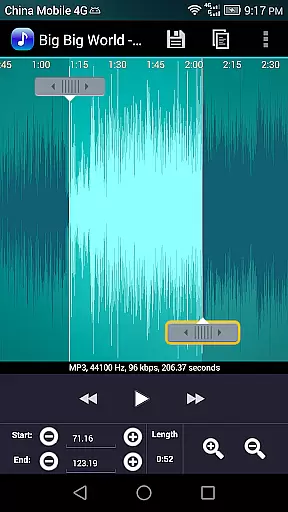
Ringtone Maker Pro offers an impressive array of features that cater to diverse audio editing needs. One of its standout capabilities is the scrollable waveform representation of audio files, available at five different zoom levels. This visualization allows for precise editing and ensures you can fine-tune every aspect of your ringtone or audio clip.
The app supports multiple editing functions such as copying, cutting, pasting, and adjusting volume levels. For MP3 files, you can apply fade in/out effects to create smooth transitions. The optional touch interface lets you set exact starting and ending points within the audio file, while the preview function helps you test your edits before finalizing them.
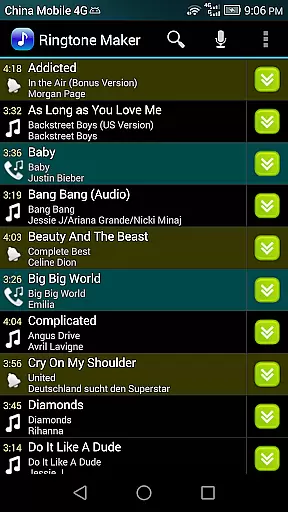
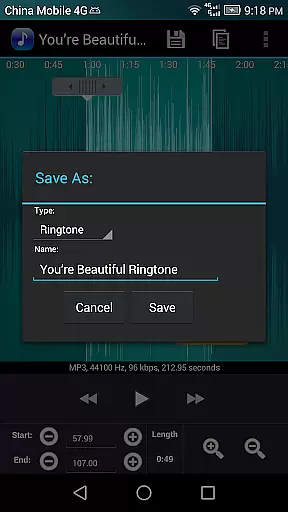
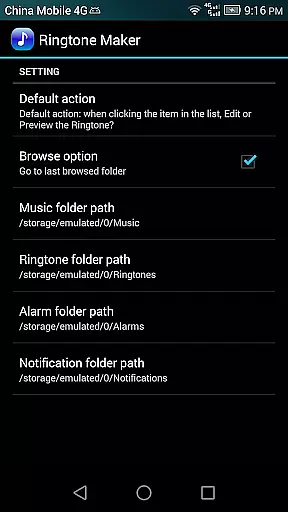
Additional features include the ability to save clipped audio as new files and categorize them as Music, Ringtone, Alarm, or Notification. You can also manage contact-specific ringtones, sort audio files by tracks, albums, or artists, and record new audio clips directly within the app. These comprehensive tools make Ringtone Maker Pro an indispensable utility for anyone looking to customize their mobile audio experience.
Ringtone Maker Pro offers a versatile music library that supports multiple audio formats including MP3, WAV, AAC/MP4, and 3GPP/AMR files. This extensive compatibility ensures users can work with a wide range of audio sources to create personalized ringtones, alarms, and notifications.
The app's commitment to copyright authenticity is evident in its transparent handling of audio files. Users can legally transform their own music files into ringtones without concerns about unauthorized content usage. The application strictly works with user-provided audio files and doesn't distribute or share these files, maintaining proper copyright compliance.
Furthermore, Ringtone Maker Pro provides tools for precise editing, allowing users to set exact start and end points for their custom ringtones. This feature-rich environment enables the creation of unique audio clips while respecting original content ownership rights.
With its robust feature set and responsible approach to audio file management, Ringtone Maker Pro establishes itself as a reliable tool for creating personalized audio content within legal boundaries.
Ringtone Maker Pro delivers exceptional audio quality options for discerning users. The application maintains the original audio quality during the editing process, ensuring that the final output meets professional standards. Advanced features like fade in/out effects and volume adjustment for MP3 files contribute to superior sound production.
The app provides five zoom levels for precise waveform editing, allowing users to make accurate cuts and adjustments. This level of detail ensures that even the most subtle audio nuances are preserved during the editing process. The ability to preview edited files before saving guarantees optimal audio quality in the final product.
Users can choose from various output categories including Music, Ringtone, Alarm, or Notification, each maintaining high-quality audio standards. The app's sophisticated audio processing capabilities ensure that all saved files retain their intended quality across different device uses.
With its comprehensive quality preservation features and professional-grade editing tools, Ringtone Maker Pro sets a new standard for mobile audio editing applications.
User-friendly interface
Wide format compatibility
Advanced editing tools
Direct contact assignment
Comprehensive help resources
Limited free version
Occasional stability issues
Ads in basic version
Complex for beginners
Storage permission required

Formerly known as Spotistats! View your top tracks, artists, albums and more!
 4.40
4.40
Pay Once, no monthly payment
4.60
A High-Precision Audio Spectrum Analysis App
4.20
Recording studio w/ 10k beats, pro vocal FX and a network of 20M rappers & fans!
4.60
Play your hearts out on TouchTunes jukeboxes & connect with fellow music lovers.
4.80
No wifi music app. Mp3 offline. Tuner radio, young radio music. Music downloader
4.20
Music, News & Sports Radio Tuner App. Tune in Live FM & AM Radio Stations.
4.80
Smart piano keyboard, Classical to Pop, Real-time multiplayer connection!
4.20
Play your music offline without limits
4.80
Voice recorder - Audio recorder. Best recorder for recording
4.90
Offline Music Player & MP3 Player.Powerful equalizer, Lyrics, Themes, Tag Editor
4.80
Walkout Song DJ is the most intuitive app to manage your sports music.
4.70
Learn the notes on the guitar fretboard fast with this easy and fun app
4.60
10-Band Audio Equalizer, Sound / Bass Booster for Spotify Users & Music Players
4.40
Equalizer, Bass Booster and Volume Booster (Eq & Bass) improve sound quality
4.30
Next generation modular control surface
4.10
The ultimate media player for Android devices
3.90
Learn to play the piano using falling notes!
3.80
Remove ads permanently from Music Visualizer
4.3

User Reviews