

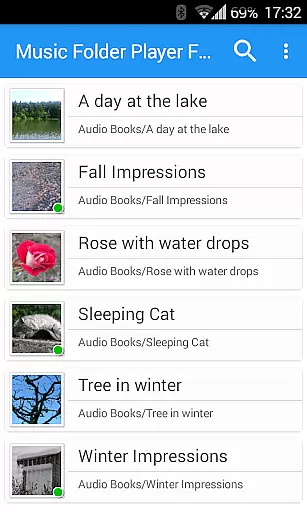
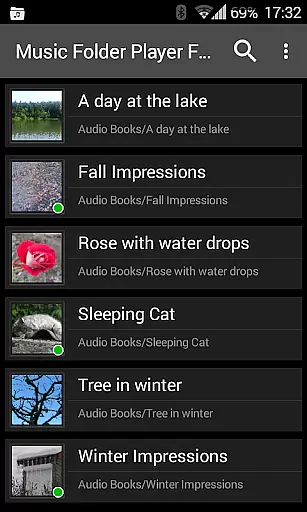
Music Folder Player Full is a versatile audio player designed for users who prefer organizing their music files in folders rather than traditional categories like artist or album. The app offers a unique folder-based playback experience, making it ideal for those with specific organizational preferences.
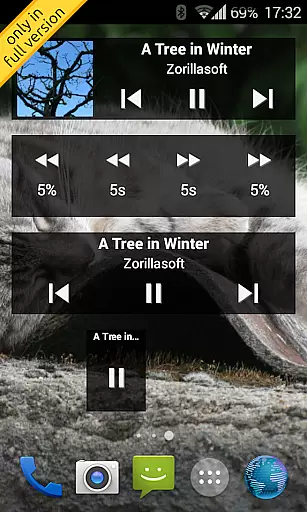
This full version stands out with its ad-free interface and inclusion of homescreen widgets. It provides advanced features such as resume functionality, customizable seek buttons, and equalizer settings. Whether you're managing a small music collection or a large library, this player ensures seamless navigation and optimal audio quality.
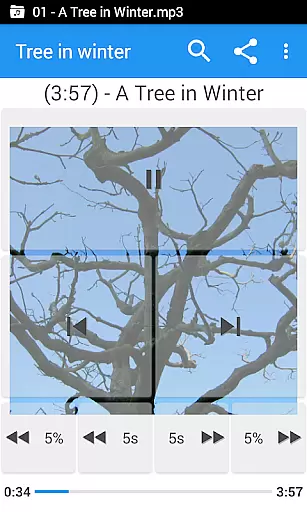
The app boasts an impressive array of features that enhance the listening experience. Its Material Design interface is both modern and intuitive, while the availability of three different homescreen widgets allows for personalized shortcuts.
Unique functionalities include speed control with pitch correction, virtual room effects, and 432 Hz playback mode. These features cater to audiophiles and podcast enthusiasts alike. Additionally, the app supports Last.fm scrobbling, file management options, and gesture controls, providing a comprehensive solution for all your music playback needs.
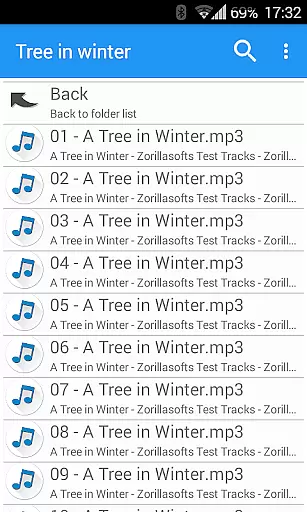
Music Folder Player Full offers a unique approach to music organization by allowing users to manage their audio tracks through folders rather than traditional artist or album categories. This method provides an extensive personal music library that is only limited by the device's storage capacity.
The app supports various audio formats, ensuring that users can include all their legally acquired music files without compatibility concerns. The folder-based system inherently respects copyright authenticity as it relies on users' own collections, thus avoiding any unauthorized distribution of music content.
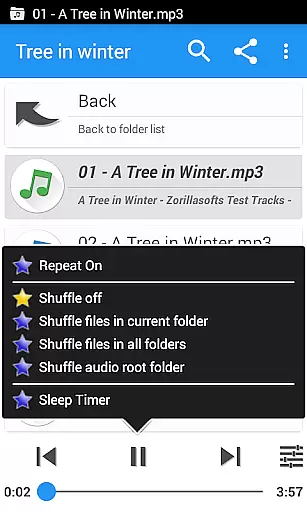
With features like virtual folders for favorite songs and playlist creation, users can curate a personalized music library that reflects their individual tastes while maintaining proper ownership and copyright compliance.
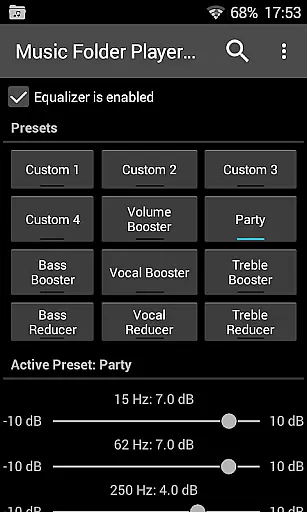
One of Music Folder Player Full's standout features is its advanced audio quality options. The equalizer provides four customizable settings and eight presets, such as Bass Booster and Vocal Booster, catering to diverse listening preferences and enhancing the overall sound experience.
For audiobooks and podcasts, the speed control with pitch correction allows users to adjust playback speed without affecting audio quality. This feature is particularly useful for those who want to consume content more efficiently while maintaining clarity.
Additional enhancements include virtual room and reverb effects, pre-amplification for low-level recordings, and a 432 Hz playback mode. These options give users precise control over their listening experience, ensuring optimal audio quality tailored to individual preferences.
User-friendly folder organization
Customizable homescreen widgets
Advanced equalizer settings
Speed control for podcasts
Ad-free experience
Limited appeal for non-folder users
Complex for casual listeners
No native playlist creation
Occasional bugs reported
Premium price tag

The Cubase remote control app
 3.60
3.60
Taal player that lets you sing any Indian & Western song with Tabla & Tanpura
4.60
Visualize the guitar fretboard, master scales & play through changes like a pro!
4.50
Learn to play the piano using falling notes!
3.80
Smart piano keyboard, Classical to Pop, Real-time multiplayer connection!
4.20
Help you quickly get started with Shokz headphones
4.40
Simple mp3 and mp4 player with advanced features.
3.40
Travel To The Music Universe
3.40
Listen to offline music and sounds from all categories
4.70
Full-featured, High-Quality Groovebox Workstation, perfect for Live Performance!
4.80
Your song collections with lyrics and chords on Android smartphones and tablets.
4.80
Listen radio AM / FM Stations. Live AM / FM Radio App Station. Radio Com.
4.70
The best music and audio player, with beautiful UI, music search and equalizer.
4.60
A complete sound package for the sound engineer or enthusiast
4.60
A synth that really lets you shape your sounds!
4.50
Formerly known as Spotistats! View your top tracks, artists, albums and more!
4.40
A High-Precision Audio Spectrum Analysis App
4.20
Sing, record, and create music together — enhanced by smart voice tools.
4.00
The only true audiophile music player with Hi-Fi audio rendering and DSP engine
3.90

User Reviews