

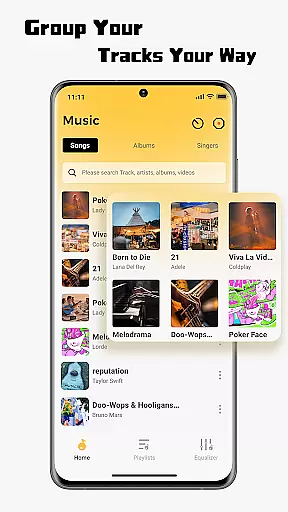
SonicNest is a feature-rich music player app designed to enhance your audio experience. It offers seamless local music import, allowing users to easily transfer their personal music libraries into the app for uninterrupted playback. The app also provides smart local music management tools, enabling users to organize tracks by album, artist, or custom folders.
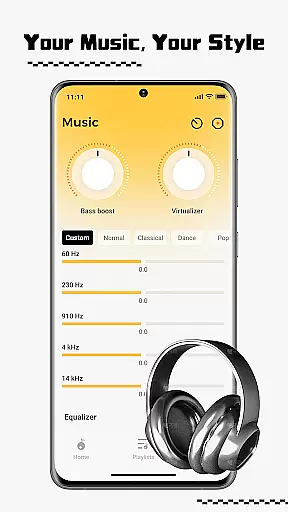
One standout feature is its precision sound control through a built-in equalizer. Users can fine-tune audio with adjustable bass, vocal enhancement, and expert presets. Whether you're an audiophile or a casual listener, SonicNest delivers a personalized and immersive listening experience, making it more than just a standard music player.
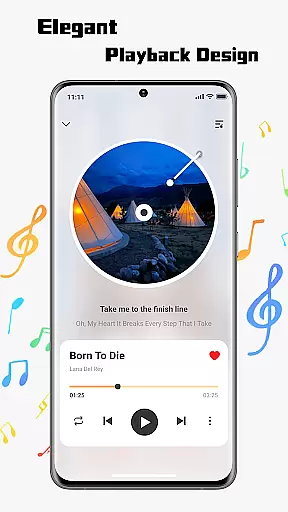
SonicNest stands out with its sleek and intuitive interface, offering a user-friendly design that simplifies navigation. Its seamless local music import functionality lets users browse device storage and add tracks effortlessly, consolidating all music in one accessible location.
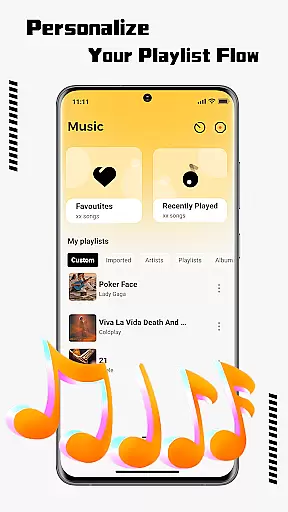
The app's smart music management system allows detailed organization of your library. Edit track information, sort files, and create custom playlists tailored to specific moods or activities. Additionally, the advanced equalizer provides precise audio adjustments, including bass boost, vocal clarity, and customizable presets, ensuring every track sounds exactly how you want it.
These features collectively make SonicNest not just a music player but a comprehensive audio command center, catering to both everyday listeners and audio enthusiasts alike.
One of the standout features of SonicNest is its extensive music library, which allows users to seamlessly import and manage their local music files. This ensures that all your favorite tracks are centralized in one location, making it easy to access and enjoy them without switching between multiple apps.
SonicNest places a strong emphasis on copyright authenticity, ensuring that users can confidently manage their personal audio collections within a legally compliant framework. The app supports importing music from your deviceu2019s storage, giving you full control over your library while maintaining respect for intellectual property rights.
With smart local music management tools, SonicNest empowers users to edit track details, sort by album or artist, and create custom folders. This meticulous organization not only enhances accessibility but also enriches the overall listening experience, allowing users to curate playlists tailored to different moods and activities.
SonicNest offers precision sound control through its built-in equalizer, enabling users to fine-tune every track to their exact preferences. Whether you want to boost the bass for an intense workout session or enhance vocals for focused lyrical listening, SonicNest provides the tools to achieve studio-quality audio playback.
The app includes expertly crafted presets designed to cater to various musical genres and listening scenarios. For audiophiles seeking complete customization, manual adjustment options allow for granular control over sound profiles, ensuring an immersive and personalized auditory experience.
By prioritizing audio quality, SonicNest transforms how users engage with their music libraries. Its advanced equalizer and customizable settings ensure that every note sounds rich, clear, and true to the artist's original intent, elevating your listening journey to new heights.
User-friendly interface
Advanced equalizer
Smart music management
Seamless music import
Customizable playlists
Limited streaming options
No cloud sync
Few social features
Ads in free version
Device-specific

Offline and always ad-free - stream in the highest quality available.
 4.10
4.10
Pay Once, no monthly payment
4.60
Control your MIDI USB or Bluetooth devices in app and avoid some trampling
3.30
Save hundreds of dollars for a physical strobe tuner and instead use this app.
4.50
Super Sound Editor, Song Maker & Mixer, Vocal Remover, Voice Recorder & Changer!
4.60
Manage your Sonos system directly from your home-screen!
4.40
Versatile MP3 recorder with auto-backup to Dropbox and Google Drive
4.10
Sing, record, and create music together — enhanced by smart voice tools.
4.00
Get alarms that fit your lifestyle and wake up to the sounds you love.
4.80
Music, News & Sports Radio Tuner App. Tune in Live FM & AM Radio Stations.
4.80
Performance-Synthesizer & Multi-Track-Sequencer, polyphonic + multi timbral!
4.70
DJ Music Mixer Pro is a real DJ controllers and DJ Music Studio to remix DJ.
4.40
Play KORG’s revolutionary touch-based instrument on a variety of devices.
4.40
Full featured mp3 and audio player with Chromecast and Android Auto support.
4.40
Master Salsa Rhythm quickly and with a lot of fun!
4.30
Time Trainer: accurate metronome w tools to help you develop your internal time!
4.20
Powerful beat maker & DJ mixer to remix tracks, make music, & perform DJ mix
3.70
The Minimalistic Premium Music Player. Handmade with passion for music
2.20
Music Streaming suite for Ampache, Nextcloud Music and compatible backends.
4.2

User Reviews