

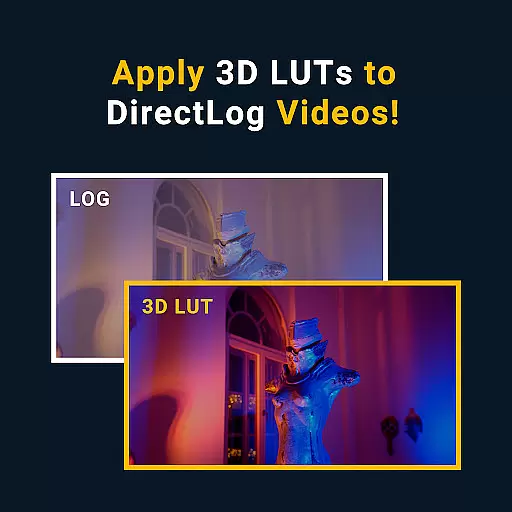
MotionCam Pro revolutionizes mobile photography and videography by offering professional-grade tools directly on your smartphone. The app's standout feature is its ability to capture RAW videos, a first for smartphone cameras. This allows users to retain maximum detail and dynamic range in their footage, making it ideal for post-production editing.
In addition to video capabilities, MotionCam Pro enhances still photography through advanced computational algorithms. These replace standard camera software to deliver stunning images with improved clarity, color accuracy, and low-light performance. Whether you're an amateur photographer or a seasoned professional, MotionCam Pro provides the tools needed to elevate your mobile photography experience.
MotionCam Pro stands out with its innovative features tailored for both videographers and photographers. For video enthusiasts, the app offers RAW video capture, enabling unparalleled control over video quality. This feature is particularly beneficial for those who require flexibility during post-processing, as RAW files preserve more information compared to compressed formats.
For photography, MotionCam Pro employs sophisticated computational algorithms that enhance image quality. These algorithms optimize various aspects such as exposure, white balance, and noise reduction, resulting in photos that are vibrant and sharp. Additionally, the app provides manual controls for ISO, shutter speed, and focus, giving users the freedom to experiment and achieve their desired photographic outcomes.
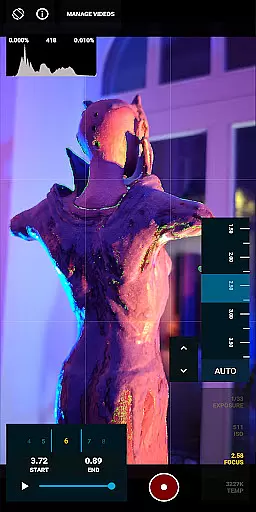
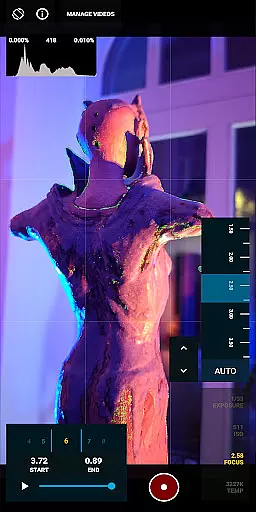
Real-time capture and preview functionality is essential for photographers who need to see the exact image they are capturing before taking the shot. MotionCam Pro excels in this area by providing users with a live view of their subject, ensuring that every detail is captured as intended.
The app employs advanced computational photography algorithms that enhance the live preview, offering adjustments for exposure, white balance, and focus in real time. This allows photographers to fine-tune their settings on the fly, ensuring optimal image quality.
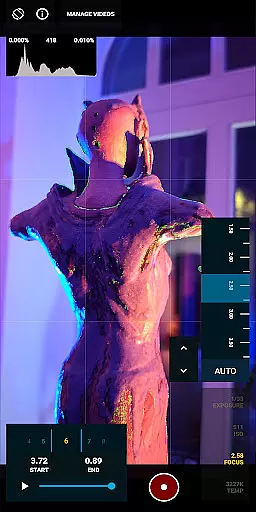
With MotionCam Pro, users can also take advantage of professional tools such as histograms and zebra patterns, which help in achieving perfect exposure and focus. These features make the app an indispensable tool for both amateur and professional photographers.
MotionCam Pro takes photo enhancement to the next level with its AI beauty and enhancement features, designed to bring out the best in every photo naturally. The app uses sophisticated AI algorithms to analyze and enhance images without making them look over-processed or artificial.
Users can expect improvements in skin tone, texture, and overall image clarity while maintaining a natural look. This is particularly beneficial for portrait photography, where maintaining the authenticity of the subject is crucial.
In addition to beautification, MotionCam Pro offers various filters and effects that can be applied to photos, giving users creative control over the final output. Whether it's for professional work or personal enjoyment, these enhancements ensure that every photo stands out with natural beauty.
RAW video capture
Advanced computational algorithms
Manual camera controls
Vibrant photo output
Active community support
Premium pricing model
Steep learning curve
High storage requirements
Limited device compatibility
Resource-intensive operation



Trendy TikTok time warp scan funny filter app brings you unique photos & videos.
 4.40
4.40
Be your best in every shot! Fix, edit and retouch your face in selfies & photos.
3.70
Create Business Headshots, Polaroid Filter, Retake Photos,Profile Pics,AI Photos
4.50
The #1 app for B&W film developing featuring an advanced darkroom timer.
4.10
Add a dreamy vibe to your selfies and videos with soft style filters
4.0
Astrophotography with your smartphone, photo live stacking and much more!
3.90
Snap photos remotely using your Garmin watch as the camera trigger
4.3
Solocator stamps photos you take with GPS location, Compass Direction, Date/Time
3.80
Your Family Calendar + Photos. Manage your Skylight Calendar and Skylight Frame.
4.40
Gallery show photo, video, slideshow, is perfect 3D effect private photo albums.
4.80
Light-weight Media Gallery app for Android made with Jetpack Compose
4.60
A must-have app for landscape photographers
4.60
Unblur, enhance & restore photos with powerful AI photo enhancer tools.
4.60
Create AI photos & videos with Enhancer; restore, fix, beautify, enhance photos
4.50
Catch sunlight, sunrise sunset times and sun phases with the AR sun tracker.
4.10
USB Storage Access for Photos, Videos, Music and Documents
3.80
Hair color changer, AI haircut app, fun hair editor and buzz cut filter for all!
3.80
Superimpose one photo on top of another using the original Superimpose app!
3.20
An interval timer to automate photo taking process for timelapse
2.90

User Reviews