

Intervalometer for TimeLapse is a powerful photography tool designed to automate the process of capturing time-lapse sequences. This app allows photographers to configure specific time intervals to trigger the camera shutter, working seamlessly with any camera app on Android devices running version 7 and above.
The app's unique feature is its ability to integrate with various camera modes such as HDR, night mode, and manual settings, enabling users to create stunning low light, long exposure, and even Holy Grail time-lapses. It also supports dedicated camera remote apps from brands like Canon and Nikon, making it versatile for both smartphone and professional camera users.
Whether you're capturing star trails, light painting scenes, or creating image stacks in post-processing, Intervalometer provides the control and flexibility needed for high-quality time-lapse photography.
One of the standout features of Intervalometer for TimeLapse is its comprehensive control over time-lapse configurations. Users can set delay timers, define interval times, and specify the number of shots, allowing for precise customization of their time-lapse sequences.
In addition to its standard mode, the app offers an infinite mode and bulb mode, catering to more advanced time-lapse techniques. The infinite mode is perfect for projects where the duration isn't predetermined, while bulb mode gives users the ability to capture extremely long exposures.
Another key advantage is its compatibility with any camera app, thanks to the AccessibilityService API. This ensures that regardless of the camera app being used, Intervalometer can reliably trigger the shutter button. For optimal performance, users of Huawei and Xiaomi devices are advised to restart their devices if they encounter issues with touch input.
Real-time capture and preview functionality is essential for ensuring that every moment of your time-lapse photography is captured accurately. Intervalometer for TimeLapse offers this by integrating seamlessly with any camera app, allowing users to configure and trigger the camera shutter at desired intervals.
This app leverages the AccessibilityService API to automate the process of capturing images, making it possible to work with advanced camera modes such as HDR, night mode, and manual settings. This ensures that users can achieve professional-quality results without needing to manually control each shot.
By enabling precise control over exposure settings and supporting RAW format captures, Intervalometer empowers photographers to explore creative possibilities like low light time-lapse, star trails, and more. The ability to adjust configurations on-the-fly means you can adapt to changing lighting conditions effortlessly.
Ultimately, the real-time capture feature provides a reliable way to execute complex time-lapse projects, whether you're shooting with a smartphone or triggering a dedicated camera remotely. This makes Intervalometer an indispensable tool for both amateur enthusiasts and professional photographers looking to elevate their craft.
While primarily focused on time-lapse photography, Intervalometer for TimeLapse also indirectly enhances image quality through its precise control capabilities. Although it doesn't directly apply AI beauty enhancements, the app's meticulous handling of photo sequences contributes significantly to post-processing potential.
The app allows users to capture frames intended for image stacking, star trails, and lightning stacking. These techniques rely heavily on consistent and high-quality input images, which Intervalometer delivers by automating the capture process with exact timing and settings.
For scenarios requiring long exposures or challenging lighting conditions, Intervalometeru2019s bulb mode and infinite shooting options ensure that each frame is captured under optimal conditions. This consistency is crucial when assembling final images through post-processing techniques.
By focusing on delivering natural and unaltered image sequences, Intervalometer supports photographers in achieving enhanced final outputs without artificial alterations. This approach respects the authenticity of the captured scenes while providing the tools necessary for stunning visual effects in post-production.
User-friendly interface
Wide device compatibility
Flexible configuration options
Supports professional camera apps
Versatile shooting modes
Requires Android 7+
Initial setup can be complex
Limited iOS support
Dependent on device performance
May need device restart for some models

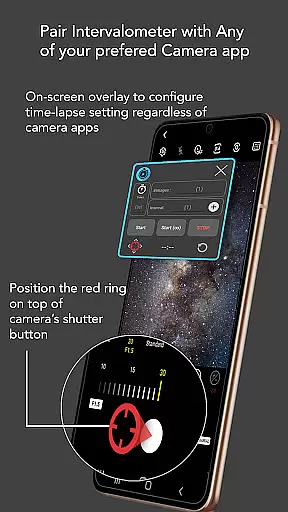
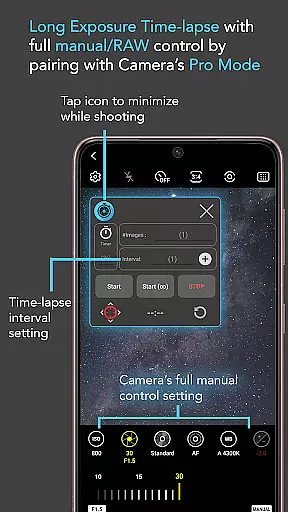
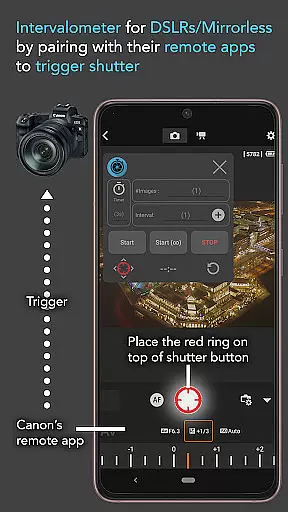
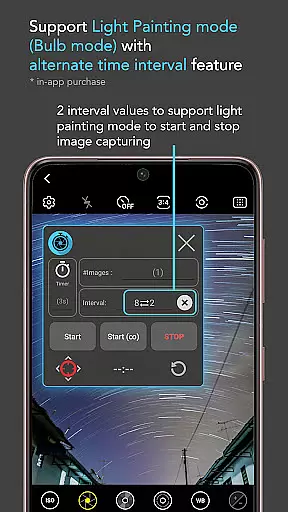
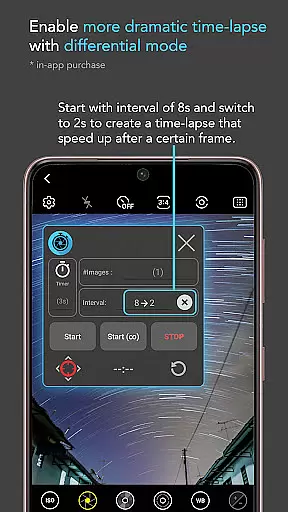
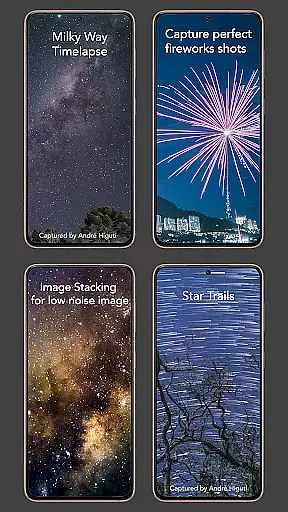

Photo editor: face & body editor, beauty cam, filters and quality enhancer.
 4.00
4.00
Pet Camera
3.70
Photo prints, cards, & gifts at Walgreens. Easy ordering & fast local pickup !
4.80
Create collages easily! Nice pic collage maker & background eraser for Instagram
4.50
AI photo editor with hair editor, retouch tools, hair color changer & filters!
4.50
HD Camera Pro with HD Video shooting, Panorama, Photo editor , Beauty Camera.
4.50
Amazing Photo Effects - The most fun you can have with your photos!
4.70
Your personal guide to the sun and moon. Plan ahead, visualize and predict!
4.70
Effortlessly make high-quality GIFs from images & videos without any watermarks.
4.70
Photo editor: AI filters, photo enhancer, pic collage maker, AI art generator.
4.80
See your baby AI baby face generator AI baby maker Face generator babymaker fun!
4.70
Easily view, share, delete photos with Gallery.
4.70
1M influencer's special filter
4.60
Effortlessly organize, view and share your photos & videos with Gallery app!
4.40
Edit like a pro with Hypic. Apply filters, AI effects, & magic touch.
4.40
What celebrity do you look like? Celebs will find your celebrity match!
4.10
Turn photos into cartoons & avatars! - Photo Editor, Cartoon Face!
3.90
Hair color changer, AI haircut app, fun hair editor and buzz cut filter for all!
3.80
Remote control of the phone camera from your Wear OS smartwatch
3.70

User Reviews