

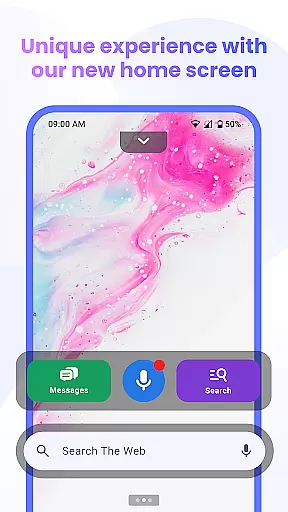
Messenger Chat Home is a unique personalization app that transforms your Android home screen into an efficient messaging hub. It combines the simplicity of SMS and MMS texting with the functionality of a modern launcher, allowing users to send messages, access their inbox, and utilize creative tools like stickers and GIFs directly from their home screen.
The app's standout feature is its seamless integration of communication tools into the user's daily workflow. With capabilities such as group chats, media sharing, and voice-to-text functionality, Messenger Chat Home ensures that staying connected is both convenient and enjoyable. Its smart widget further enhances accessibility by enabling quick previews and replies to unread messages without needing to open the app.
Designed for those who value speed and organization in their communications, this app offers a clutter-free experience that prioritizes privacy and performance. Whether you're looking to streamline your messaging or add some personality to your conversations, Messenger Chat Home provides a reliable solution tailored for everyday use.
Messenger Chat Home stands out with its innovative approach to personalizing the Android home screen experience. One of its key features is the ability to send and receive SMS & MMS messages directly from the home screen, eliminating the need to switch between multiple apps. This functionality is complemented by a smart widget that allows users to preview and respond to unread texts instantly, enhancing productivity and convenience.
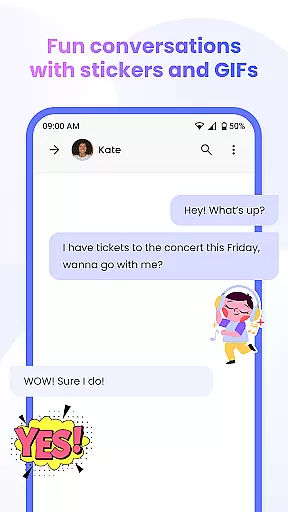
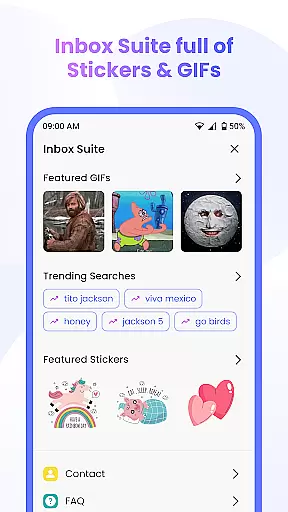
In addition to its core messaging capabilities, the app offers extensive customization options. Users can express themselves through thousands of free stickers, GIFs, and emojis, making each conversation more engaging and fun. The inclusion of group chat support and media sharing ensures that users can stay connected with friends and family in a variety of ways, whether it's through text, photos, or videos.
Another notable aspect of Messenger Chat Home is its focus on user privacy and system performance. Unlike many other messaging apps, it avoids unnecessary data collection and runs efficiently on devices, minimizing battery and storage usage. These thoughtful design choices make it an ideal choice for individuals seeking a fast, secure, and personalized messaging solution.
Customization is at the heart of Messenger Chat Home, allowing users to tailor their messaging experience to fit their personal style. With a wide array of customization options, users can modify their home screen interface and chat settings with ease.
The app offers thousands of free stickers, GIFs, and emojis that bring personality to every message. This vast selection ensures that users can find the perfect expression for any conversation, making each interaction more engaging and fun.
Beyond aesthetic preferences, Messenger Chat Home also provides functional customization. Users can organize their inbox, manage notifications, and set preferences for media sharing, ensuring an efficient and personalized communication process.
By integrating these comprehensive customization features, Messenger Chat Home empowers users to create a unique and enjoyable texting environment that enhances both individual and group conversations.
Messenger Chat Home excels in theme compatibility, offering users the ability to seamlessly switch between different visual themes to suit their mood or preference. This flexibility in aesthetics enriches the user's interaction with the app on a daily basis.
The application supports various themes that maintain visual consistency across the user's device, providing a cohesive look and feel. Whether opting for a light, dark, or vibrant theme, users can expect a smooth transition and integration with their overall device theme.
In addition to pre-set themes, Messenger Chat Home allows for custom theme creation. Users can personalize colors, fonts, and layouts, which are then uniformly applied throughout the app, ensuring a harmonious and visually pleasing experience.
This dedication to theme compatibility not only enhances the app's usability but also keeps the user interface fresh and aligned with personal tastes, encouraging prolonged user engagement.
User-friendly interface
Fast message delivery
Customizable chat options
Efficient home screen integration
Privacy-focused design
Limited to Android devices
No iOS compatibility
Requires constant updates
Some features may feel redundant
Dependent on Google services



Customize glowing edges, wallpapers, and caller screen with EdgeAura.
 3.50
3.50 4.50
4.50 3.50
3.50
⭐ OneUI inspired Fluffy Icon Pack – Soft. Stylish. Standout. ⭐
4.1
Adaptive Dot Style IconPack with Light & Dark Theme.
3.70
Unleash Your Creativity and Connect with Loved Ones with Lockscreen Drawing!
4.20
300+ Beautifully crafted widgets inspired by OneUI.
4.60
Enjoy a variety of amazing live wallpapers and colorful EDGE lighting borders!
4.80
Custom ringtones songs, music ringtones for Android phones
4.60
A launcher for Samsung Good Lock and Good Guardians modules without ads
4.70
Icons made of colorful linear lines
4.60
Handcrafted pixel art icons, widgets & wallpapers
4.60
Try creating your own keyboard with "Keyboard theme for android" app now!
4.50
Customizable screen pets that play, climb, and keep you company.
4.50 4.50
4.50
Transform your device in a game console
4.40
Launcher OS™ Pro without ads help make your phone simple and pretty
4.30
Your home screen, just the way you like it.
4.30
Custom edge gestures for volume control, brightness, apps, and shortcuts.
4.1

User Reviews