

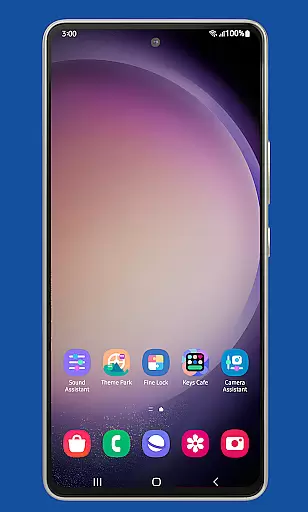
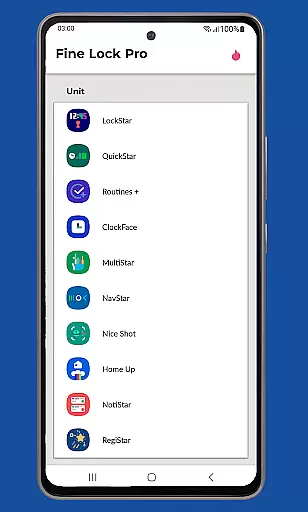
Fine Lock is a specialized launcher designed exclusively for Samsung devices running official One UI, enabling users to access and optimize Good Lock and Galaxy Labs modules. This app bridges the gap for users in regions where these customization tools are not readily available through Galaxy Store.
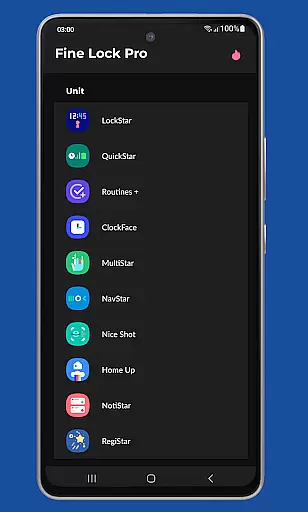
With Fine Lock, users can enjoy advanced personalization features while ensuring compatibility with their Samsung devices' official Android builds. The app offers both essential and premium functionalities, including module shortcuts, background update checks, and dynamic wallpapers that adapt to Dark/Night modes.
This solution is particularly valuable for power users seeking to maximize their device's potential without compromising system stability. By sourcing APK modules from trusted platforms, users can safely expand their customization options while maintaining optimal performance.
Fine Lock stands out with its unique ability to act as a gateway for Good Lock and Galaxy Labs modules, offering seamless integration with Samsung's ecosystem. The app provides practical features such as home screen shortcuts for installed modules, allowing quick access to customization settings.
Premium PRO features enhance the user experience further by enabling background update notifications, hiding uninstalled modules for a cleaner interface, and introducing dynamic wallpapers that respond to system themes. These features collectively create a more personalized and efficient device management experience.
The app ensures reliable performance by restricting usage to Samsung devices running official firmware. This deliberate limitation maintains system integrity while delivering powerful customization capabilities tailored specifically for Samsung's One UI environment.
Fine Lock offers a diverse range of customization options tailored specifically for Samsung devices running official One UI. This app acts as a launcher for Good Lock and Galaxy Labs modules, which are powerful tools for personalizing the Android experience.
With Fine Lock, users can access features such as module app shortcuts on the home screen and dynamic wallpapers that adapt to the device's Dark/Night modes. These options allow for a personalized interface that caters to individual preferences and enhances usability.
The app is designed to unlock the full potential of Samsung's software by providing these advanced customization features. Users can enjoy a more tailored experience without compromising the integrity of their device's operating system.
By integrating with trusted sources like APKMirror or Sammobile, Fine Lock ensures that users have access to the latest modules, thus maintaining an up-to-date and customized device experience.
Theme compatibility is a crucial aspect of Fine Lock, ensuring that all visual customizations are seamlessly integrated into the Samsung device's One UI environment. The app supports dynamic wallpapers that change based on the deviceu2019s Dark/Night mode settings, offering a cohesive look and feel.
This compatibility extends to various themes and design elements, allowing users to maintain a consistent aesthetic across their device. Whether it's through custom icons, color schemes, or layout adjustments, Fine Lock ensures that every modification aligns perfectly with the overall theme.
Moreover, Fine Lock provides PRO features like hiding uninstalled modules and background checks for updates, which contribute to a streamlined thematic experience. These functionalities help keep the user interface clutter-free and visually appealing.
By focusing on theme compatibility, Fine Lock not only enhances the visual appeal but also improves the functional harmony of the device, making daily interactions more enjoyable and intuitive for users.
User-friendly interface
Dynamic wallpaper support
Background update checks
PRO feature enhancements
Trusted module sources
Limited to Samsung devices
No direct module downloads
Requires manual setup
Premium features cost
Region restrictions apply

The definitive Icon pack maker and editor
 4.30
4.30
Want to make your phone more special than ever?
4.60
⭐ OneUI inspired Fluffy Icon Pack – Soft. Stylish. Standout. ⭐
4.2
Icons made of colorful linear lines
4.60
Adorable pets roam and play right on your phone screen!
3.30
Handcrafted pixel art icons, widgets & wallpapers
4.60
400+ Beautifully crafted widgets inspired by NOTHING.
4.70
Modern Glass Icon Pack with glossy icons, clean minimal theme & aesthetic style
4.1
Transform your phone with stylish zipper lock themes and 4D live wallpaper
4.10
One 8 icons glass color version
4.80
Stylish Pink Cute Hippo keyboard with 10000+ customized keyboard themes!
4.60
Choose your keyboard with RGB colors effect, themes, fonts, emojis.
4.60
300+ widgets inspired by Material You and Material 3 expressive design.
4.60
Beautiful realistic hybrid watch face with numerous customization options.
4.50
3D, live, and moving wallpapers & themes in 4K and HD for your device.
4.50
Try creating your own keyboard with "Keyboard theme for android" app now!
4.50 4.50
4.50
Launcher OS™ Pro without ads help make your phone simple and pretty
4.30
Struggling to find apps? Use this app to locate and open any app on your phone!
2.20

User Reviews