

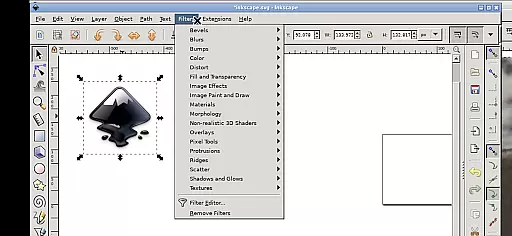
Inky is a powerful vector graphics editor that brings the full functionality of Inkscape to your mobile device. This Android adaptation allows users to create and edit vector images in Scalable Vector Graphics (SVG) format, with support for importing and exporting other file types. The app supports rendering of primitive shapes, text manipulation, and offers advanced features like adjustable transparency and gradient fills.
The application's intuitive touch-based interface enables precise control through simple gestures. Users can zoom, pan, and scroll using familiar touch commands, while right-click functions are accessible via two-finger taps. The app seamlessly integrates with Android's file system, providing direct access to Documents and Pictures without requiring additional import/export steps. Whether you're a professional designer or hobbyist, Inky delivers desktop-grade vector editing capabilities on your mobile device.
Inky stands out with its comprehensive set of vector editing tools adapted for mobile use. The application maintains all core features of desktop Inkscape, including shape primitives, text tools, gradient editors, and path operations. Unique to this mobile version is its optimized touch interface, where common mouse functions are translated into intuitive touch gestures such as pinch-to-zoom and one-finger panning.
Advanced functionality includes layer management, object grouping, and boolean operations. The app supports pressure-sensitive stylus input for precise drawing and tracing. Through its integration with Android's notification system, users can adjust desktop scaling settings. Additionally, the app provides seamless access to Android's native file system through pre-configured directory links in the home folder structure, eliminating the need for traditional file import/export procedures.
Inky offers a comprehensive suite of creative tools that cater to both professional designers and hobbyists. The app provides full-featured vector graphics editing capabilities, allowing users to create intricate designs with ease.
With Inky, you can render primitive vector shapes such as rectangles, ellipses, polygons, arcs, spirals, stars, and even 3D boxes. Text creation is also supported, giving you the flexibility to incorporate typography into your artwork seamlessly.
The ability to fill objects with solid colors, patterns, radial or linear color gradients, and adjust transparency levels for borders ensures that your designs are not only versatile but also visually appealing. Additionally, the support for embedding and tracing raster graphics enables the transformation of photos and other raster sources into scalable vector images.
Manipulating created shapes is intuitive, thanks to a range of transformation options including moving, rotating, scaling, and skewing. These robust features make Inky an indispensable tool for anyone looking to explore their creativity on mobile devices.
One of Inky's standout features is its canvas and format flexibility, which empowers users to work on projects of varying sizes and complexities without constraints. This adaptability ensures that whether you're designing for print or digital media, Inky has got you covered.
The app supports Scalable Vector Graphics (SVG) format primarily, but it doesn't stop there. Users have the freedom to import and export various file formats, making collaboration and project integration smoother than ever before.
Accessing files from different parts of your Android device is straightforward, thanks to useful links in the home directory. You can easily reach your Documents, Pictures, and more without needing to go through cumbersome import/export processes.
Whether you're using a tablet with a stylus for precision work or sketching ideas on a phone with just your finger, Inky adapts to your workflow. Its responsive interface allows panning, zooming, scrolling, and performing right-click actions effortlessly, ensuring a seamless experience regardless of your preferred device setup.
User-friendly touch interface
Full-featured vector editing
Seamless file system integration
Supports pressure-sensitive stylus
Open-source and free to use
Steep learning curve
Small screen limitations
Requires technical knowledge
Performance may vary
No native Android UI

Discover Cartoon Dream : Unleash Your Creativity with CuttingEdge AI
 4.50
4.50
Vidu is an AI video generator made for creators and aspiring makers.
3.30
AI Assistant, powered by ChatGPT GPT-4 & GPT-4o. Your intelligent companion.
3.50
Logo Generator powered by AI: Create stunning logos effortlessly!
4.70
800+ Drawing, Painting Lessons App to Practice, Sketch & Paint Art.
4.30
Painting, drawing, & sketching
4.50
Novices can also easily complete diamond painting masters
4.70
Your AI soulmate — meaningful chats, and unique emotional moments
4.70
Create cute cat emojis & PFPs! Fun, custom avatars for cat lovers.
3.70
Digital, Abstract, Classic - all types of color wheels in one app!
4.60
Turn your drawings into flipbook-style animations with simple creative tools
4.60
Draw anime & manga drawing, art with templates to create stunning picture!
4.50
Digital illustration drawing & painting pad app to paint Anime and Manga art
4.50
Draw Trace image sketch by, AR art projector app, Easy to trace any image.
4.50
Just trace a projected picture on paper and color! Draw & Paint with AR drawing
4.40
AR Anime Drawing: How to draw anime with AR drawing & sketching apps!
4.00
Resize photos and print photos in exact size with our powerful photo printer!
3.80
Draw anime easily with AR guidance, sketch templates & trace tools!
3.10
Your Essential Color Theory Guide: Red, Yellow, Blue (RYB)
4.2

User Reviews