

The Everything Key is a powerful utility app designed to unlock the hidden potential of your device's hardware button. With its intuitive remapping capabilities, you can transform that underutilized button into a productivity powerhouse. The app allows you to assign custom actions to both double and triple presses, giving you instant access to your most-used apps and functions.
What sets The Everything Key apart is its commitment to simplicity and privacy. The clean, minimalist interface makes it easy to manage your key mappings, while the app's use of Android's Accessibility Service ensures your data remains secure. Whether you want to launch your camera, favorite messaging app, or essential utilities with a simple press combination, this tool puts control back in your hands without requiring root access or complex setup.
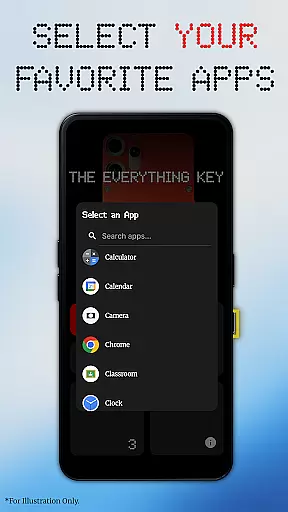
The Everything Key offers an impressive array of features that make hardware button customization both powerful and accessible. At its core, the app provides advanced remapping options for double and triple presses, allowing users to assign specific apps or functions to each action. This flexibility enables seamless access to frequently used applications without navigating through menus.
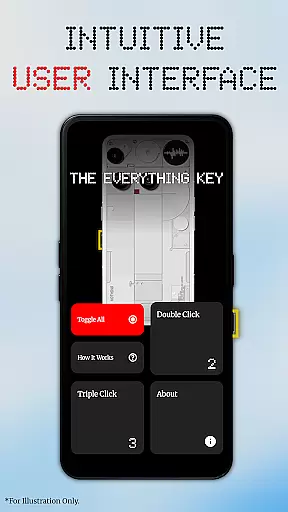
Beyond basic remapping, the app includes sophisticated control features that enhance usability. Users can quickly enable or disable specific mappings through interactive cards, while the 'Toggle All' function allows for comprehensive management of all assigned actions. The interface itself is a standout feature - inspired by the Nothing aesthetic, it presents a beautiful, minimalist design that integrates perfectly with supported devices.
Additional notable features include automatic device model detection for personalized backgrounds, and strict adherence to privacy standards through limited Accessibility Service usage. These elements combine to create a user experience that is both functional and aesthetically pleasing, making hardware button customization accessible to users of all technical levels.
The Everything Key app excels in providing accurate and effective core functionality by enabling users to remap their device's special hardware button. This feature allows for the customization of both double-press and triple-press actions, ensuring that each press triggers a desired application or function reliably.
With an intuitive user interface inspired by minimalist design principles, the app ensures ease of use while delivering powerful control options. Users can quickly enable or disable specific actions through mapped cards, offering swift access to frequently used apps like the camera or messaging services without navigating through multiple screens.
Advanced control features such as the 'Toggle All' option allow users to manage their mappings efficiently, activating or deactivating all set functions with minimal effort. This level of precision and control enhances productivity by streamlining access to essential tools on your device.
By leveraging standard Android features, The Everything Key operates seamlessly without requiring root access or complex configurations. This approach not only simplifies the user experience but also maintains system integrity and security, making it an effective solution for personalizing device interactions.
The Everything Key offers a beautifully simplistic and intuitive interface that aligns perfectly with modern design aesthetics. Upon launching the app, users are greeted with a clean layout where mapped applications are visually represented, allowing for immediate recognition and management of assigned actions.
This straightforward design philosophy extends to its advanced control options; tapping a mapped card instantly enables or disables its action, providing a seamless way to customize the hardware button's functionality. Additionally, removing an app from mapping is as simple as tapping the 'X' icon, ensuring clutter-free maintenance of your settings.
First-time users benefit from a personalized setup process that tailors the background based on their specific device model and color choice. This attention to detail creates an integrated look that feels native to the device, enhancing overall user satisfaction.
By focusing on simplicity and intuitiveness, The Everything Key ensures that even those unfamiliar with technical configurations can easily harness the full potential of their deviceu2019s hardware button, promoting accessibility and ease of use across all experience levels.
Intuitive user interface
No root access required
Advanced remapping options
Strong privacy protection
Device-specific optimization
Limited device compatibility
Requires accessibility permission
No official brand affiliation
Specific use case focus
Potential learning curve


A powerful, easy-to-use flight computer on your phone or tablet!
 3.80
3.80
Fluid navigation gestures for all of us!
4.30
Clean the junk files on your device
3.40
VESC Tool can monitor and configure VESC-compatible devices over BLE and Wifi
4.20
A non-root local ADB shell client. READ BELOW!
3.40
Excellent scientific calculator with symbolic algebra, integrals, derivatives
4.80
WiFi Signal Strength Meter help you detect WiFi Signal Strength in real time.
4.80
A simple app to back up and restore SMS & MMS messages and call logs.
4.10
Creation, Learning, Entertainment & More — The All-in-One AI Search Engine
4.70
Navigate with Ease and Style
4.90
Optimize your WiFi network, turn your phone into Wifi Analyzer
4.70
HD Camera captures every special moment.
4.60
Canon PRINT is a companion app for your Canon printer.
4.60 4.50
4.50
Game Booster, GFX Tool is now compatible with newer game update
4.50
Pro Emulator is an easy to use game console emulator for a range of consoles.
4.40
Just one-tap to easy translate in any language after calls within seconds.
4.20
Carry a FTP server in your pocket and avoid USB cables for file transfer
4.20
Create your own live wallpaper or check out thousands already made presets
3.90

User Reviews