

Vivid Navigation Gestures is a powerful tool that revolutionizes the way you interact with your Android device. This app allows users to control their devices through intuitive gestures instead of traditional button presses, bringing a modern and fluid user experience.
With features like beautiful visual effects during gesture interactions, multiple trigger points across the screen, and a wide range of customizable actions, this app caters to power users who want more control over their navigation methods. Whether you're looking to launch Google Assistant, toggle split-screen mode, or take quick screenshots, Vivid Navigation Gestures has got you covered.
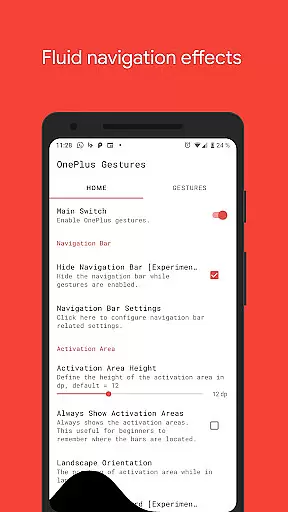
The app also supports advanced functionalities such as hiding the stock navigation bar using ADB or Root access, making it an ideal solution for those seeking a cleaner, button-free interface on their device.
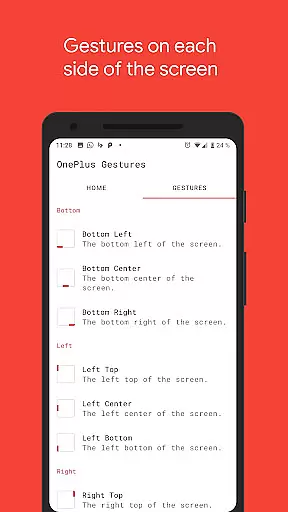
Vivid Navigation Gestures stands out with its comprehensive set of features designed to enhance user interaction. The app offers nine different gesture trigger zones spread across the edges and corners of the screen, allowing for versatile control options.
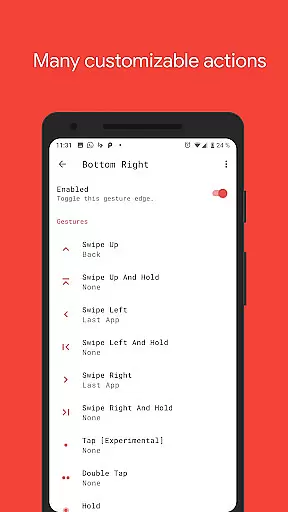
Users can perform various gestures including swipe up, swipe left, double tap, and hold, each corresponding to specific actions like going back, opening recent apps, or toggling auto-rotation. These gestures are complemented by stunning visual effects, providing both aesthetic appeal and functional feedback.
Additionally, the app integrates accessibility services to execute commands programmatically without collecting any personal data. For tech-savvy users, the option to hide the navigation bar via ADB or Root adds another layer of customization, ensuring a seamless and immersive experience.
Gestures have become a pivotal way to interact with mobile devices, and Vivid Navigation Gestures excels in this domain by offering precise control through intuitive gestures. The app allows users to replace traditional button presses with fluid swipes and taps, providing an innovative approach to device navigation.
The app supports multiple gesture triggers from various screen edges, ensuring that users can access commands from convenient points on their device. With options like swipe up, double tap, and hold, each gesture is accurately mapped to perform specific actions such as launching the Google Assistant, going back, or opening recent apps. This variety ensures that users can tailor the gesture system to fit their unique usage patterns.
By utilizing accessibility services, Vivid Navigation Gestures programmatically executes essential navigation functions without collecting user data. This commitment to both functionality and privacy underscores the app's dedication to delivering an effective core feature set while maintaining user trust.
Achieving simplicity in design while maintaining powerful functionality is no small feat, yet Vivid Navigation Gestures manages to offer an interface that is both straightforward and highly intuitive. Users are not required to navigate through complex menus to set up their gesture controls; instead, they can quickly assign actions to gestures with minimal effort.
Visual feedback during gesture execution adds to the overall user experience, making interactions feel responsive and natural. These fluid effects assure users that their inputs are registered correctly, enhancing the sense of control over their device.
Moreover, the ability to hide the stock navigation bar declutters the screen, offering a more immersive experience. Although this feature requires ADB or root access, it exemplifies how Vivid Navigation Gestures prioritizes user interface cleanliness and simplicity, allowing for an unobstructed view of the content on your device.
Intuitive gesture controls
Beautiful visual effects
Wide range of actions
Customizable trigger points
Advanced ADB support
Requires learning curve
ADB setup needed
No iOS compatibility
Limited to Android
Root access preferred

Quickly switch to an encrypted DNS server on Android TV
 4.50
4.50
A convenient photo, video, and file recovery tool.
4.00
Connect instantly to a fast, encrypted VPN with one tap
4.60
Just one-tap to easy translate in any language after calls within seconds.
4.20
Remote for Roku, Fire TV, Samsung TV, LG TV, Android TV, Chromecast and VIZIO TV
4.20
Safely recover deleted photos, videos, and files with a single easy tap.
3.70
ADB support Android 4.X-Android 13(Support wireless pair mode).No root required!
4.70
Clean up large files and similar photos, fast and easy to use
4.40
Clean up your phone, find files, play media, and share files offline
4.50
Navigate with Ease and Style
4.90
Excellent scientific calculator with symbolic algebra, integrals, derivatives
4.80
Small and simple app to Verify Root Access and BusyBox Install!
4.70
Keep track of your Palia friendships, tasks, and inventory with Palia Notebook
4.60
With videos, electrical calculators, and built-in ebook, Ugly’s has your answer.
4.50
Forza Tuning Calculator App for Forza Horizon 5, Motorsport and Earlier Titles
4.40
Mirror your screen to Fire TV - Super fast and simple
4.40
View detailed information about your Nissan Leaf the dealer never shows you.
4.10
A recovery soft,it features photo recovery, video recovery, file recovery.
3.40
Transfer Files, APK from Phone to Watch & Install.
4.0

User Reviews