

Phonos Ultimate is a comprehensive control solution for your Sonos music system, designed to provide users with an intuitive and reliable way to manage their whole-home audio experience. The app offers all the essential features needed to operate your Sonos devices, including device and room management, music source selection, and playback controls.
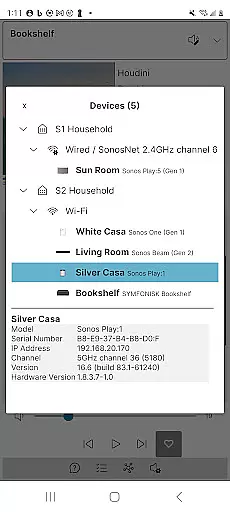
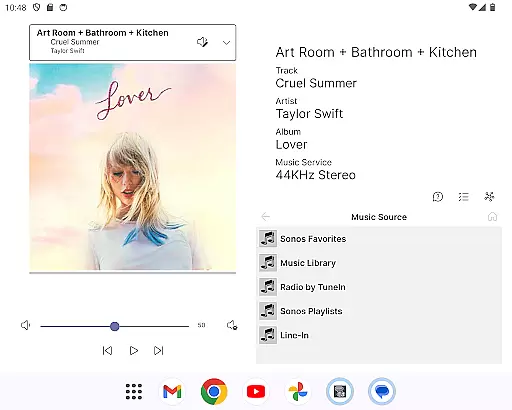
Beyond basic functionality, Phonos Ultimate stands out with unique capabilities such as the Devices View that shows how your devices are interconnected, and detailed track streaming information like sample rate and bit depth. It supports over a hundred music services, local libraries, custom station URLs, and various playlist management options, making it an indispensable tool for any Sonos user looking for advanced control without relying on the official app.
Whether you're adjusting EQ settings, managing queues, or exploring music across different rooms, Phonos Ultimate ensures a seamless and high-performance experience. Its support for both S1 and S2 systems, along with multiple simultaneous connections, makes it versatile for diverse home audio setups.
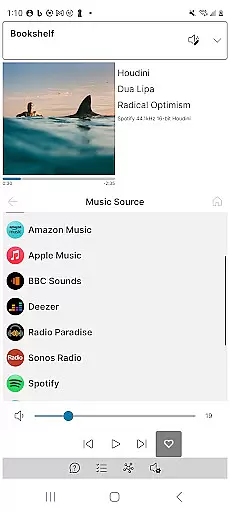
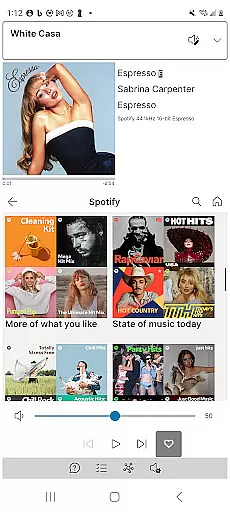
Phonos Ultimate boasts an array of features that cater to both casual listeners and audio enthusiasts. The app provides complete control over your Sonos system, allowing you to see all your devices, rooms, groups, and music sources in one place. With support for over a hundred music services, local libraries, and custom station URLs, users can access a vast range of audio content effortlessly.
One of the standout features is the unique Devices View, which gives users insight into how their Sonos devices are connected, enhancing troubleshooting and system understanding. Additionally, the app displays detailed track streaming data, including sample rate and bit depth, offering audiophiles the technical details they crave. The absence of reliance on the Sonos cloud API ensures faster performance and greater reliability.
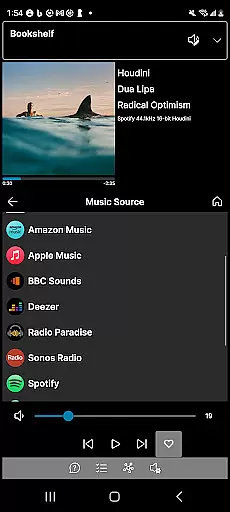
Other notable features include comprehensive volume control, easy group editing, and support for portrait, landscape, and dark modes. Whether you're managing playlists, adjusting EQ settings, or adding direct streaming URLs as custom radio stations, Phonos Ultimate delivers a robust set of tools to enhance your listening experience.
Phonos Ultimate offers an extensive music library that supports over a hundred music services, similar to what Sonos provides. This ensures users have access to a vast array of music options, enhancing their listening experience.
In addition to supporting popular music services, the app allows users to integrate local libraries and custom station URLs. This feature not only broadens the music selection but also guarantees that all content is legitimate and copyright-compliant, giving users peace of mind.
The ability to save queues as Sonos Playlists and manage these playlists directly within the app showcases its comprehensive music management capabilities. Users can add or delete tracks from playlists, offering flexibility and control over their music collections.
By providing unique features such as direct streaming URLs as custom radio stations, Phonos Ultimate further enriches the music library while ensuring all content adheres to copyright laws. This positions the app as a reliable tool for managing diverse music sources.
One of the standout features of Phonos Ultimate is its ability to display track streaming data, including sample rate and bit depth, for systems running on S2. This transparency allows audiophiles to monitor and optimize their audio quality settings according to their preferences.
The app supports EQ settings editing, enabling users to fine-tune audio outputs to match their acoustic environment or personal taste. Whether adjusting bass, treble, or balance, users can achieve the perfect sound profile for any setting.
Phonos Ultimate's commitment to high-quality audio is further demonstrated by its avoidance of the Sonos cloud API. By prioritizing speed and reliability, the app ensures minimal latency and uninterrupted playback, which are crucial for maintaining audio fidelity.
With support for every Sonos device except Ace headphones, users can enjoy consistent and superior audio quality across different devices. This compatibility underscores the app's dedication to delivering an exceptional auditory experience without compromise.
User-friendly interface
Comprehensive feature set
Reliable performance
Unique Devices View
No ads or cloud dependency
Not for initial setup
Limited to Sonos systems
No official endorsement
Advanced features may overwhelm
Requires existing Sonos system

Taal player that lets you sing any Indian & Western song with Tabla & Tanpura
 4.60
4.60
Background pads for your band
3.80
A High-Precision Audio Spectrum Analysis App
4.20
The ultimate media player for Android devices
3.90
Record, Mix & Master with all n-Track effects, 64-bit audio and Stem Separation.
4.70
Recording studio w/ 10k beats, pro vocal FX and a network of 20M rappers & fans!
4.60
Music, News & Sports Radio Tuner App. Tune in Live FM & AM Radio Stations.
4.80
The original SP-1200 experience on your iPad
4.20
The iconic iOS metronome app is now on Android.
3.70
Responsive piano with great sounds, graphics, and songs
4.80
A complete sound package for the sound engineer or enthusiast
4.60
Bass Booster & Volume Equalizer Pro improves your music and video sound quality
4.60
Save hundreds of dollars for a physical strobe tuner and instead use this app.
4.50
Formerly known as Spotistats! View your top tracks, artists, albums and more!
4.40
DJ Music Mixer Pro is a real DJ controllers and DJ Music Studio to remix DJ.
4.40
The Music Journey in Your Hands
4.30
Next generation modular control surface
4.10
The only true audiophile music player with Hi-Fi audio rendering and DSP engine
3.90
Simple mp3 and mp4 player with advanced features.
3.40

User Reviews