

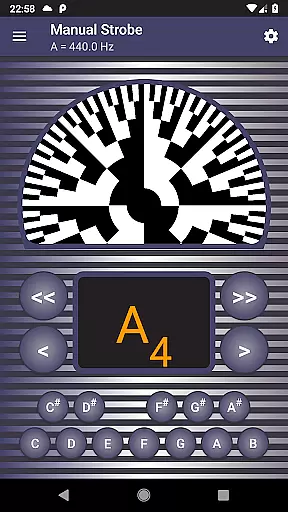
Strobe Tuner Pro is a highly accurate professional tuner that brings the stroboscopic effect to your mobile device. Designed for musicians of all levels, it supports guitar, violin, bass, ukulele, viola, cello, banjo, and shamisen. The app combines two independent tuners - chromatic and strobe - with advanced algorithms that ensure precise tuning even in noisy environments. Its unique features include manual mode emulating physical strobe tuners, built-in metronome functionality, and reference tone playback.
The application's accuracy makes it suitable for both professionals who demand precision and beginners learning proper instrument tuning. With support for various alternate tunings and multiple note naming conventions, Strobe Tuner Pro offers versatile tuning options. The app's sophisticated noise cancellation system works seamlessly even when using the metronome simultaneously, making practice sessions more efficient.
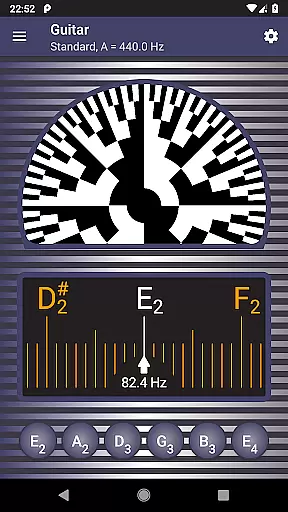
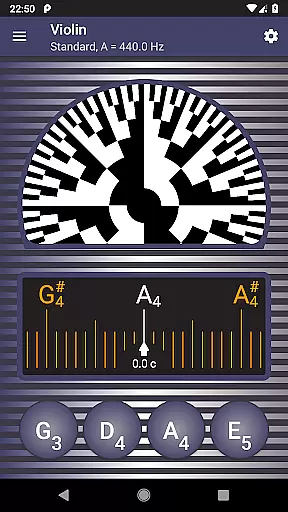
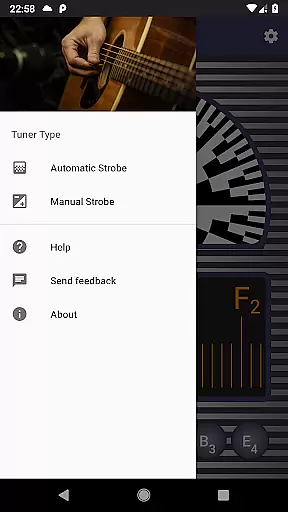
Strobe Tuner Pro stands out through its dual-tuner system and advanced technical implementation. The chromatic tuner uses Fast Fourier Transformation for frequency detection while the strobe tuner employs GPU-based algorithms similar to oscilloscope technology. This combination provides exceptional accuracy and responsiveness. The app's interface displays real-time stroboscopic patterns where pattern movement indicates tuning direction and speed.
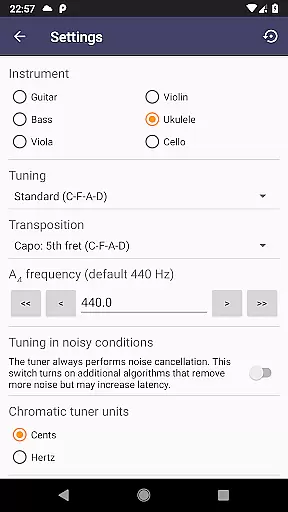
Additional notable features include multiple concert pitch settings, three note naming systems (English, European, Solmization), and equal temperament support. The app maintains an extensive test suite with recordings from various instruments, ensuring reliable performance across different devices. Beginners benefit from the first-start tutorial and built-in help system, while professionals appreciate the manual mode that replicates physical strobe tuner behavior.
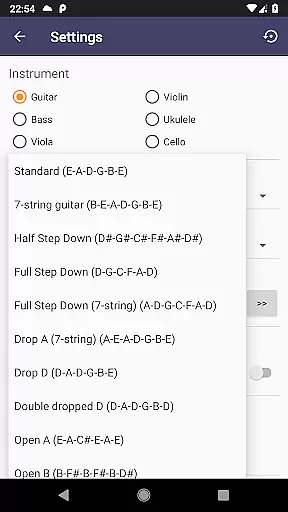
The integration of metronome functionality with chromatic tuning creates a powerful practice tool. Users can quickly switch between instruments through easy-access settings and choose from popular alternate tunings for guitar, ukulele, banjo, and shamisen. The app's comprehensive feature set makes it an essential tool for musicians seeking professional-grade tuning capabilities on their mobile devices.
Strobe Tuner Pro offers a comprehensive music library that caters to a wide range of instruments including guitar, violin, bass, ukulele, viola, cello, banjo, and shamisen. The application ensures that all the reference tones played are synthesized respecting the concert pitch setting, which guarantees an authentic auditory experience.
The app's dedication to copyright authenticity is evident in its meticulous design and functionality. It has been tested with numerous instruments, ensuring that each tone and frequency aligns perfectly with professional standards. This rigorous testing process not only enhances the reliability of the tuner but also assures users of the legitimacy of the audio content they are engaging with.
Furthermore, Strobe Tuner Pro incorporates advanced algorithms for its chromatic and strobe tuners, both of which operate independently yet derive input from the device's built-in microphone. These algorithms have been developed to emulate the stroboscopic effect and Fast Fourier Transformation, providing users with precise and accurate tuning capabilities.
By choosing Strobe Tuner Pro, musicians can be confident in accessing a vast and verified music library that upholds the highest standards of copyright authenticity and precision. This makes it an invaluable tool for both beginners and professionals who demand nothing less than perfection in their musical pursuits.
Strobe Tuner Pro stands out in the realm of audio quality options by offering exceptional precision and accuracy in its tuning capabilities. The app features two independent tuning algorithms - a chromatic tuner utilizing Fast Fourier Transformation and a strobe tuner emulating the stroboscopic effect, both ensuring top-notch audio quality for a variety of instruments.
Users can fine-tune their instruments with incredible accuracy thanks to the app's advanced noise cancellation feature, which functions effectively even when a metronome is operating simultaneously. This allows musicians to practice without any interference, maintaining the purity of sound at all times.
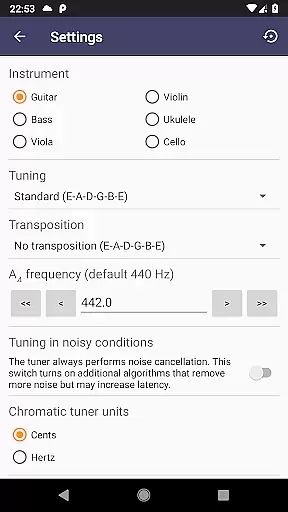
In addition to its primary functions, Strobe Tuner Pro provides several customization options such as concert pitch frequency settings and note naming conventions including English, European, and Solmization. These features enable users to tailor their experience according to personal preferences while preserving superior audio fidelity.
Whether you're a beginner learning to tune your instrument or a seasoned professional seeking extreme accuracy, Strobe Tuner Pro delivers unmatched audio quality options that cater to every musician's needs. Its commitment to excellence ensures that you will absolutely love the sound of your instrument and the music you play.
Highly accurate tuning
Advanced noise cancellation
Two independent tuners
Supports multiple instruments
Real stroboscopic effect
Paid application
Requires good microphone
Complex for beginners
No MIDI support
Heavy processing power

Fun & Easy Voice Changer – Record, Edit & Add Hilarious Effects!
 4.50
4.50
Turn your phone into a musical instrument from the future!
3.90
Gorgeous UI, Powerful music Search and Equalizer, the great choice for you!
4.70
Most Advanced AI Song Generator and Music Creator. Rap, Pop, Rock, Gospel & more
4.70
Visualize the guitar fretboard, master scales & play through changes like a pro!
4.50
Ultimate Sonos Controller
4.70
Recording studio w/ 10k beats, pro vocal FX and a network of 20M rappers & fans!
4.60
PowerAudio is a powerful offline music player.
4.20
Master Salsa Rhythm quickly and with a lot of fun!
4.30
Offline Music Player&MP3 Player with themes, equalizer, lyrics, music play mode
4.60
Pay Once, no monthly payment
4.60
DJ Music Mixer - DJ Remix: remix songs, make beat music & record mix of DJ.
4.40
Time Guru will strengthen your internal sense of musical time via random muting.
4.30
The Music Journey in Your Hands
4.30
The alternative folder based music player.
4.20
Next generation modular control surface
4.10
Versatile MP3 recorder with auto-backup to Dropbox and Google Drive
4.10
Remove ads permanently from Music Visualizer
4.4
Music Streaming suite for Ampache, Nextcloud Music and compatible backends.
4.4

User Reviews