

AutoPad is a versatile ambient pad loop application designed to enhance live performances and recordings with seamlessly looped drones. It provides musicians with tasteful soundscapes that can be triggered instantly and played for any duration, making it ideal for both stage and studio use.
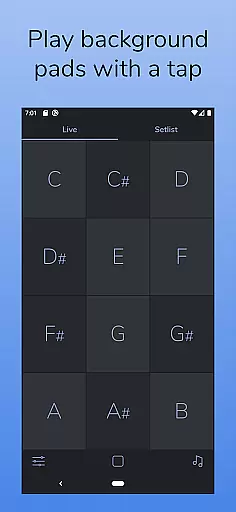
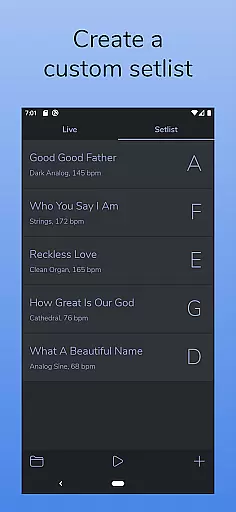
The app features two distinct modes - LIVE mode for instant access to all twelve keys, and SETLIST mode for creating custom song lists. With 10 carefully designed pad sounds, natural crossfades, and comprehensive controls including filters, reverb, and pan, AutoPad offers musicians complete creative freedom while maintaining technical precision.
Additional features include MIDI support for external controllers, a built-in metronome for band synchronization, and expandable sound libraries through in-app purchases or custom WAV file imports. Its dark color scheme ensures optimal visibility during performances, making it an essential tool for modern musicians.
AutoPad stands out with its dual-mode functionality, offering both immediate key access and customizable setlist creation. The app's 10 premium pad sounds are meticulously crafted to provide unique atmospheres across all 12 musical keys, ensuring versatility in various performance scenarios.
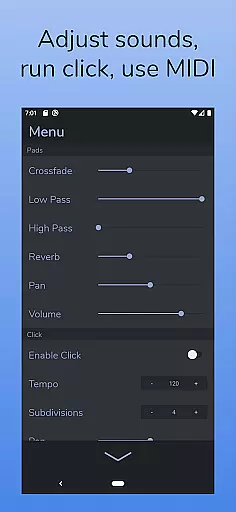
Musicians benefit from advanced control options including adjustable crossfade times, dual filters, reverb settings, pan controls, and volume management. The built-in metronome helps maintain perfect timing without additional equipment, while MIDI compatibility allows integration with professional setups through physical controllers.
For those seeking expanded capabilities, AutoPad supports WAV file imports and offers additional sound packs for purchase. The application's specialized design for worship music and its ability to function effectively in major or minor contexts makes it particularly valuable for contemporary church services and similar musical environments.
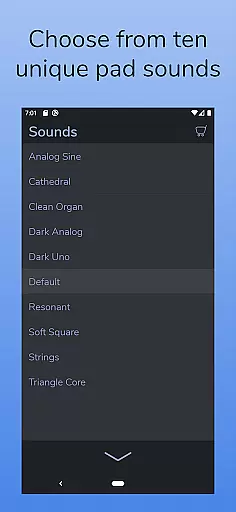
AutoPad offers a diverse music library with 10 carefully designed pad sounds included in the base version. These sounds provide unique atmospheres across all 12 musical keys, ensuring users have ample options for their creative projects.
In addition to the default library, AutoPad allows users to expand their sound collection through in-app purchases of additional sound packs. This feature ensures that musicians can continually refresh their sonic palette while maintaining access to high-quality audio resources.
For those who prefer a personalized touch, AutoPad supports importing custom pad files, although currently limited to WAV format on Android devices. This flexibility empowers artists to incorporate their own creations into the app's ecosystem.
All sounds within AutoPad are professionally crafted and licensed for commercial use, providing peace of mind regarding copyright authenticity. Musicians can focus on their performances without worrying about potential legal complications.
AutoPad delivers exceptional audio quality through its meticulously designed pad sounds. Each of the 10 included pads maintains consistent quality across all 12 musical keys, ensuring professional-grade output regardless of the chosen tonality.
The application features advanced audio controls including two filters, reverb amount adjustment, pan settings, and volume regulation. These tools allow users to fine-tune their soundscapes with precision, achieving the exact auditory atmosphere they desire.
With its seamless looping technology, AutoPad guarantees smooth transitions between notes and natural crossfades between keys. This technical sophistication ensures that the audio quality remains consistently high during live performances and recordings.
While supporting WAV file imports exclusively on Android, AutoPad maintains high audio fidelity throughout its operations. The built-in metronome further enhances timing accuracy, contributing to overall improved audio quality in ensemble settings.
User-friendly interface
Seamless looping technology
Versatile sound library
Comprehensive control options
Stage-friendly design
Limited Android functionality
No virtual MIDI support
WAV-only file format
Basic free sound selection
Specialized use case

SqueezePlayer turns your Android phone or tablet into a SqueezeBox on its own!
 4.60
4.60
Turn your phone into a musical instrument from the future!
3.90
Control your MIDI USB or Bluetooth devices in app and avoid some trampling
3.30
Brian Eno and Peter Chilvers’ acclaimed music app Bloom, radically reinvented.
4.80
The only true audiophile music player with Hi-Fi audio rendering and DSP engine
3.90
Music Streaming suite for Ampache, Nextcloud Music and compatible backends.
4.3
Learn to play the piano using falling notes!
3.80
PowerAudio is a powerful offline music player.
4.20
Full featured mp3 and audio player with Chromecast and Android Auto support.
4.40
More downloads than any other metronome. Includes drum machine & tempo trainer.
4.80
Listen radio AM / FM Stations. Live AM / FM Radio App Station. Radio Com.
4.70
Pay Once, no monthly payment
4.60
A synth that really lets you shape your sounds!
4.50
Visualize the guitar fretboard, master scales & play through changes like a pro!
4.50
Guzheng Master supports many playing techniques as an acoustic Guzheng
4.50
Let your Android device with the sound effects you want
4.50
DJ Music Mixer Pro is a real DJ controllers and DJ Music Studio to remix DJ.
4.40
Network/Cloud Streaming, Visualization, Graphic Equalizer and Sound Effects.
4.20
The Minimalistic Premium Music Player. Handmade with passion for music
2.20


User Reviews