

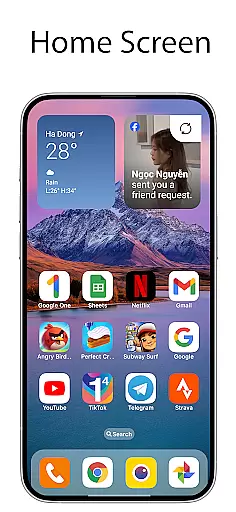
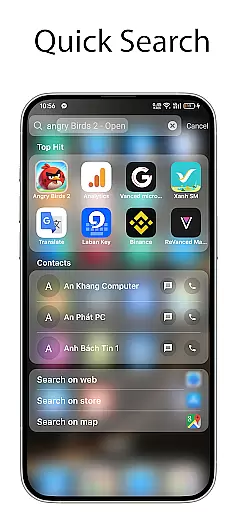
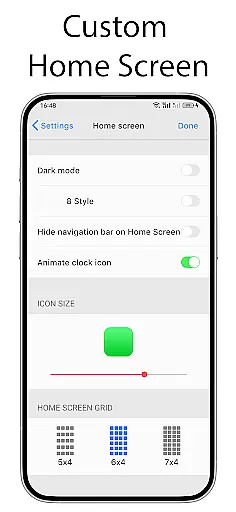
OS Launcher 18 - Phone 16 Max offers a premium customization solution for Android users who seek both simplicity and luxury in their device's interface. This launcher app transforms the visual appearance of your Android device, providing a clean and elegant user experience. With features like customizable app icons, wallpapers, and intuitive layout options, it allows users to replicate the Simple interface while retaining the powerful functionality of Android.
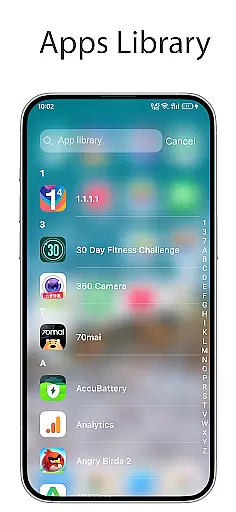
The launcher includes practical tools such as an apps library for organizing applications into categories, lock app functionality for enhanced security, and widgets that add useful information directly to the home screen. Whether you're looking to streamline your home screen or create a more personalized smartphone experience, OS Launcher 18 - Phone 16 Max delivers versatility and style.
OS Launcher 18 - Phone 16 Max stands out with its comprehensive feature set designed to enhance usability and aesthetics. The app library helps organize apps into categories, making navigation seamless and efficient. Users can also lock sensitive apps to protect their privacy from intruders attempting unauthorized access.
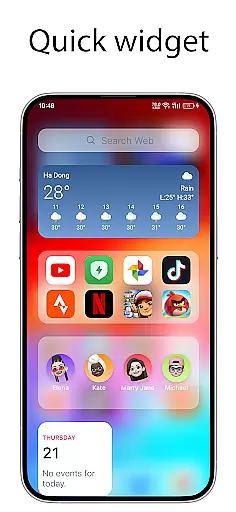
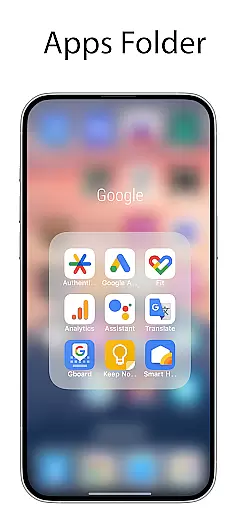
Another highlight is the Today View, which displays essential information such as weather forecasts, favorite contacts, and calendar events. The launcher supports app folders, enabling users to group similar apps together by simply dragging and dropping them. Additionally, the customizable icons and hide apps feature allow for complete personalization, letting users modify their interface to suit individual preferences.
For those who value utility, the unread notification dot ensures you never miss important messages. Coupled with beautiful weather widgets and numerous other customization options, OS Launcher 18 - Phone 16 Max provides everything needed to tailor your Android device exactly how you want it.
OS Launcher 18 - Phone 16 Max offers a wide array of customization options that allow users to personalize their Android devices extensively. This app provides features such as customizable app icons, wallpapers, and the ability to modify both the icon and name of applications. Users can tailor their device's interface to match their personal style or mood while maintaining the core functionality of the Android operating system.
The launcher includes an Apps Library feature which organizes apps into categories for easier access and management. Additionally, it allows for the creation of folders by simply dragging and dropping one app onto another, enabling better organization on the home screen. With these tools at hand, users have the freedom to arrange their apps in a way that best suits their workflow or aesthetic preferences.
For those who value privacy, OS Launcher 18 also offers options like hiding apps from the home screen and locking them with permissions so they cannot be accessed without authorization. These security-focused customization features ensure that sensitive information remains protected while still allowing full control over how content is displayed on your device.
Theme compatibility within OS Launcher 18 - Phone 16 Max ensures that users can seamlessly integrate various themes across their deviceu2019s interface. The application supports different visual styles, including luxury designs, making it possible for individuals to achieve a consistent look throughout their entire mobile experience. Whether you prefer minimalist aesthetics or vibrant colors, this launcher adapts to fit your desired theme effortlessly.
In addition to supporting diverse themes, the launcher comes equipped with beautiful widgets and weather forecasts that enhance the overall appearance of your home screen. These elements are designed not only to provide useful information but also to blend harmoniously with whatever theme you choose. By offering visually appealing yet functional components, OS Launcher 18 enhances both form and function.
Furthermore, if any issues arise regarding theme integration or other aspects of customization, support is readily available. Users can reach out via email for assistance, ensuring that any questions about theme compatibility or customization challenges are addressed promptly. This level of customer service underscores the commitment to delivering a personalized and trouble-free user experience.
User-friendly interface
Highly customizable options
Enhanced security features
Beautiful widget designs
Efficient app organization
May consume additional resources
Limited default icon styles
Premium features require payment
Occasional compatibility issues
Notifications may need manual setup

Adult video chat, dating, making friends, random matching
 4.20
4.20
Ultimate widget creator. Design custom widgets for a truly unique home screen!
3.90
Customize glowing edges, wallpapers, and caller screen with EdgeAura.
3.50
Launcher OS™ Pro without ads help make your phone simple and pretty
4.30
Choose your keyboard with RGB colors effect, themes, fonts, emojis.
4.60
Struggling to find apps? Use this app to locate and open any app on your phone!
2.20
Your home screen, just the way you like it.
4.30
Install amazing sticker packs: endless styles, always cool.
4.70
Custom ringtones songs, music ringtones for Android phones
4.60
Unique Android Launcher
4.60
Customize your home screen with stunning themes, blur, widgets & icons.
4.60
Handcrafted pixel art icons, widgets & wallpapers
4.60
Beautiful realistic hybrid watch face with numerous customization options.
4.50
Transform your phone with Launcher iOS 26 - Smooth & elegant iOS experience
4.50
Yandex Browser — stylish and secure, with voice search and data compression
4.40
Themes - Widget & Wallpaper: Customize home screen, icon changer w unique themes
4.30
Run multiple accounts of the same app on a single device
4.10
Create unique, fun emojis with Funny Emoji Maker! Unlimited creativity!
4.00
Emoji Maker app - Design custom emojis and effortlessly blend them with Mixer
3.80

User Reviews