

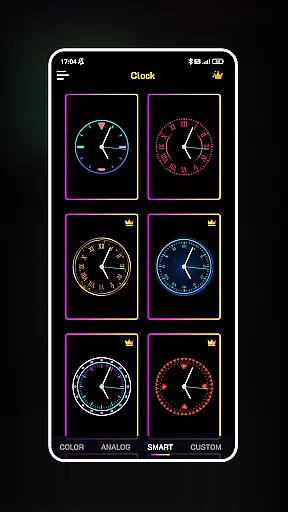
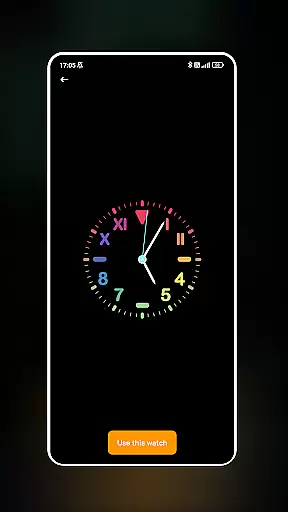
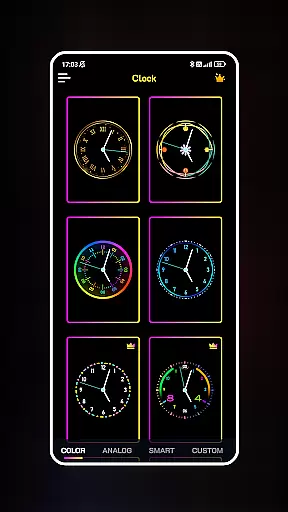
Neon Clock Wallpaper is a dynamic personalization app that allows users to design and customize unique clock wallpapers for both their home screen and lock screen. The app offers a wide selection of pre-made clock templates with various designs, colors, and stunning neon effects. Users can choose from these templates or create a completely custom clock by adjusting components, colors, sizes, and styles. This flexibility makes it an ideal tool for those looking to express their personal style through their phone's appearance.
The app stands out by providing not only aesthetic value but also practical functionality. With its vibrant neon effects and diverse customization options, Neon Clock Wallpaper transforms a regular smartphone screen into a personalized work of art. Whether you want a minimalist clock design or something more elaborate, the app caters to all preferences. It is particularly useful for users who enjoy regularly refreshing their device’s look while maintaining a functional timepiece on their screen.
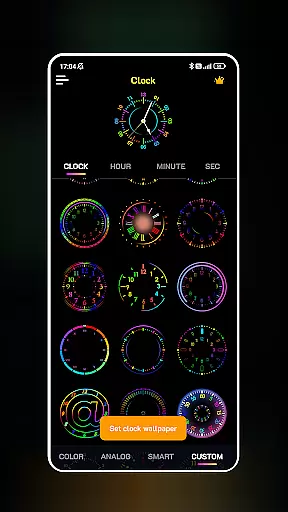
Neon Clock Wallpaper boasts several standout features that make it a top choice in the personalization category. One of its key strengths is the ability to choose from a variety of pre-designed clock templates. These templates come in multiple styles and color schemes, ensuring there is something for everyone. Additionally, the app provides tools for creating fully customized clocks, allowing users to modify every aspect of the clock's appearance, including hands, numbers, and background elements.
Another notable feature is the inclusion of vibrant neon effects. These effects give each clock a lively and modern look, making them visually appealing. The app also supports setting the customized clock as both wallpaper and lock screen, offering dual functionality. With intuitive controls and real-time previews, users can easily experiment with different designs until they achieve the perfect look. This combination of creative freedom and ease of use sets Neon Clock Wallpaper apart from other personalization apps.
Customization is at the heart of Neon Clock Wallpaper, allowing users to express their unique style through diverse clock designs. The app offers a wide array of customization options that cater to individual preferences, ensuring that no two clocks need to be the same.
With an extensive selection of pre-made clock templates, users can choose from various designs and colors, each offering a different aesthetic appeal. This flexibility ensures that whether you prefer minimalist designs or vibrant, eye-catching styles, there's something for everyone.
Beyond the templates, the app empowers users to create entirely new clocks by combining components and customizing colors, sizes, and styles. This level of personalization means that your clock isn't just a time-telling tool; it's a reflection of your personality on your device's screen.
The ability to customize every aspect of the clock's appearance provides immense value to users who wish to make their devices truly their own. With Neon Clock Wallpaper, customization isn't just an option; it's a core feature that enhances user experience.
Theme compatibility is crucial for users who want their clock wallpapers to seamlessly integrate with their device's overall look and feel. Neon Clock Wallpaper excels in this area by ensuring that its clocks are not only visually appealing but also compatible with various themes.
Whether you have a light theme or a dark one, the app's stunning neon effects adapt beautifully, maintaining visual consistency across your device. This compatibility ensures that the clock remains readable and attractive, regardless of the background or theme you choose.
Moreover, the app allows users to set their self-designed clocks as wallpapers for both home screens and lock screens, enhancing the cohesive look of their devices. This dual compatibility enriches the user experience by providing a unified aesthetic throughout the device.
By focusing on theme compatibility, Neon Clock Wallpaper ensures that users enjoy a harmonious and visually pleasing interface, making their devices not only functional but also a joy to look at every day.
User-friendly interface
Highly customizable designs
Vibrant neon effects
Dual screen support
Wide template selection
Limited free options
Ads may interrupt
Premium features costly
Consumes battery
Occasional glitches

Ultra realistic gold analog watch face with lots of customization options.
 4.50
4.50
Capture moments that pass like a storm, second by second.
4.5
Realistic animated snow on your wrist, with 10 images landscapes to choose from
4.00
Unique Android Launcher
4.60
Bring adorable pets to life on your screen. Playful, interactive and full of fun
4.60
Turn text & photos into stunning AI videos, art, and creative visual stories.
4.50
Nothing Icon pack with more than 3750+ highly crafted icons.
4.70
Customize your home screen with stunning themes, blur, widgets & icons.
4.60
Crystal-clear, square icon provides a sleek and sophisticated visual upgrade
4.00
Sparkle your screen with Glitter Wallpapers For Girls and Cute Backgrounds!
4.80
350+ widgets with a premium glass-style finish, perfect for home & lock screens.
4.70
Glass style colourful icons with a One UI look and feel
4.60
A retro cartoon style watch face and a punch right in the face of the copyright
4.60
Make your phone look simple & luxury, like iDevice
4.60
Over 28,000 high quality icons to bring color & homogeneity to your phone.
4.60
Art & Emoji Keyboard with Cool Fonts, Cute Themes and Custom Designs.
4.40
A light in the dark, a unique style and an andless cutomization!
4.30
More than 3000+ themes and 9000+ wallpapers for everybody!
4.10
HappyLighting is a Bluetooth lamp control software.
3.40

User Reviews