

My Invisalign is a comprehensive application designed for individuals undergoing orthodontic treatment with Invisalign clear aligners. This app serves as an essential tool for both prospective and current patients, offering a range of functionalities to support the journey towards achieving a perfect smile.
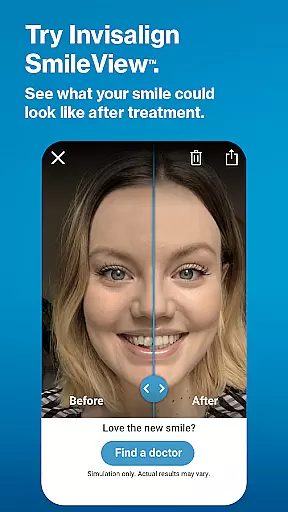
For those considering Invisalign treatment, the app provides detailed information about the process and benefits of using clear aligners. A standout feature is the SmileView simulation tool, allowing users to visualize potential results. Additionally, it facilitates finding nearby specialists and scheduling consultations, ensuring personalized guidance throughout the treatment.
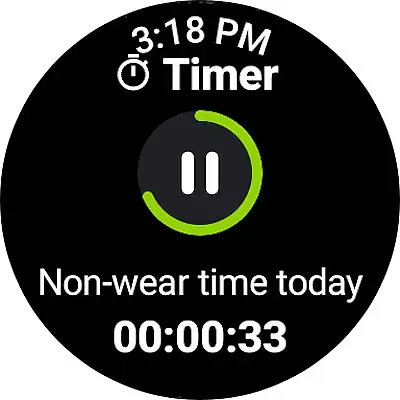
Existing Invisalign patients can utilize the app to manage their treatment effectively. Key features include tracking wear time, setting reminders for aligner changes, and accessing ClinCheck plans shared by dentists. The integration with Wear OS enhances user experience by enabling wearable tracking. Overall, My Invisalign significantly contributes to maintaining treatment schedules and achieving optimal outcomes.
The My Invisalign app boasts an array of sophisticated features tailored to enhance the user's treatment experience. One of its primary functions is the SmileView simulation tool, which empowers users to preview their future smiles and share these simulations with friends and family, thus aiding in decision-making.
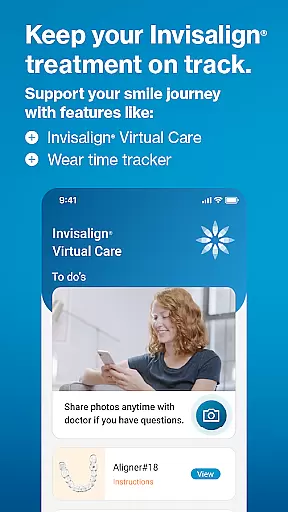
Another significant aspect is the ability to access ClinCheck treatment plans directly through the app, provided by the treating dentist. This feature ensures that patients remain informed and engaged with their progress. Moreover, the app incorporates Invisalign Virtual Care, facilitating remote communication between patients and doctors via photo sharing and feedback sessions.
Additionally, the app offers robust tracking capabilities, including monitoring wear time with various view options and setting timely reminders for aligner changes. Users can also personalize their calendars to keep track of appointments and events. These features collectively ensure adherence to treatment protocols and contribute to successful treatment outcomes.
Companion app integration is essential for users who want a seamless experience between their mobile devices and wearables. The My Invisalign app excels in this area by offering robust connectivity with Wear OS devices.
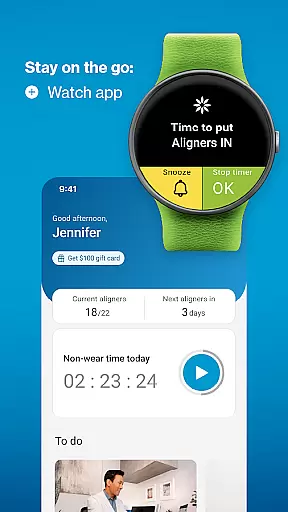
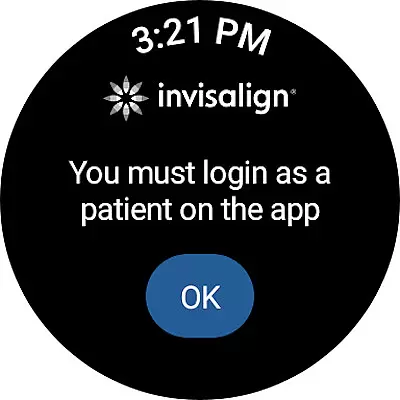
Through the My Invisalign app, users can sync their treatment data directly to their smartwatches, ensuring they have real-time access to their aligner tracking information no matter where they are. This feature allows patients to stay on top of their treatment schedules without needing to constantly check their phones.
The benefits of this integration include increased convenience and better treatment adherence. Patients can receive timely reminders directly on their wrists, prompting them to change aligners or capture progress photos. This ensures that users never miss an important step in their treatment journey.
By bridging the gap between smartphones and wearable technology, My Invisalign enhances user engagement and supports more effective orthodontic care. This thoughtful integration underscores the app's commitment to leveraging technology for improved patient outcomes.
Wear OS and device compatibility is crucial for apps aiming to provide comprehensive support across different platforms. The My Invisalign app demonstrates strong compatibility with various Wear OS devices, making it accessible to a wide range of users.
This app has been optimized to work seamlessly with multiple smartwatch models, ensuring consistent performance regardless of the specific device a user owns. Whether you have a Samsung, Fossil, or other Wear OS-enabled watch, you can expect smooth functionality and reliable data synchronization.
Users benefit from this broad compatibility as it allows them to choose their preferred wearable without worrying about losing access to vital treatment features. The ability to track aligner wear time and receive notifications directly on a smartwatch enhances the overall user experience significantly.
By prioritizing extensive device compatibility, My Invisalign ensures that all patients can take full advantage of its innovative features, ultimately leading to more successful treatment outcomes and higher patient satisfaction.
User-friendly interface
Comprehensive treatment tracking
Remote doctor communication
Personalized smile simulation
Integration with Wear OS
Limited to Invisalign users
Some features require dentist invitation
Premium features may incur costs
Dependent on device compatibility
Requires consistent internet connection

an Analog Watch Face for winter season with freeze winter background for Wear OS
 4.0
4.0
Snowflake Rose Gold Watch Face - Digital, modern, & sleek with GYRO effect.
4.10
Current temperature, weather hourly, weather radar by the weather forecast app
4.40
Beautiful artistic animated digital watch face, with a customizable layout!
4.40
Ideal for surviving in the wasteland left after nuclear fallout
4.50
Locate your family members by GPS phone location tracker everywhere and anytime
4.30
The ultimate destination for kids ages 3-8 to explore the Marvel Universe!
4.30
Real-time weather radar with temperatures, warnings, hurricanes, and widgets
4.80
Track your active life in one place and share the journey with friends.
4.40
The Chevron App allows you to pay for fuel from the comfort of your car!
4.80
MyNISSAN® lets you remotely control your car from your phone.*
4.50
Digital watch face. For Wear OS devices.
4.40
A white realistic classic analog watch face with many customization options.
4.40
Let's celebrate Thanksgiving - Wear Os watch face
4.20
Structured watch face with seven complications and modular UI elements
3.90
Stay in touch with your friends and family using LINE!
3.40
A heartwarming Christmas scene featuring a cute image of Santa and Rudolf
4.3
Contemporary digital watch face with five complications
4.0
Fitness interactive virtual pet super fighter boy watch face
4.1


User Reviews