

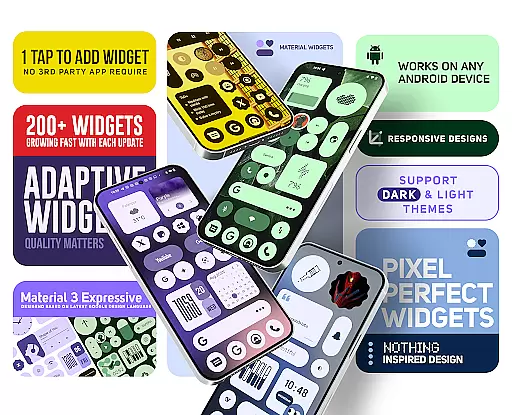
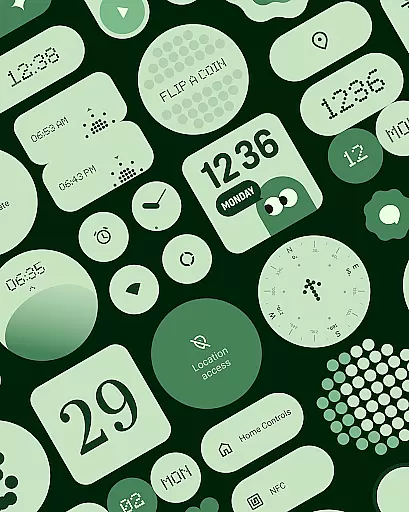
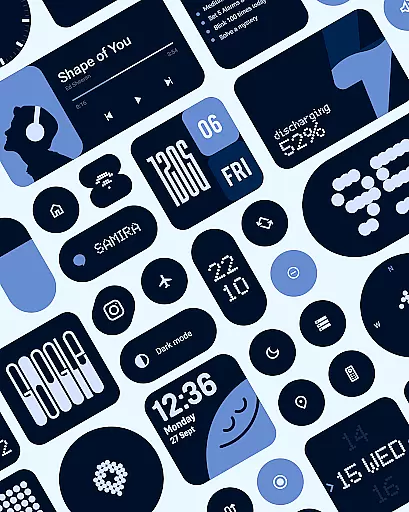
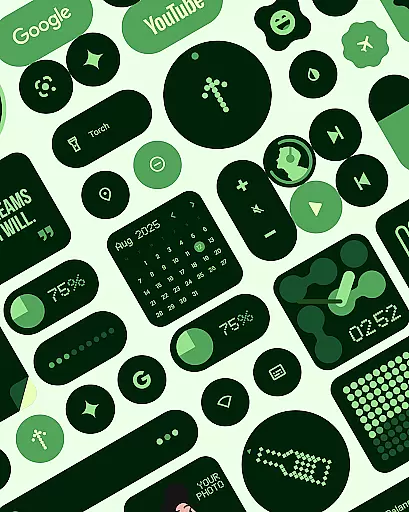
Material Widgets is a feature-rich personalization app that brings Google's Material 3 design to your home screen. The app offers over 200 customizable widgets that dynamically adapt to your wallpaper and system settings, providing a seamless experience between light and dark modes.
The widget collection includes clocks, calendars, weather indicators, battery monitors, and productivity tools - all designed with modern aesthetics and usability in mind. What sets Material Widgets apart is its native functionality, eliminating the need for third-party apps like KWGT while delivering superior performance and design quality.
Ideal for users seeking to create a personalized yet cohesive home screen experience, this app makes it simple to maintain a visually stunning and functional mobile interface that truly reflects individual style.
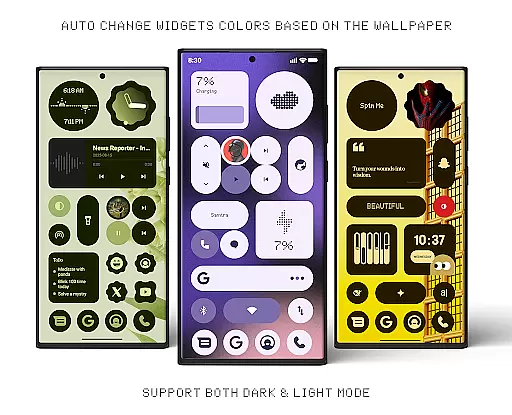
Material Widgets stands out with its comprehensive set of features designed for maximum customization. The app's signature capability is its automatic theming engine, which uses your wallpaper to generate matching color schemes across all widgets, ensuring perfect visual harmony.
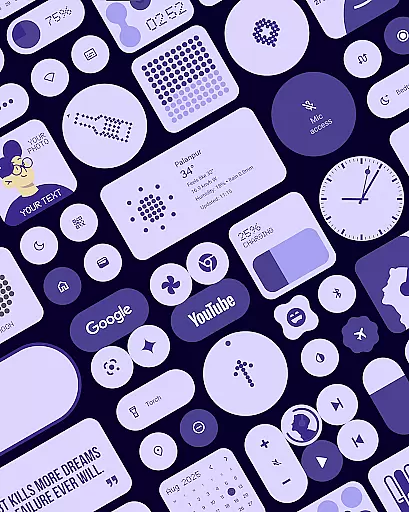
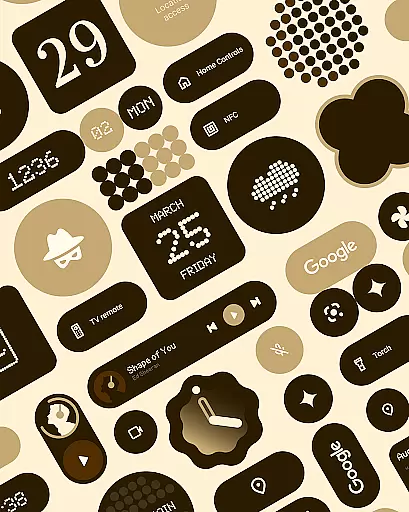
Each widget category serves distinct purposes while maintaining consistent design language. Clock widgets offer both digital and analog options, calendar widgets provide intelligent scheduling views, and weather widgets display detailed forecasts with adaptive layouts. The app also includes practical tools like quick settings controls, pedometer displays, and motivational quote panels.
Advanced resizing options allow precise placement on any home screen configuration. Unlike many alternatives, Material Widgets operates independently without requiring additional launcher applications, making it both efficient and easy to use while delivering professional-grade results.
Material Widgets offers an extensive range of customization options, ensuring that every user can tailor their home screen to reflect their personal style. With over 200 widgets available, the app provides a diverse selection including Clock & Calendar, Battery, Weather, Quick Settings, Contact, Photo, Google, Productivity, Pedometer, and Quote widgets.
Each widget is designed with modern shapes, bold typography, and dynamic theming that automatically adapts to your wallpaper and system colors. This seamless integration allows for a cohesive look that feels fresh and uniquely yours. The ability to resize and adjust widgets from compact sizes to full-screen layouts gives you complete control over your home screen's layout.
The app also includes matching wallpapers inspired by Material You design principles, enhancing the overall aesthetic and providing the perfect backdrop for your personalized widgets. By offering such a wide variety of customization options, Material Widgets empowers users to create a home screen that is not only functional but also expressive and dynamic.
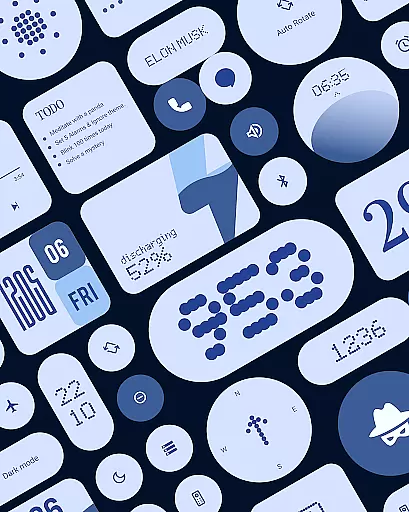
Theme compatibility is at the heart of Material Widgets' design philosophy. Every widget in this pack adapts its colors to match your chosen wallpaper, ensuring a harmonious and visually pleasing experience. Whether you prefer dark or light modes, the widgets will seamlessly adjust, maintaining consistency across your deviceu2019s interface.
This level of theme compatibility extends beyond just color adaptation; it encompasses modern design elements like bold typography and adaptive layouts that enhance usability while keeping aesthetics intact. Users can enjoy a perfectly styled home screen without needing third-party apps, as these native widgets work out-of-the-box with simple tap-to-add functionality.
By focusing on deep integration with Androidu2019s theming engine, Material Widgets ensures that all components remain visually consistent regardless of changes in system settings or user preferences. This commitment to theme compatibility makes it easy for anyone to maintain a polished and professional appearance on their device while enjoying the flexibility to express individuality through customizable features.
Native widget support
Automatic theming
Wide widget variety
Regular updates
Wallpaper integration
Limited iOS support
High storage use
Occasional bugs
Premium features
Complex settings

Classic analogue watch face. For wear os devices.
 4.60
4.60
Ninja Turtles Cowabunga SE watch face for Wear OS
4.50
More than 3000+ themes and 9000+ wallpapers for everybody!
4.10
The definitive Icon pack maker and editor
4.30
Ultimate Gallery Lock App - Hide Pictures, Videos and Lock Apps Instantly!
4.60
Stylish Pink Cute Hippo keyboard with 10000+ customized keyboard themes!
4.60
Emoji Maker app - Design custom emojis and effortlessly blend them with Mixer
3.80
set a new experience for the Android mobile phone
4.20
Custom ringtones songs, music ringtones for Android phones
4.60
Dark icon pack based on One 8
4.80
Enjoy a variety of amazing live wallpapers and colorful EDGE lighting borders!
4.80
Glass style colourful icons with a One UI look and feel
4.60
Ultra realistic gold analog watch face with lots of customization options.
4.50
Beautiful realistic hybrid watch face with numerous customization options.
4.50
3D, live, and moving wallpapers & themes in 4K and HD for your device.
4.50
Color phone with cool effects for call screen, flash alert & ringtones music
4.50
Art & Emoji Keyboard with Cool Fonts, Cute Themes and Custom Designs.
4.40
Themes - Widget & Wallpaper: Customize home screen, icon changer w unique themes
4.30
Ultimate widget creator. Design custom widgets for a truly unique home screen!
3.90

User Reviews