

Clean Sweep Plus is a comprehensive phone management tool designed to optimize device performance and simplify daily maintenance tasks. The app offers a suite of practical features including junk file cleaning, large file management, and battery status monitoring.
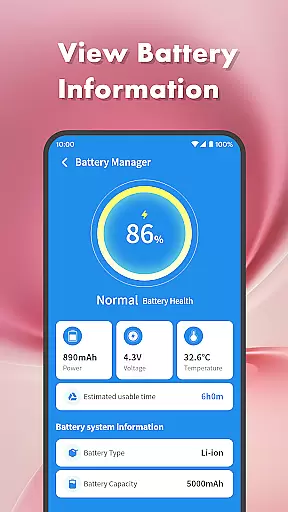
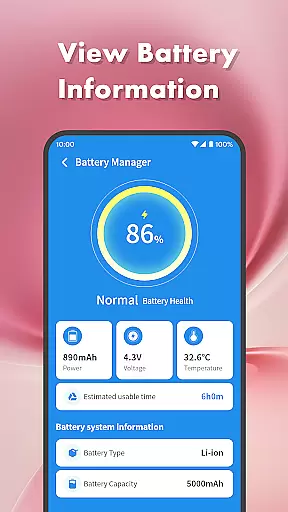
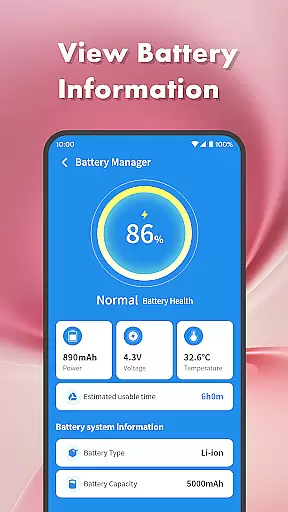
One of the standout capabilities is its App Manager, which allows users to easily uninstall infrequently used applications. Additionally, the Battery Management Center provides detailed insights into battery health and usage patterns. These tools collectively ensure your device remains clutter-free and operates at peak efficiency.
Whether you need to free up storage space, manage app installations, or monitor battery performance, Clean Sweep Plus delivers an intuitive interface that makes phone management straightforward and efficient. Its user-friendly design and essential utilities make it an invaluable tool for maintaining an organized and high-performing mobile device.
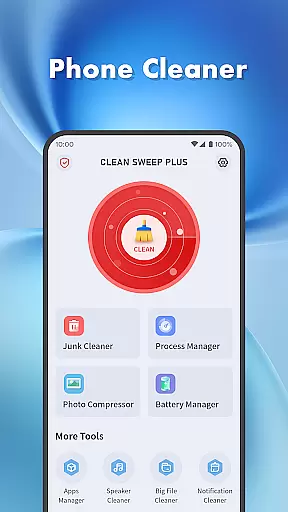
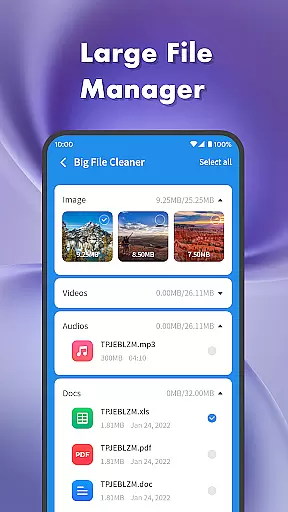
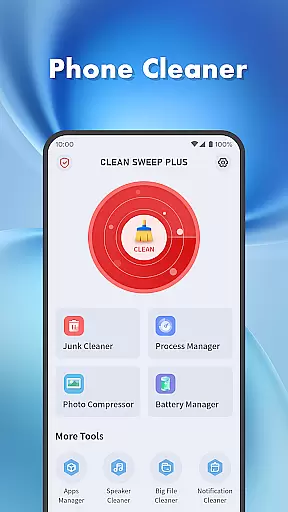
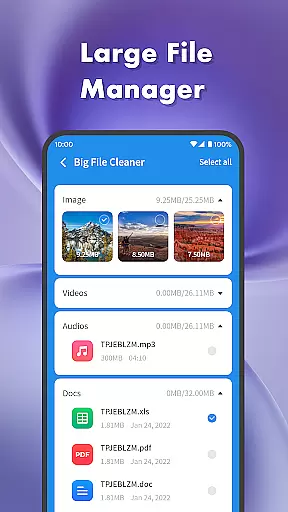
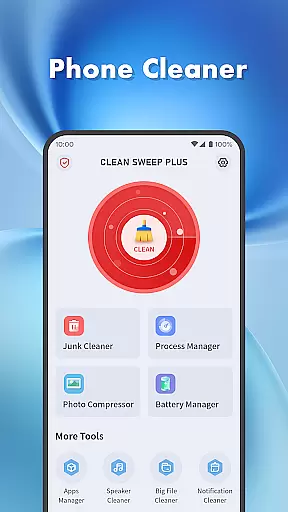
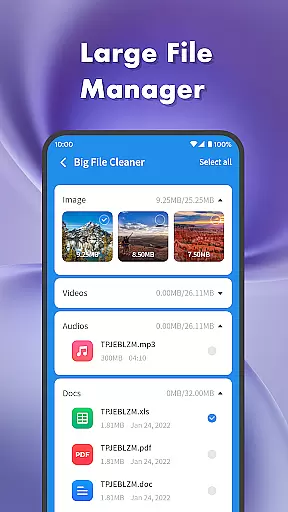
Clean Sweep Plus stands out with its diverse range of features tailored for effective phone management. The Junk Cleaner efficiently scans and removes unnecessary files, while the Large File Manager helps identify and manage bulky media files such as images, videos, and audio.
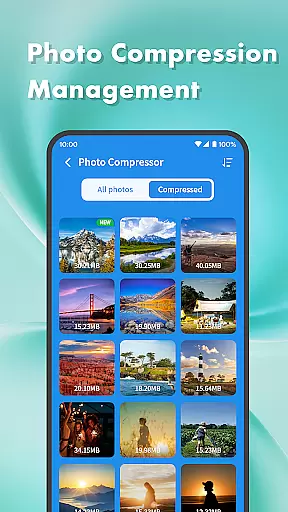
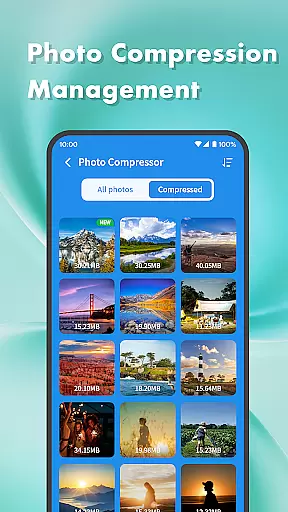
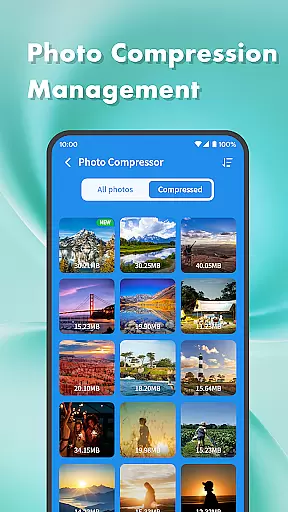
The app also includes a Photo Compression tool to reduce file sizes without compromising quality, alongside a Notification Cleaner that declutters the notification bar. For those looking to optimize their app ecosystem, the App Manager provides a streamlined uninstallation process, complemented by the Process Manager that monitors background app activities.
Battery Management tools offer detailed analytics on power consumption and battery health, ensuring prolonged device longevity. With additional utilities like Speaker Cleaner, Clean Sweep Plus consolidates all essential phone management functions into one accessible platform, enhancing both usability and device performance.
When it comes to mobile device management tools, the accuracy and effectiveness of core functions are paramount. Clean Sweep Plus excels in this area by offering a comprehensive suite of features designed to optimize your phone's performance.
The app's Junk Cleaner precisely identifies unnecessary files, while the Large File Manager helps you locate space-consuming media. The Battery Management Center provides reliable data on battery health and estimated usage time, ensuring you're never caught off guard. Each tool has been carefully developed to deliver measurable results.
What sets Clean Sweep Plus apart is its practical approach to device management. The App Manager offers precise control over installed applications, and the Notification Cleaner effectively declutters your notification bar. These features work together seamlessly to maintain your phone's optimal performance.
Users benefit from the app's technical precision as it handles each task with care. Whether compressing photos without quality loss or managing background processes, Clean Sweep Plus maintains a perfect balance between functionality and system stability, making daily phone management both effective and worry-free.
A well-designed interface is crucial for productivity tools, and Clean Sweep Plus demonstrates exceptional attention to user experience through its intuitive design. The developers have created a visually clear layout that makes navigation effortless for users of all technical levels.
Each feature is strategically placed within the interface, following logical grouping principles. The main dashboard presents essential tools like the Junk Cleaner and Battery Management Center in easy-to-find locations. This thoughtful arrangement ensures users can quickly access the functions they need without unnecessary searching.
Clean Sweep Plus maintains consistency across its various sections, from the App Manager to the Speaker Cleaner. Standardized icons and recognizable patterns help users understand each function's purpose at a glance. The learning curve is minimal, allowing even novice users to feel comfortable right away.
This focus on simplicity extends beyond mere aesthetics. The interface responds quickly to user inputs, and each action produces immediate, predictable results. Such reliability builds user confidence and encourages regular use of the app's complete feature set.
User-friendly interface
Comprehensive toolset
Efficient junk cleaning
Intuitive app management
Practical battery insights
Limited advanced features
Basic photo compression
No cloud backup option
Occasional slow performance
Ads in free version

A powerful, easy-to-use flight computer on your phone or tablet!
 3.80
3.80
A recovery soft,it features photo recovery, video recovery, file recovery.
3.40
An open-source APK explorer for Android!
4.10
ADB support Android 4.X-Android 13(Support wireless pair mode).No root required!
4.70
Small and simple app to Verify Root Access and BusyBox Install!
4.70
The Ultimate Bluetooth Keyboard & Mouse. Securely control your PC, Mac, and more
4.50
Connect wirelessly to your computer to watch movies, browse the web, play games
5.00
Creation, Learning, Entertainment & More — The All-in-One AI Search Engine
4.70
A clean app.
4.50
Change your GPS location instantly. Simulate routes anywhere in the world.
4.90
Excellent scientific calculator with symbolic algebra, integrals, derivatives
4.80
Learn the vast amount of system information about device and monitor it's state
4.70
The one-and-only remote control for PC, Mac, and Linux
4.70
Fast Video Downloader, Movie Downloader, Torrent Downloader & Adblock Browser
4.70
Planner and Tracker for Stardew Valley
4.60 4.50
4.50
Complete kernel toolbox with features to manage and tweak your rooted device
4.30
PC precision for mobile gaming: dominate with keyboard and mouse!
4.30
VESC Tool can monitor and configure VESC-compatible devices over BLE and Wifi
4.20

User Reviews