

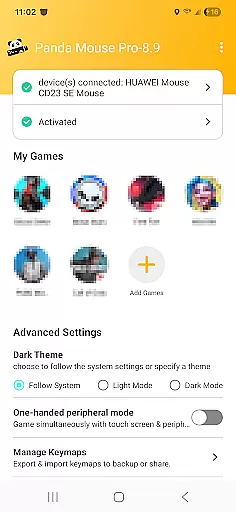
Panda Mouse Pro is a specialized keymapper tool that revolutionizes mobile gaming by allowing players to use their keyboard and mouse for enhanced control. Designed for gamers who demand precision, this app supports virtually all keyboard and mouse brands and works seamlessly with Android devices. Whether you're playing shooters, MOBAs, or sports games, Panda Mouse Pro delivers pinpoint accuracy and faster reaction times compared to traditional touch controls.
One of the standout features of Panda Mouse Pro is its ability to launch games directly without requiring cloning, while also ensuring secure Google Play logins. It employs unique technology to prevent bans in games that restrict duplication running, making it a reliable choice for competitive gamers. Compatible with both rooted and non-rooted devices, it offers hassle-free activation across various Android versions, including direct activation on Android 11+.
Panda Mouse Pro stands out through its innovative features tailored specifically for mobile gamers. The Direct Game Launch functionality eliminates the need for cloning, enabling users to jump straight into their favorite games. Its secure Google Play login ensures that your gaming accounts remain protected while providing an uninterrupted experience.
The app's universal compatibility with almost all keyboard and mouse brands makes it versatile for different setups. Additionally, Panda Mouse Pro supports extensive game genres, from shooting games to MOBAs and sports titles, offering customizable controls for each type. With options like Android 11+ direct activation, PC/Mac quick activation for older versions, and automatic activation for rooted devices, it provides flexible solutions for all users.
Beyond its core functionalities, Panda Mouse Pro incorporates ban-proof technology, giving gamers peace of mind when playing competitively. This feature, combined with its user-friendly interface and comprehensive video tutorials, ensures that even beginners can quickly master the app and enhance their gaming performance.
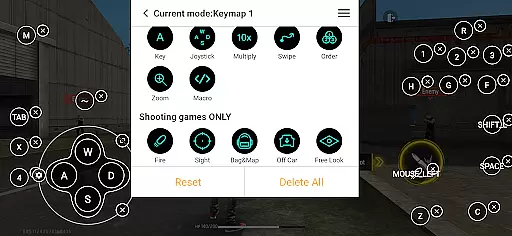
Panda Mouse Pro is a keymapper tool that allows gamers to use their keyboard and mouse for mobile gaming, providing superior control and precision. The core function of this application lies in its ability to map keyboard keys and mouse actions to touchscreen inputs, which is crucial for gamers seeking an edge in competitive play.
The app achieves its primary function through direct game launching, ban-proof technology, and universal compatibility with various input devices. This seamless integration ensures that users can enjoy pinpoint accuracy in shooters, swift reactions in MOBAs, and effortless control across different game genres without the fear of account bans or compatibility issues.
For the user, this means an elevated mobile gaming experience where they can fully unleash their skills. Gamers no longer have to rely solely on touch controls; instead, they can leverage the speed and accuracy of their preferred peripherals. This functionality effectively bridges the gap between PC-like control schemes and mobile gaming, offering a significant competitive advantage.
Ultimately, Panda Mouse Pro's dedication to functional accuracy and effectiveness translates into tangible benefits for the end-user. By removing barriers such as device compatibility and security concerns, it empowers gamers to focus on what truly matters - enjoying and excelling in their favorite games with enhanced precision and confidence.
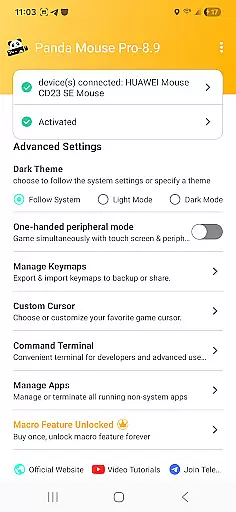
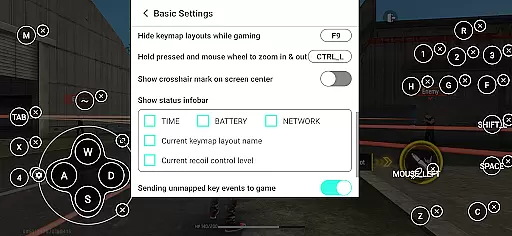
Achieving interface simplicity and intuitiveness is vital for any tool, especially one like Panda Mouse Pro, which caters to gamers who require quick access and ease of use. The application boasts a straightforward setup process that accommodates different Android versions and device types, ensuring that users can activate the keymapping feature without hassle.
Panda Mouse Pro provides clear instructions and support through video tutorials and activation guides. These resources help demystify the initial setup for users who may not be technically inclined, making the interface more accessible. Whether it's activating directly on Android 11+ devices or using a PC or Mac for older versions, the steps are designed to be intuitive and user-friendly.
Users benefit from this simplicity as it reduces the learning curve associated with adopting new technology. With features like secure Google Play login and ban-proof gaming, the app removes potential frustrations related to account security and game restrictions. This thoughtful design ensures that even novice users can navigate the interface with ease.
In essence, Panda Mouse Pro's commitment to maintaining an intuitive and simple interface enhances the overall user experience. It allows gamers to concentrate on their performance within games rather than being bogged down by complex configurations or unclear instructions, thus maximizing both enjoyment and efficiency while gaming.
Enhanced precision
Wide game support
Ban-proof technology
Easy activation
Universal compatibility
Requires setup time
Premium cost
Device compatibility
Learning curve
Limited touchscreen use

Easily install aab(Android App Bundle) files on your Android device with our app
 4.80
4.80
HD Camera captures every special moment.
4.60
Safely recover deleted photos, videos, and files with a single easy tap.
3.70
App to pay for FUTO Keyboard
4.60
Excellent scientific calculator with symbolic algebra, integrals, derivatives
4.80
The ultimate tool for network analysis, wifi scanning and problem detection.
4.90
Protect your device with antivirus, storage cleanup, and system monitoring
4.70
fast and easy mp3 music downloader
4.80
The ideal app to be the digital eye of your family
3.40
NFC Tools can read and write NFC tags.
4.70
The Ultimate Flex Drivers Utility App - Convenient Tapping & Block Filters
4.70
HD Video player and downloader for all formats, fast & smooth 4K video playback.
4.60
Complete kernel toolbox with features to manage and tweak your rooted device
4.30
Quickly check the frequency of the Earth
4.30
Effortlessly run ADB commands directly on your device without a PC.
4.20
An open-source APK explorer for Android!
4.10
Automate everything from settings to photos, SMS to speech. ADC2 prize winner.
4.10
Create your own live wallpaper or check out thousands already made presets
3.90
Download any file easily and quickly with Downloader
4.2

User Reviews