

Bluetooth Keyboard & Mouse Pro revolutionizes the way you interact with your devices by turning your Android phone into a versatile remote control tool. This powerful application establishes a direct Bluetooth connection to your computer, tablet, or media center without requiring additional software or server connections. The result is an instant, private, and secure link that enhances both productivity and convenience.
The app offers a comprehensive toolkit including precision mouse control, keyboard functionality with over 100 international layouts, presentation mode for confident public speaking, and multimedia controls for effortless content management. Advanced features like Keep-Alive mode, integrated QR code scanning, and custom interface layouts make this app indispensable for professionals seeking efficient workflow solutions across multiple platforms.
Whether you're working remotely, giving presentations, or managing media playback, Bluetooth Keyboard & Mouse Pro provides seamless device control. Its universal compatibility ensures reliable performance on Windows, iOS, Android, Chrome OS, and Steam Deck systems, making it an essential tool for modern digital environments.
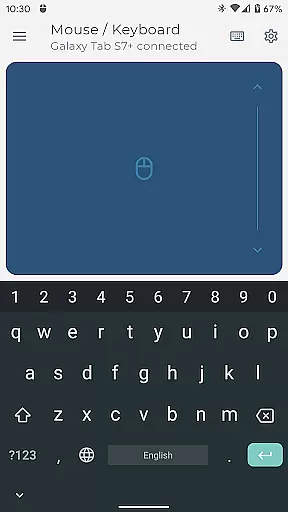
Bluetooth Keyboard & Mouse Pro stands out through its innovative feature set designed to maximize user control and productivity. The app's core functionality revolves around its highly responsive keyboard, multi-touch trackpad, and intuitive scrolling capabilities. These features enable precise navigation and efficient text input across different operating systems and device types.
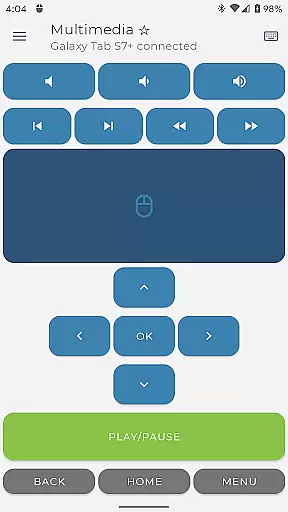
Advanced professional tools include Keep-Alive mode to prevent system sleep during important tasks, presenter functionality for controlling slideshows and pointers during presentations, and multimedia management for various entertainment platforms. The integrated QR code scanner streamlines data entry while voice-to-text capabilities and clipboard synchronization enhance cross-device workflows. Users can also create custom control layouts tailored to specific applications or gaming requirements.
What truly sets this application apart is its commitment to security and compatibility. By utilizing direct Bluetooth connections, it eliminates the need for third-party servers while maintaining universal compatibility with Windows, iOS, Android, Chrome OS, and Steam Deck systems. This combination of advanced features, customization options, and robust security makes Bluetooth Keyboard & Mouse Pro an exceptional choice for professional device management.
Bluetooth Keyboard & Mouse Pro offers a comprehensive suite of tools designed to enhance productivity through precise control mechanisms. The app transforms an Android device into a versatile Bluetooth-enabled keyboard and mouse, ensuring that every interaction is both accurate and responsive.
The core functionality includes a highly sensitive multi-touch trackpad, full international keyboard support, and dedicated presentation controls. These features are engineered to provide seamless navigation and typing experiences across multiple platforms without the need for additional software or server connections.
Users benefit from reliable performance with instant response times, thanks to the direct Bluetooth connection. This ensures not only efficiency but also security, as no intermediary servers are involved in the communication process between devices.
Ultimately, this application's effectiveness lies in its ability to streamline workflows while maintaining privacy. Whether you're managing presentations, controlling media playback, or customizing layouts for specific tasks, Bluetooth Keyboard & Mouse Pro delivers professional-grade tools that adapt to various operational needs.
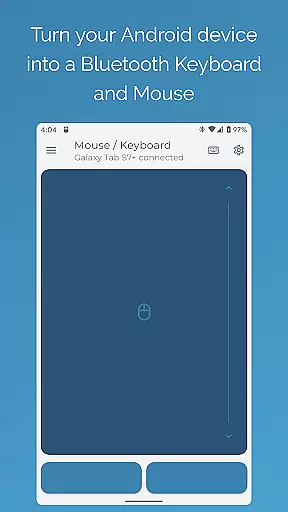
A user-friendly interface is crucial for productivity tools, and Bluetooth Keyboard & Mouse Pro excels in providing an intuitive experience. The design emphasizes ease of use, allowing users to quickly adapt to its functionalities without a steep learning curve.
Upon launching the app, users are greeted with a clean layout that organizes features like Precision Control, Presenter Mode, and Multimedia Control into easily accessible sections. Each tool is represented by clear icons and labels, making it simple to identify and activate desired functions.
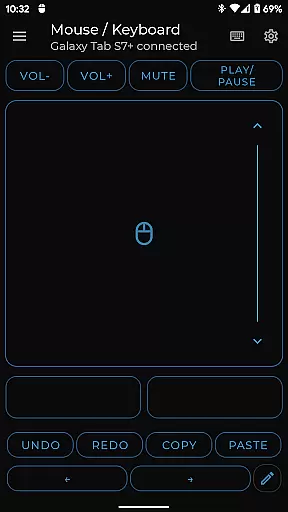
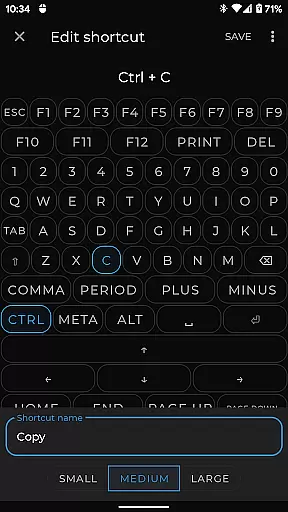
The app minimizes complexity by integrating advanced features such as Keep-Alive Mode and Custom Layouts within a straightforward menu system. Users can effortlessly switch between different language layouts or customize controls tailored to their specific applications, enhancing overall usability.
This focus on simplicity extends to the setup process, which requires only a standard Bluetooth connection. By removing the need for additional software installations or complicated configurations, Bluetooth Keyboard & Mouse Pro ensures that users can concentrate on their tasks rather than troubleshooting technical issues.
Instant Bluetooth connection
Multi-platform support
Customizable layouts
Secure serverless operation
Comprehensive toolkit
Premium features locked
Complex setup required
Limited free functionality
Device compatibility issues
Occasional connectivity problems


Change your GPS location instantly. Simulate routes anywhere in the world.
 4.90
4.90
PDF Reader - Document Viewer: Read, Manage & Organize Your Documents
3.10
Unit and currency converter with easy and simple UI.
4.80
Remote for Roku, Fire TV, Samsung TV, LG TV, Android TV, Chromecast and VIZIO TV
4.20
card-reader app
2.20
Excellent scientific calculator with symbolic algebra, integrals, derivatives
4.80
Fast Video Downloader, Movie Downloader, Torrent Downloader & Adblock Browser
4.70
Download any file easily and quickly with Downloader
4.0
Automate everything from settings to photos, SMS to speech. ADC2 prize winner.
4.10
Enjoy smooth gameplay with Game Booster
4.90
Best leveling tool for your Android device. Hang paintings like a pro.
4.90
Navigate with Ease and Style
4.90
The ultimate tool for network analysis, wifi scanning and problem detection.
4.90
Creation, Learning, Entertainment & More — The All-in-One AI Search Engine
4.70
FV File Manager Pro, Fast and powerful file manager for Android
4.60
Play your X-Box games remotely in 1080p with any controller and zero latency
4.60
Head tracking for PC sim games such as MSFS 2024 or Elite:Dangerous. No headset!
4.50
Family Locator, Share location, StayConnect with your family in real time
3.90
Fun lie-detection pranks for friends and parties.
3.80

User Reviews