

Callipeg is a professional-grade 2D hand-drawn animation app designed for both professional animators and beginners. It offers all the essential tools of a full-featured animation studio on your Android device, optimized for tablets with stylus support. The app provides unlimited creative possibilities without requiring a subscription, making it an ideal choice for artists who want to create animations anytime, anywhere.
The app supports various animation techniques including frame-by-frame and keyframe animation, storyboarding, and complete shot production. With features like adjustable frame rates up to 60fps, canvas sizes up to 4K, and unlimited layer support, Callipeg ensures that users can meet professional standards while enjoying a flexible and intuitive interface.
Whether you're working on feature-quality shots or simple rough sketches, Callipeg's comprehensive toolset allows you to streamline your workflow. Its supportive learning resources and active community make it easy to get started and continuously improve your skills.
Callipeg stands out with its extensive feature set tailored for professional animators. One of its core strengths is the studio-like organization system, allowing users to arrange shots by dragging and dropping them into scenes and folders. The ability to apply color tags and filters makes asset management efficient, while the integrated search function helps quickly locate specific shots.
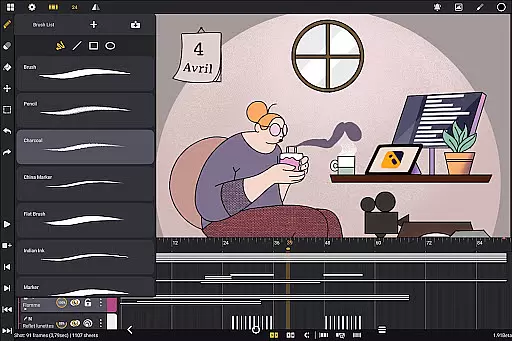
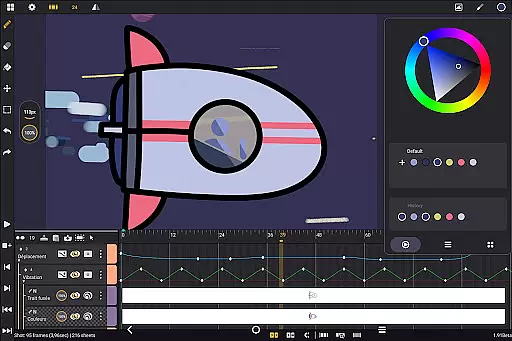
The app provides powerful drawing tools, including a versatile brush set with options like pencil, charcoal, and ink. Users can customize brush settings such as smoothing, tip shape, and texture, and manage colors using the color wheel, sliders, and palettes. These features optimize the coloring process and enhance creative control.
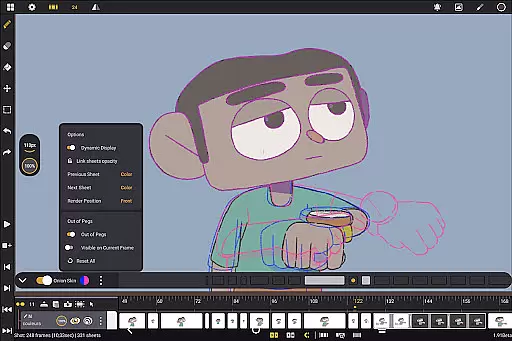
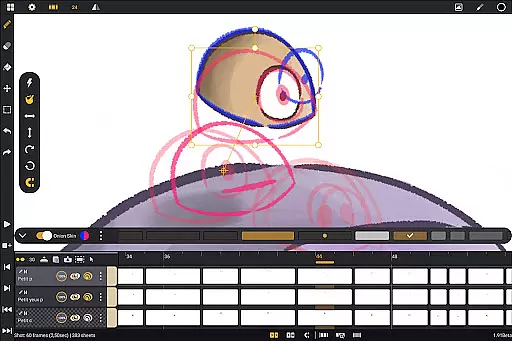
Animation-focused tools like onion skinning enable displaying up to eight frames before and after the current frame, with adjustable opacity and color settings. Combined with customizable workspace options, including right- and left-handed interfaces and flexible sidebar positioning, Callipeg ensures a personalized and productive animation experience.
In the realm of 2D animation, having access to a comprehensive suite of creative tools is essential for producing high-quality work. Callipeg offers an all-in-one solution with its extensive set of drawing instruments, including pencil, charcoal, and ink brushes. These tools are not only diverse but also customizable, allowing users to adjust smoothing, tip shape, and texture to fit their unique style.
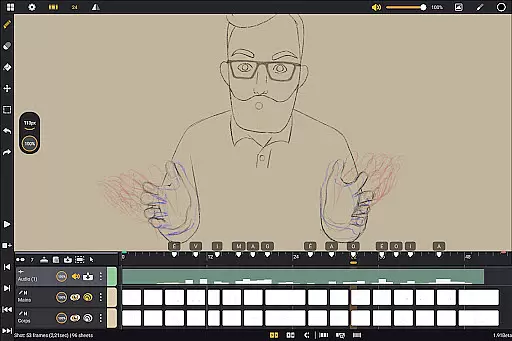
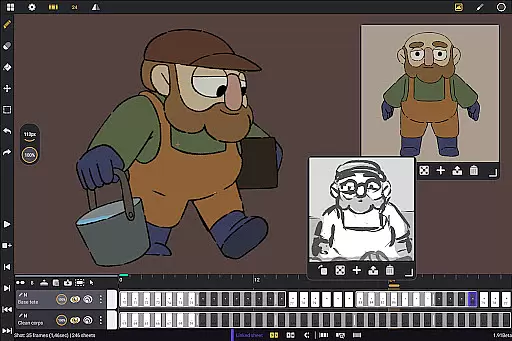
Furthermore, the app provides animators with unlimited layer support, accommodating various types such as drawing, video, transformation, audio, or group layers. This flexibility empowers creators to import images, video clips, and audio files, facilitating advanced techniques like rotoscopy and lip-syncing. With these capabilities at hand, both professional animators and beginners can execute complex projects that demand precision and creativity.
The inclusion of studio-like organization features in Callipeg enhances project management by enabling users to arrange shots through drag-and-drop actions, apply color tags and filters, and utilize an integrated search function. Such organizational tools ensure that artists can maintain a streamlined workflow without losing sight of their creative vision.
Flexibility in canvas size and format compatibility is crucial for animators who need to meet professional standards while working on diverse projects. Callipeg addresses this need by offering adjustable frame ratesu2014ranging from 12 to 60 frames per secondu2014and supporting canvas sizes up to 4K resolution. This adaptability allows users to tailor their workspace according to specific project requirements, whether they're crafting feature-quality shots or simple rough sketches.
In addition to its robust animation-focused tools, Callipeg provides a customizable workspace that caters to individual preferences. Users can switch between right- and left-handed interfaces, position sidebars as desired, import unlimited reference images, and even invert the canvas for proportion checks. These features contribute significantly to user comfort and efficiency during long creative sessions.
Callipeg further ensures flexibility through its broad range of import and export options. Animations can be exported in multiple formats such as .mp4, .gif, .png, .tga, .psd, and .peg, while project files are compatible with industry-standard software via .json, .xdts, and .oca formats. By maintaining timing and layer structure across platforms, Callipeg enables seamless integration into various production pipelines, enhancing collaboration opportunities within the global animation community.
Professional-grade tools
No subscription model
Active user community
Regular updates
Multi-language support
Stylus-dependent features
Steep learning curve
Limited mobile optimization
Few advanced effects
Large file sizes

Premium version of Shimeji-ee app with no ads & no limit active shimeji
 4.5
4.5
Art of Combination Wear OS Watch faces
4.3
Image/ Text to Video Generator
4.40
Draw anime & manga drawing, art with templates to create stunning picture!
4.50
Convert image to JPG PNG HEIC PDF, support almost all kinds of image formats
4.70
Everything you need to create hand drawn animation, anywhere you go!
4.40
Video AI: Revolutionize Your Content Creation with Advanced Video Generation
4.50
Create Logos, Tattoos, AI Art & more with our AI Photo Generator & Design Editor
4.20
Just trace a projected picture on paper and color! Draw & Paint with AR drawing
4.40
Mobile pixel art editor. Simple. Fast. Portable.
4.80
Image resizer to resize, crop, rotate, flip, change dpi photo or picture in bulk
4.60
The perfect place to start sketching! Use Sketchbook to draw and paint sketches.
4.50
Bring One UI 8.5 Icons to life -elegant dark icons with a modern, premium touch.
4.30
Floor Plan Creator lets you create, edit and share floor plans.
4.00
Resize photos and print photos in exact size with our powerful photo printer!
3.80
Create cute cat emojis & PFPs! Fun, custom avatars for cat lovers.
3.70
Retouch photos. Create or edit images. Endless capabilities.
2.70
Your Essential Color Theory Guide: Red, Yellow, Blue (RYB)
4.5
A luxurious gold watch face for an elegant and refined look.
4.5


User Reviews