

RoughAnimator is a professional-grade hand-drawn animation app designed for both Android tablets and smartphones. This powerful tool provides animators with everything needed to create frame-by-frame animations on the go. With its robust feature set, it caters to professional animators while remaining accessible to beginners.
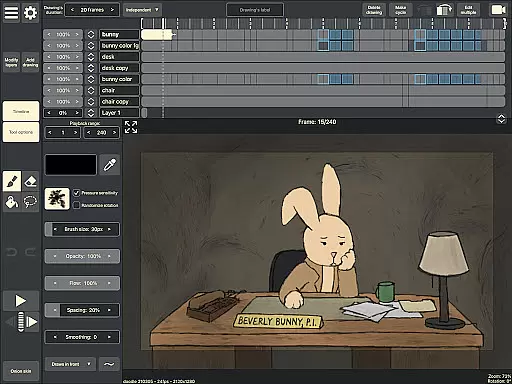
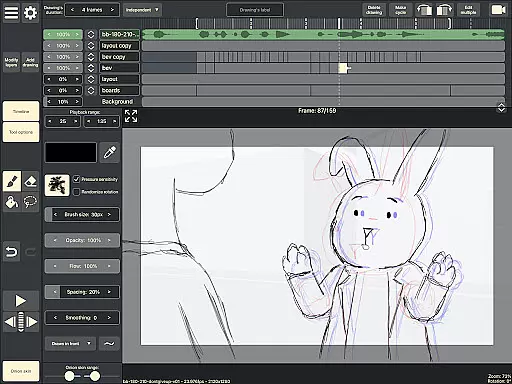
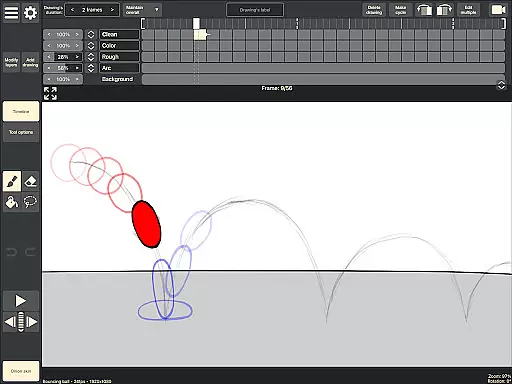
The application offers an intuitive timeline interface with unlimited layers, customizable exposure settings, onion skinning, and playback preview capabilities. Users can import audio for lip-syncing, video for rotoscoping, and export their work in multiple formats including Quicktime video, GIFs, or image sequences. The app's compatibility with industry-standard software like Adobe Flash and After Effects makes it a versatile choice for digital artists.
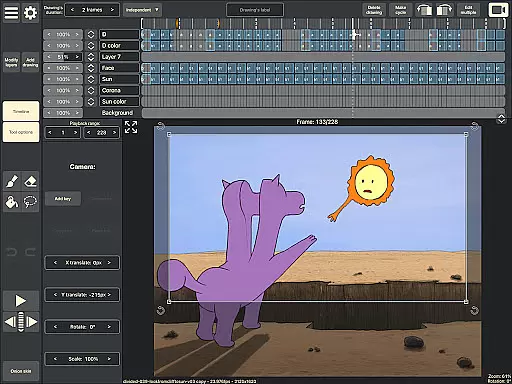
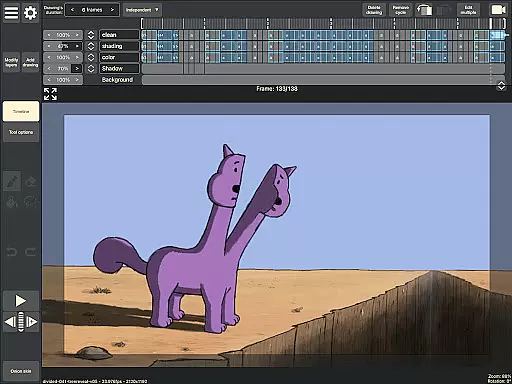
RoughAnimator stands out with its comprehensive set of animation tools tailored specifically for creative professionals. The app's timeline functionality supports unlimited layers and allows precise control over drawing exposures, making it suitable for both pose-to-pose and straight-ahead animation techniques.
Artists can utilize advanced features such as onion skinning for better frame referencing, custom brush creation for unique styles, and pressure-sensitive support for devices like Samsung S-Pen. The ability to import audio and video expands creative possibilities, while the option to export projects in various formats ensures compatibility with professional animation pipelines.
What sets RoughAnimator apart is its seamless integration with desktop animation software, allowing users to continue refining their work in programs like Adobe Animate and Toon Boom Harmony. This cross-platform capability, combined with its sophisticated toolset, makes it an essential app for digital animators.
Creative tools are essential for any artist or designer, and RoughAnimator excels in this area. This application offers a comprehensive suite of features that cater to both professional animators and beginners alike. With unlimited layers on the timeline, adjustable exposure lengths, onion skinning, and custom brushes, users have everything they need to create traditional hand-drawn animations.
RoughAnimator supports advanced functionalities such as importing audio for lip-syncing and video for rotoscoping, which adds another layer of creativity and precision to your work. The ability to control frame rate and resolution ensures that your animations meet the highest standards of quality. Additionally, compatibility with Samsung S-Pen and other pressure-sensitive devices enhances the drawing experience, making it feel as natural as working with pen and paper.
For those looking to take their projects further, RoughAnimator allows exporting animations into various formats including Quicktime video, GIFs, or image sequences. Projects can also be imported into industry-standard software like Adobe Flash/Animate, After Effects, and Toon Boom Harmony, providing seamless integration into professional workflows. These robust export options ensure that artists can continue refining their work across different platforms without losing any detail or quality.
Flexibility in canvas size and format is crucial for accommodating diverse artistic visions, and RoughAnimator delivers on this front. Artists using RoughAnimator can enjoy unparalleled freedom when it comes to setting up their workspace. Whether you're creating simple sketches or complex multi-layered animations, the app's flexible canvas settings allow you to tailor the environment exactly how you want it.
The app supports high-resolution outputs, ensuring that every stroke and detail remains crisp and clear regardless of the final medium. This adaptability extends beyond just visual fidelity; RoughAnimator enables users to adjust frame rates and resolutions according to project requirements, giving them full control over the technical aspects of their creations. Such versatility makes it suitable for a wide range of applications from quick drafts to polished productions.
Moreover, RoughAnimatoru2019s cross-platform availabilityu2014including desktop versionsu2014ensures that no matter where inspiration strikes, you'll always have access to your preferred setup. By offering consistent performance and feature parity across devices, RoughAnimator empowers creators to seamlessly transition between mobile and desktop environments while maintaining complete creative control over their projects.
Powerful animation tools
User-friendly interface
Cross-platform compatibility
Professional export options
Pressure-sensitive support
Steep learning curve
Requires high-end device
Limited free features
No automatic backup
Occasional bugs

Premium version of Shimeji-ee app with no ads & no limit active shimeji
 4.4
4.4
Floor Plan Creator lets you create, edit and share floor plans.
4.00
Easy 3D drawing design maker & creator. Model designing, Sculpting. Create&paint
4.00
Draw beautiful mandala's very easily
4.60
Powerful home decoration & house design that allows you to design dream home.
3.80
Resize photos and print photos in exact size with our powerful photo printer!
3.80
Experience next-gen icons with a modern liquid glass look.
3.60
Unleash the artist in you with our AR drawing and tracing tool for photo drawing
4.10
An intuitive, high-performance painting app that lets you focus on creating
4.40
Passport size photo maker, create ID photo and visa photo in seconds
4.80
Discover Cartoon Dream : Unleash Your Creativity with CuttingEdge AI
4.50
Create neon drawing with magic doodle and fun doodle art effects!
4.50
Unleash your drawing and painting potential
4.50
Kling AI is an image and video generation and editing studio powered by AI.
4.50
Stylish letters, Stylish Keyboard, Symbols, Emojis, Cool nickname
4.40
AI generated images & photos, turn your words into drawing, painting & pictures.
4.30
Nano Banana AI Image Generator, Anime Filter, AI Portrait, AI Photo Generator
4.30
Create cute cat emojis & PFPs! Fun, custom avatars for cat lovers.
3.70
Create trending AI photos & videos with powerful effects and 3D styles.
3.20


User Reviews